How to Choose Automated Vendor Risk Remediation Software


Vendor security findings pile up faster than many teams can chase vendors to fix them. A queue with no order is only a to-do list, and the data behind it is often shaky. In its 2026 global survey, KPMG found that only 17% of 851 organizations rate their third-party risk management (TPRM) data as fully reliable.
That finding is a data-quality gap, and it weakens any ranking built on top of it. The right automated vendor risk remediation software prioritizes work by vendor criticality and expected risk reduction, then re-prioritizes it as new signals arrive.
Test any tool you’re evaluating against three checks: assessment workflows, cybersecurity reporting, and vendor discovery and continuous monitoring.
If you're still building the case for a vendor risk program, start with this TPRM buyer's guide. This guide assumes you're ready to compare tools.
What software helps prioritize vendor remediation workflows?
Automated vendor risk remediation software ranks vendor security findings by vendor criticality and expected risk reduction, then re-ranks them as new signals arrive. Look for three mechanics: criticality weighting from vendor tier and data access, impact projection that shows the score change before you request a fix, and alerts that move a vendor up the queue when its score drops.
The table below pairs six capabilities with the reason each one shapes remediation priority and a way to test it in a demo:
Vendor risk assessment workflows
Many assessment programs lose time at the handoff, after a vendor fails a control and before anyone sends a remediation request. When that step depends on someone copying answers into a tracker, findings sit while the next questionnaire goes out.
In a 2025 survey of 500 senior TPRM executives at large enterprises, EY found that organizations send third parties an average of 55 questionnaires. At that volume, manual handoffs don't hold up. Look for automation at each point where work changes hands:
- Questionnaire scheduling: Reassessments go out on a cadence that follows each vendor's tier.
- Evidence collection: Vendors upload documents to one place, and reviewers see them next to the related answers.
- Due-diligence tracking: New vendors move through review with a clear status before they get access to your data and systems.
- Auto-created remediation requests: A failed control opens a request to the vendor with the finding already attached.
The next step is to tie that cadence to vendor criticality. The NIST SP 800-161r1 recommends prioritized supplier risk assessments that focus on your most critical suppliers.
Framework support matters in your tool evaluation too. Check that it supports the SIG questionnaire and the Cloud Security Alliance CAIQ, in addition to your own questions.
Once a finding exists, it needs a single record with an owner and a due date. That record should also hold the vendor's evidence and the re-test result, so you can prove closure in an audit. Spreadsheets split that history across tabs and inboxes.
In a demo, ask the vendor to take one failed control all the way to a remediation request without exporting data. If the flow needs a CSV file or a second tool, you'll inherit that manual step.
In UpGuard Vendor Risk, the risks an assessment identifies feed directly into remediation, so you request the fix where you found the issue. You track due diligence, questionnaire scheduling, and evidence collection in one platform instead of juggling spreadsheets. When a vendor marks a fix as done, UpGuard runs an on-demand rescan to verify it, so closure rests on evidence insead of an email.
Cybersecurity reporting
Remediation efficiency analytics show your board that the queue order was right by tying each closed fix to a change in vendor risk.
Public companies face a formal version of that requirement. A 2023 U.S. Securities and Exchange Commission cybersecurity disclosure rule requires registrants to describe the board's oversight of cybersecurity risk. The NIST CSF 2.0 points the same way, as its Govern function includes a cybersecurity supply chain risk management category.
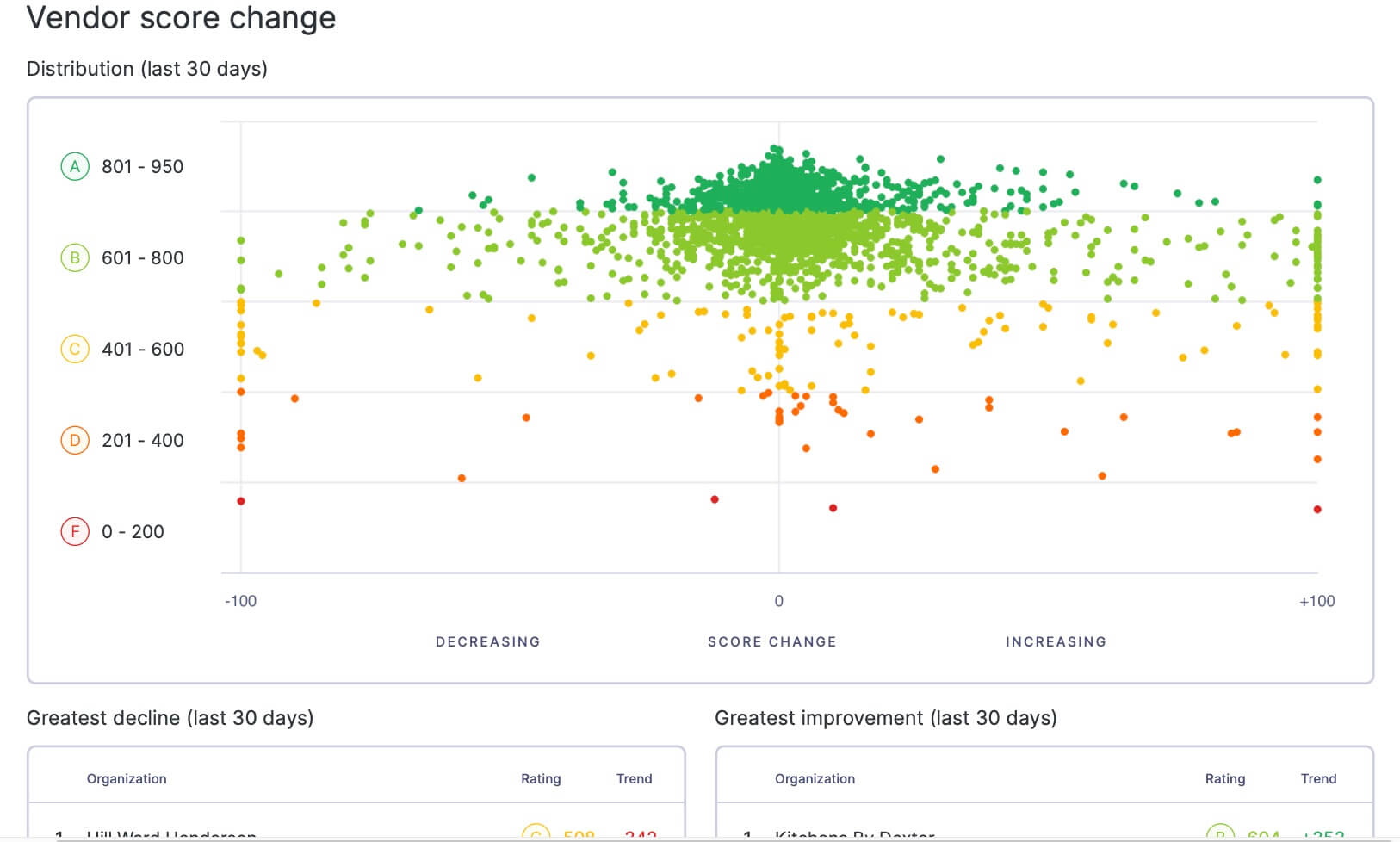
Look for report templates that pull current data each cycle, so nobody rebuilds a deck from scratch. Vendor score change tracking should also show which vendors improved or declined since the last report. Finally, check that reports can be scheduled for automated delivery, and that your team can edit them before a meeting.
Three measures tell you whether remediation is working:
- Time to close: The days between a remediation request and verified closure show where vendors stall.
- Reopened findings: Issues that return after closure point to weak verification or temporary fixes.
- Score change after fixes: Rating movement after remediation shows whether the work lowered risk.
UpGuard report templates pull current data automatically, and vendor score change tracking shows how each vendor's posture has moved. You can export board summaries, and reports can also arrive by email on a weekly, monthly, quarterly, or annual schedule.
Vendor risk discovery and continuous monitoring
A remediation queue is only accurate on the day you build it unless something keeps re-prioritizing it. Continuous monitoring re-scores vendors daily, giving you a current view of each vendor's security posture.
Posture changes between assessments, and widely used vendors are no exception. In a 2026 analysis, UpGuard found that 28% of the top 100 vendors universities most commonly use have had a data breach since 2024.
Discovery carries equal weight. Vendors often enter through procurement or through single teams trying new tools, so the software should discover and onboard vendors you didn't know about. A vendor you haven't found can't enter the queue at all.
Look for security ratings that combine with point-in-time assessments in one risk profile. Ratings show outside-in posture, meaning what anyone can see from the internet, while assessments capture internal controls a scan can't reach. Together, they give each vendor one score you can rank against.
Vendor Risk combines security ratings on a scale of zero to 950 with point-in-time assessments, so you see one risk profile per vendor. Impact projection shows how much a vendor's score could improve from the fixes you select. You can also build custom notification sequences on whatever thresholds matter to your program.
How to evaluate vendor remediation software
Judge automated vendor risk remediation software by the order of the queue it builds, not the number of findings it surfaces. A long, unranked list leaves your team to prioritize manually, which is the work you're buying software to handle. Use these five steps to test that order:
- Map your current remediation flow: Trace three recent findings through to closure and note where each one stalled. Those stall points become your test cases.
- Run a live prioritization test: Give each shortlisted tool the same vendor set and compare the rankings. The strongest ranking puts critical vendors and high-impact fixes first.
- Check closure evidence: Confirm each closed finding records who owned it and when your team re-tested it. Auditors ask for both, along with the vendor's evidence.
- Confirm reporting output: Generate a board report from trial data and see whether it needs rework before you can present it.
- Test integrations: Connect the tool to your ticketing system and any workflow automation you run through an API. Remediation work should reach the people fixing it without copy-and-paste.
How UpGuard prioritizes vendor remediation
Vendor Risk connects the full remediation cycle, starting with vendor discovery and onboarding and ending with proof you reduced risk. It covers all three checks above, plus the proof layer your board asks for:
- Assess: Discover and onboard vendors, then run automated questionnaires and evidence reviews that feed findings straight into remediation.
- Prioritize: Rank the work that reduces risk, with vendor criticality, findings, monitoring signals, and risk context in one view, so you focus where exposure is highest.
- Monitor: Continuously oversee your vendors, track security ratings daily, and get custom alerts when a vendor's posture declines between assessments.
- Prove: Send scheduled board reports that show how remediation changed vendor risk over time.
See how the queue prioritizes your own vendors. Start a free trial to experience UpGuard Vendor Risk yourself.
Frequently asked questions
How do you automate vendor risk assessments?
Set a reassessment cadence for each vendor tier, then let the software send questionnaires and chase overdue responses. Failed controls should open remediation requests without anyone re-keying the finding.
What is automated vendor risk reporting?
Automated vendor risk reporting builds risk summaries from live vendor data and delivers them to stakeholders on a set schedule. The numbers stay current each cycle, so nobody rebuilds the deck.
Can vendor risk ratings update in real time?
Ratings that draw on continuous external scanning can update daily as a vendor's internet-facing posture changes. Questionnaire-based scores change only when the vendor completes a new assessment.
How do you measure vendor remediation efficiency?
Track median time to verified closure and the share of findings that reopen. Compare both by vendor tier to confirm your most critical vendors close fastest.
Related posts
The Evidence Is In: UpGuard Named a Leader in the IDC MarketScape for Worldwide Third-Party Risk Management
