

OneTrust vs UpGuard product overview
Learn more about the products and how they compare.
Overview
Organizations are relying more heavily than ever on third-party data handling, and this trend is on the rise. The IT outsourcing market is set to reach US$425.19 billion by 2026, according to a 2021 report by Mordor Intelligence.
The steady increase of these third-party relationships comes with a major downfall — third-party risk.
IBM and Ponemon Institute’s 2021 Cost of a Data Breach Report found that third-party data breaches cost organizations an average of US$4.33 million.
Executives must manage third-party risk throughout the entire vendor life cycle, from pre-purchase to onboarding to continuous monitoring once vendors are active.
Handling a Vendor Risk Management (VRM) program effectively is a labor-intensive task for information security teams. Your organization must dedicate the significant time and resources needed to develop a comprehensive VRM program.
Alternatively, you can invest in automated VRM tools that allow you to continuously monitor your entire third-party attack surface and perform regular vendor assessments throughout the lifecycle.
We assess two VRM solutions, OneTrust Vendorpedia and UpGuard, to help you make an informed decision before investing in the right solution for your needs.
OneTrust Overview
OneTrust is a US incorporated company with primary operating offices based in Atlanta and London. The OneTrust platform helps users assess and manage cyber risk from third-party vendors in their digital supply chain.
The OneTrust solution leverages security questionnaires and remediation workflows through both an exchange and ad-hoc model to help customers reduce risk and improve due diligence efficiency across vendor relationships.
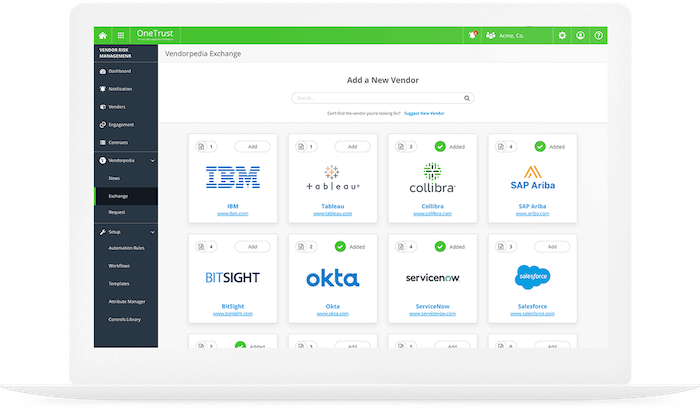
OneTrust Vendorpedia UI. Source: onetrust.com
UpGuard Overview
UpGuard is a third-party risk and attack surface management platform that helps global organizations prevent data breaches, monitor third-party vendors, and improve their security posture. UpGuard’s platform uses proprietary security ratings, data leak detection capabilities, and remediation workflows to proactively identify security exposures. UpGuard’s all-in-one third-party risk and attack surface management software intelligently groups risks into six categories: website risks, email security, network security, phishing & malware, reputation risk, and brand protection.
Usability and the learning curve
Minimizing the amount of time and effort in learning to use a new solution is a critical aspect of delivering on any value proposition.
OneTrust and UpGuard both offer their services via SaaS and are accessible from web-based platforms that can help you find, assess, and remediate risk.
OneTrust: A fully cloud-based service with minimal installation criteria required. The OneTrust platform also features an easy-to-use navigation interface, workflow customization, and dashboard reporting functionality.
UpGuard: High-level summation of risk with the ability to drill down into precise technical details. Each risk is prioritized based on extensive research conducted by the in-house security team, and where possible remediation and protection suggestions are provided.
Capabilities
The core capability of OneTrust’s third-party risk offering is the ability to create and automate workflows for onboarding and offboarding vendors. This helps users maintain an inventory of their vendors along with relevant information such as risk tiers, service types, and commercial timeframes.
UpGuard can help organizations automate their third-party risk assessment and vendor compliance due diligence processes. UpGuard’s solution capabilities work to optimize third-party risk management workflows.
Security Questionnaire Workflows & Exchange
OneTrust: Allows users to automate the security questionnaire process with pre-built questionnaires aligned with common security frameworks, standards, and regulations, Users are also able to create custom-built questionnaires that can be sent to vendors via the same automated process with multi-language support included.
OneTrust offers customers access to an exchange of pre-completed security questionnaires and other vendor due diligence information, such as relevant certifications. OneTrust’s exchange aims to reduce the operational overhead and time costs of gathering questionnaire responses.
By using this information, customers can better understand the risk impacts of a given vendor’s internally managed security policies, controls, and practices.
UpGuard: Also automates the security questionnaire process, allowing users to choose from a library of pre-built questionnaires, including recognized security frameworks like ISO 27001, PCI DSS, NIST CSF, GDPR, and CCPA.
Users can create and send custom questionnaires to vendors using the assessment builder. Users may also access UpGuard’s database of pre-completed vendor security questionnaires from the Shared Assessments Exchange.
UpGuard’s Compliance Reporting feature enables users to easily identify which areas of these security frameworks their vendors do or don’t comply with by mapping results from these questionnaires to their respective frameworks.
Attack Surface Monitoring
Attack surface monitoring capabilities allow security teams to discover, measure, and monitor the security risks associated with a vendor’s public-facing domains, subdomains, and IP spaces.
Unlike OneTrust, UpGuard allows for the monitoring of such risks with continuous checks for the presence of standard security configurations and controls, such as SPF, HTTPS. Additionally, UpGuard monitors public-facing ports for any changes, highlighting areas of inconsistency with best practice settings.
Furthermore, UpGuard’s platform gathers risk intelligence on third-party data leaks, identity breaches, potential fraud from typosquatting, and compromised corporate email accounts. These intelligence sources are indispensable to gaining a comprehensive view of supply chain and third-party risk.
Remediation
OneTrust: Offers remediation planning capabilities based on risks identified in vendor questionnaires, but does not provide remediation tracking for security risks present on a vendor’s external attack surface.
UpGuard: Also offers remediation planning capabilities. Users can create a remediation plan which projects security ratings based on the remediation of specified risks.
The platform also allows users to request remediation based on automated scanning and questionnaire risks identified in monitored vendors, with real-time updates highlighting when vendors fix any identified issues.
Community support
Keeping informed on product updates and the latest cyber security developments is paramount, with new vulnerabilities and cyber threats emerging daily.
Customers need up-to-date resources and relevant insights to stay ahead of the curve and protect their organizations from emerging cyber risks.
The frequency of publication and presence of community engagement is a key indicator of a company’s mission, focus, and investment in its users.
Both OneTrust and UpGuard offer comprehensive online resources to educate and inform customers.
OneTrust: Engages their user community with regular blog posts on topics covering relevant security incidents, global privacy regulations, new feature updates, and industry developments.
Offers live and recorded webinars that help viewers align their programs to best security practices. In addition to these webinars, OneTrust also provides certification and training programs for customers to maximize the value of using the platform.
UpGuard: UpGuard Summit brings together a community of security leaders from leading companies, explores the future of security, and helps businesses stay secure.
The UpGuard cybersecurity and risk management blog is updated four times a week and the breach research blog has uncovered and secured some of the largest data breaches.
UpGuard’s free weekly Breach Newsletter informs 20,000+ subscribers of the latest global data breaches.
Release rate
Technology is always changing. New vulnerabilities are added to CVE on a daily basis, and attackers are constantly finding new zero-day exploits.
The speed at which a security platform can incorporate changes determines how well it can respond to new threats and customer requests.
Additionally, they should continue to update, adjust, and improve their threat detection methodology to reflect changes to the threat landscape.
OneTrust: States that they make at least monthly updates to their suite of product offerings. OneTrust clearly documents product release notes and guides for customers looking to better understand and use changes in the platform.
UpGuard: UpGuard has adopted DevOps principles internally to develop, test, and release software continuously, ensuring fast, consistent, and safe releases. UpGuard has a regular release rate every two weeks, with all features, changes, and improvements listed under UpGuard Release Notes.
Pricing and support
Cyber risk platforms can be expensive and the common use of opaque pricing policies often takes power away from the purchaser. With most services offering tiered licensing options and add-ons, finding a solution that fits your needs and budget can prove more difficult without transparent pricing.
OneTrust: For established businesses with more advanced needs, OneTrust offers Standard & Advanced packages ranging in annual price from $6,000 - $18,000 USD. For more details, view estimates of OneTrust’s pricing model.
Pricing for more complex deployments requiring API and integrations access can only be accessed by speaking to a OneTrust representative.
UpGuard: UpGuard has a fully transparent and publicly accessible pricing model which you can view here. If you have any questions, please email sales@upguard.com.
API and extensibility
Accessing the information in a cyber risk product outside of its graphical interface is important for integrated business strategies and consolidating data to a preferred system.
OneTrust and UpGuard offer APIs.
OneTrust: Offers REST API and SDK for data feed connectivity and workflow management options with external applications.
UpGuard: Offers a standard API to pull data from UpGuard’s platform into other enterprise applications.
Third-party integrations
APIs are useful for technical staff, but not all information security teams have access to developers. In this situation, standard third-party integrations are an essential part of decision-making.
Both OneTrust and UpGuard offer integrations into other platforms.
OneTrust: Offers out-of-the-box integrations with a broad range of third-party platforms. OneTrust’s healthy ecosystem of integration options includes third-party platforms such as ServiceNow, UpGuard, Adobe, RSA Archer, and more.
Customers
OneTrust: Notable listed OneTrust customers include Air Canada, DHL, and Drax.
UpGuard: Major customers include Accenture, DuPont, Fujitsu, GAP, McAfee.
Security rating
OneTrust: Calculates and assigns risk tier categorizations of Critical, High, Medium, and Low based on the security questionnaire information collected from vendors in the platform.
However, OneTrust risk calculations do not incorporate insights from a vendor’s external attack surfaces and their associated risks in the same manner offered by conventional security ratings services.
UpGuard: Provides a cyber risk score between 0 and 950, along with the following letter grades, A: 801-950, B: 601-800, C: 401-600, D: 201-400, F: 0-200. Security rating scores are a weighted average of the risk rating of all externally facing assets and completed vendor questionnaire scores.
Security rating scale of 0-950, ranked as A: 801-950, B: 601-800, C: 401-600, D: 201-400, F: 0-200. You can request your free security rating by clicking here.