We Researched Four AI Evidence Analysis Tools for TPRM. Here’s What We Found.


TL;DR: We researched four AI evidence-parsing tools against four criteria security teams often overlook. None nailed all four. Here's what they got right, where they fell short, and what to ask before trusting one with a real vendor decision.
Analyzing vendor evidence is a massive undertaking, which is why more third-party risk management (TPRM) tools now offer AI capabilities that let teams upload evidence and get a faster read on a security assessment. That bottleneck is the same evidence analysis problem TPRM teams already spend the most analyst time on. When these capabilities come up in a vendor evaluation, the conversation almost always narrows to one question: how accurate are the AI results? A tool can answer every individual question correctly and still leave you exposed. Whether an AI parsing capability adds value or new risk comes down to four questions.
While most of the detail in this piece is written for the analyst running the evaluation day-to-day, the stakes apply with equal force to whoever signs off on the purchase. The cost of an ungoverned AI tool shows up later, in a board meeting or an audit, well after the demo ended.
We picked four of these tools already in market and pitted them against the criteria that teams routinely skip when comparing AI evidence-parsing capabilities. The kind of gaps that don't show up in a demo, but do show up the first time someone asks you to defend a decision you made months ago. What we found should change what you ask before you deploy one of these tools to help with a real vendor decision.
The disclosure, and how we conducted our review
Full disclosure: UpGuard Vendor Risk competes in this category, so we’re making our methodology clear upfront. We researched four tools based on what their vendors publicly document about their products, rather than relying on sales pitches or our own interpretation.
Every finding below traces back to a source you can check yourself, including vendor help center documentation, product and service descriptions, release notes and contracts, as well as independent reviews and public analyst reports. Where a claim about one competitor came only from another competitor’s marketing, we’ve left it out.
You'll probably recognize which tool is which without the sources, since most teams evaluating TPRM solutions have already come across these vendors. We’ve deliberately left the names out, keeping the focus on what to evaluate rather than on a leaderboard.
Here are the four criteria:
- What evaluation criteria is the tool comparing the evidence against?
- Can it catch contradictions?
- Does the evidence outlive the analysis?
- Do the results connect to the rest of the assessment?
We go deeper on why each of these matters later in this piece, starting with the one that tends to determine how the other three play out.
The four tools we analyzed
Tool A: the single-document reader
Tool A is a chat interface over one uploaded file at a time.
- It handles the broadest range of file types of the four, including PDFs, spreadsheets, and images.
- It’s the only one of the four that keeps the original source file on hand once the analysis is finished, rather than deleting it.
Tool B: the one-time citation
- This one returns a real, per-control citation to a specific page in the source document.
- It covers a broader span of named frameworks than the other three.
Tool C: the score without the story
- This is the only tool of the four that’s confirmed not to run a generative model, which makes it structurally less likely to state a claim the source document doesn't support.
- It’s also the only one of the four with a genuine, multi-year trend line of compliance scores.
Tool D: the folded-in answer
- This tool takes evidence in through the widest range of intake paths of the four: vendor upload, trust-center import, and manual upload.
- Its most recent update is the only one among the four that visibly labels whether a given answer came from the AI, the vendor, or an internal reviewer.
What matters just as much as accuracy when comparing AI tools
It’s vital to know what questions to ask when evaluating AI tools for your TPRM program.
1. What's the AI comparing your evidence to?
Why it matters: Every AI parsing tool needs a reference point to check evidence against, and that reference point is not the same across the category. Some tools compare evidence to the literal wording of a single assessment question. Others compare it to a named compliance control, like an ISO 27001 or NIST CSF requirement. Few go further and evaluate whether the evidence satisfies the security intent behind that control, not only the control as written.
Named controls are broad by design, which makes that distinction important. NIST CSF 2.0's PR.AA-05, for example, requires that access permissions be "defined, managed, enforced, and reviewed," which still leaves open how often, who owns the review, and how exceptions get handled.
ISO 27001's Annex A, Section 5.18, covers the same ground. Two vendors can both point to the same control and pass it on paper while sitting on different risks, if the tool evaluating them never breaks the control down far enough to see the difference. A tool that only reasons at the level of a control, or a single questionnaire answer, is also more likely to miss a contradiction that only shows up in the specific wording underneath, or to treat two different phrasings of the same requirement as unrelated. Fix the reference point and the other three questions get easier to answer.
What we found across all four tools:
- Tool A doesn't map to controls in this feature at all. Its output is a free-form chat answer to whatever the analyst types. Any framework or control is mapped elsewhere in the platform, coming from separate, externally scanned data, not from this document-analysis capability.
- Tool B's per-control citation is real and mapped to nine or more named frameworks, the most rigorous control-level mapping of the four, but it's still pitched at the control as written.
- Tool C matches at the same control level.
- Tool D's granularity is determined entirely by what a given questionnaire happened to ask. This means the same control can be assessed at different depths depending on the template in play. That also means the quality of the check depends on that of the question the customer wrote in the first place. A vaguely worded questionnaire produces a vaguely resolved control, regardless of how good the AI reading it is.
By their own documentation, none of the four tools we researched decompose a control into implementation-level sub-checks. This means a pass from any of them tells you the control was matched, not that the specific requirement behind it was met.
Questions to ask:
- How does the tool handle a control that sits in a gray area?
- Can it show you which part is satisfied and which part isn't, or does it only give you a single pass or fail for the whole control?
2. Can it catch contradictions?
Why it matters: Every tool covered here can already read at least one type of vendor document on its own, though what counts as a document varies. Tool B's citation engine, for instance, is scoped to SOC 2 reports specifically, not any document type a vendor might submit.
The risk shows up when a questionnaire, a SOC 2, and a security policy, sometimes submitted weeks apart, don't agree with each other on the same requirement. And the tool can't tell. Left unnoticed, that disagreement quietly resolves to one answer, and the check gets marked complete.
That means a vendor gets approved on the strength of whichever document the tool happened to read most favorably, rather than on whether the underlying control is in place. If a SOC 2 says access reviews happen quarterly and a penetration test notes they haven't happened in over a year, and nothing flags that gap, the assessment records a pass on a control that isn't real.
What we found across all four tools:
- Tool A's own contract language still describes single-document analysis only, narrower than what its marketing implies elsewhere. This means it can't compare that document against anything else even when an assessor has more evidence on hand.
- Tool B states outright in its own documentation that data from one document is never used to influence the analysis of another. That confirms it can't compare two documents even when both are uploaded in the same session. A reasonable inference follows from that. If one document can't influence the analysis of another, the tool likely can't synthesize insights across multiple pieces of evidence either. That issue would leave the analyst doing the reconciling manually, reading each result side by side to compare and contrast, rather than being handed a single, cross-checked view.
- Tool C matches evidence to a control, but doesn't reconcile across multiple source documents at all, so an analyst still has to manually cross-check every control by hand whenever the evidence spans more than one document.
- Tool D recently added a genuine step forward. It compares a vendor's stated answer against the AI's own evidence-derived answer for the same question. That step is the closest thing to disagreement-surfacing we found across all four tools. But it's a check on whether the vendor's answer matches the evidence for that one question, not a comparison between two source documents. Two documents using different language to describe the same control requirement could still both look consistent to it.
Questions to ask:
- Does the tool compare evidence across multiple documents, or only within one at a time?
- If two of a vendor's own documents disagree on the same point, does it surface that conflict, or produce an answer from whichever one it processed?
3. What happens to the evidence once it's been analyzed?
Why it matters: A result gets cited again at renewal, pulled up after an incident, or handed to someone other than the analyst who ran it, often a year later. That question comes down to an architecture choice most vendors don't advertise.
Are the evidence and reasoning persisted, or processed in memory and discarded the moment an answer is returned? Deleting the source document after each run is defensible for data minimization. It also leaves the result as a static output nobody can go back and re-inspect.
What we found across all four tools:
- Tool A keeps the uploaded file on hand longer than two of the other three, but its documentation doesn't describe the analysis itself as saved or versioned. If a vendor sends an updated version of the same document later, it also doesn't say how the tool would reconcile the two versions or which one the next analysis reads against.
- Tool B's current documentation is clear that a result is lost the moment a user navigates away from the summary screen, unless it's exported to PDF first. This shifts the record out of the platform entirely and into whatever separate folder it ends up saved in. That's a manual archive an analyst now has to maintain and remember to check, on top of the tool that was supposed to remove that kind of manual work.
- Tool C's solution brief is equally direct: only the confidence and completeness scores are retained once a result is saved. The source content itself is deleted by design. This means the team has to keep its own separate copy of the evidence elsewhere if it wants a record beyond the score, outside the platform, and it’s one more thing for someone to remember to do.
- Tool D keeps snapshots of the entire assessment, without version history for any single answer. That means an analyst can see that an assessment happened, but not how a specific answer inside it changed from one snapshot to the next, or which piece of evidence caused the change.
Questions to ask:
- Are the evidence and the reasoning behind a result stored anywhere, or do they only exist for the current session?
- If you pulled up this exact result in six months, what would still be there? The pass or fail result, the evidence behind it, or both?
- Can someone outside the original assessment, an internal auditor or a compliance lead, pull up that evidence and reasoning themselves? Or does access run through the analyst who ran it?
- Where does the evidence live once the assessment is done? One central system, or wherever each export happened to get saved?
4. Does a flagged result plug into the rest of the assessment, or does it dead-end as a snapshot?
Why it matters: The point of AI-assisted parsing is to get to an answer faster without losing control of the assessment it's part of. That only holds if the result goes somewhere. If a discrepancy or a failed check becomes something a human can act on, triage, and track, rather than a static answer sitting in a chat thread or a report that somebody has to remember to open and re-read. A tool that stops at "here's what I found" hands off the entire second half of the job. Deciding what to do about it, notifying the right person, and tracking it through to resolution goes back to the analyst to do manually. So the same manual process still exists. It starts right after the AI finishes, rather than being replaced by it.
What we found across all four tools:
- None of the four publish documentation showing that a flagged discrepancy or failed check automatically becomes a tracked, assignable item within a broader remediation workflow, rather than a result that lives inside the parsing feature itself.
- Tool A's output is a chat answer with no structured record at all, so there's nothing in this feature for a downstream workflow to pick up even if one existed.
- Tool B's own product documentation carries the same disclaimer as the others. It states that AI-generated results "should be reviewed and validated by users for accuracy." Nothing in that documentation describes what happens after a reviewer acts on that instruction. There's no mention of a flagged discrepancy becoming an assignable item, or a correction getting logged anywhere retrievable. Combined with results not surviving past the session unless exported, there's no structured place for a flag to land even if someone catches it.
- Tool C's compliance trend line updates when a new score is saved, but a score change is not the same as a tracked task. Nothing in its documentation describes one being created.
- Tool D's acceptance-rate reporting on AI-drafted answers speaks to how often a suggested answer is accepted, not what happens next if it's rejected or flagged.
Every tool here also places the responsibility for catching a mistake on the human reviewing it, which is standard, sensible practice across the category. That standard only holds up if the override itself gets logged somewhere retrievable, and none of the four confirm that it is.
Questions to ask:
- When the AI flags a discrepancy or fails a check, does that become a tracked item assigned to someone? Or is it a result the analyst has to notice and act on unprompted?
- When a human reviews or overrides that result, is the override itself logged anywhere retrievable, and does it connect back to the rest of the vendor's assessment record
A recap of our findings
| Tool | What it does well | Where it falls short |
|---|---|---|
| Tool A: the single-document reader | Keeps the original file on hand after analysis, and handles the widest range of file types of the four | Analyzes one document at a time, with no durable record of the analysis itself |
| Tool B: the one-time citation | Gives a real per-control citation to a specific page in the source document, and has the broadest framework coverage of the four | The citation and the result it supports don't survive past the session unless exported |
| Tool C: the score without the story | The only one of the four confirmed not to run a generative model, which makes it structurally less likely to state a claim the source doesn't support. It keeps a genuine, multi-year trend line | Deletes the evidence behind the score, so the trend can't be traced back to what changed |
| Tool D: the folded-in answer | Takes evidence in through the widest range of intake paths of the four, and it labels whether an answer came from the AI, the vendor, or a reviewer | Output is tied to one assessment question at a time, so depth depends on the questionnaire in use |
None of the four tools above keep the evidence and the analysis together over time. Vendor Risk Security Profile does. See AI evidence analysis built for the decision, not just the extraction.
It catches up with your team before it catches up with a regulator
Regulation is one part of this, and it's the narrower part. The EU AI Act's Article 12 requires automatic logging of AI-assisted decisions with a minimum six-month retention period. Article 13 requires transparency sufficient for a deployer to interpret and act on an output. Both reached enforcement for high-risk systems in August 2026.
No source confirms that vendor-evidence tools of the kind covered here are formally classified as high-risk under the Act's Annex III, so it’s best read as the direction regulatory pressure is moving in, rather than confirmation that these tools are already regulated under it. In the US, the Securities and Exchange Commission’s (SEC) cybersecurity disclosure rule requires companies to disclose their process for managing cybersecurity risk, with the same caveat about AI-specific applicability. Read narrowly, that's a fines-and-bad-press argument, and it's real enough on its own terms.
The version of this problem that shows up first is closer to home, and it doesn't wait for a regulator to get involved. It's a board member asking why a vendor involved in a breach was approved six months after the fact, and nobody can reproduce the reasoning on the spot. It's an internal audit or a certification renewal where your own compliance team needs the evidence behind a result. And the team finds a session that's already expired, or a document that's already been deleted. What lands on the team in that moment is hours of manual reconstruction work, on the team the AI was supposed to free up.
The market data reflects the same anxiety without needing a regulatory hook to explain it. ISACA's 2026 AI Pulse Poll found that only 11% of professionals were completely confident they could explain an AI incident to a regulator, and one in five didn't know who was accountable if an AI system caused harm. That uncertainty doesn't wait for a regulator to ask the question. It shows up the first time anyone else does.
What all four questions are asking
Strip away the specifics of any one tool, and all four questions above are testing the same underlying thing. Would the person receiving an AI-generated answer act on it without quietly redoing the work themselves? Every tool in this category can already produce a result. Far fewer are built so the result is something a team can trust immediately, defend months later, and hand to someone else without walking them through how it was reached.
Where UpGuard Vendor Risk fits in
These four questions describe a gap that spans the category and is shared across all four tools. We built our answer to it into Security Profile, UpGuard's AI-powered assessment workflow inside Vendor Risk.
On question one, control depth: Security Profile breaks a framework control down into the specific implementation checks that determine whether it's satisfied, rather than stopping at the control as written. For NIST CSF, 106 controls expand into 354 individually verifiable checks, delivering 3.3 times the depth of a framework-literal assessment. ISO 27001 goes further: 93 controls become 406 checks, or 4.3 times the depth. But that extra depth doesn't mean extra work. Parsing a single SOC 2 can cover up to 61% of both framework controls upfront.
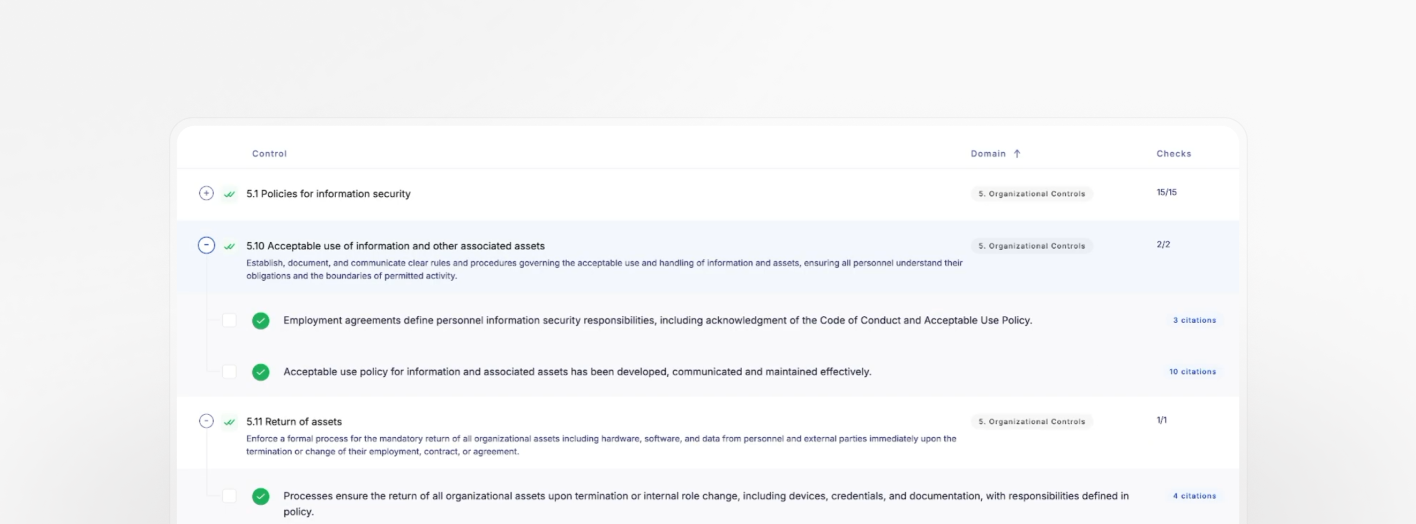
On questions two and three, contradiction and durability: citation clarity shows which evidence supports a check result and which evidence points to risk, instead of flattening both into a single pass or fail. Check history keeps that evidence and the reasoning behind it linked over time, so a result from six months ago is still there to look at, evidence and reasoning included.
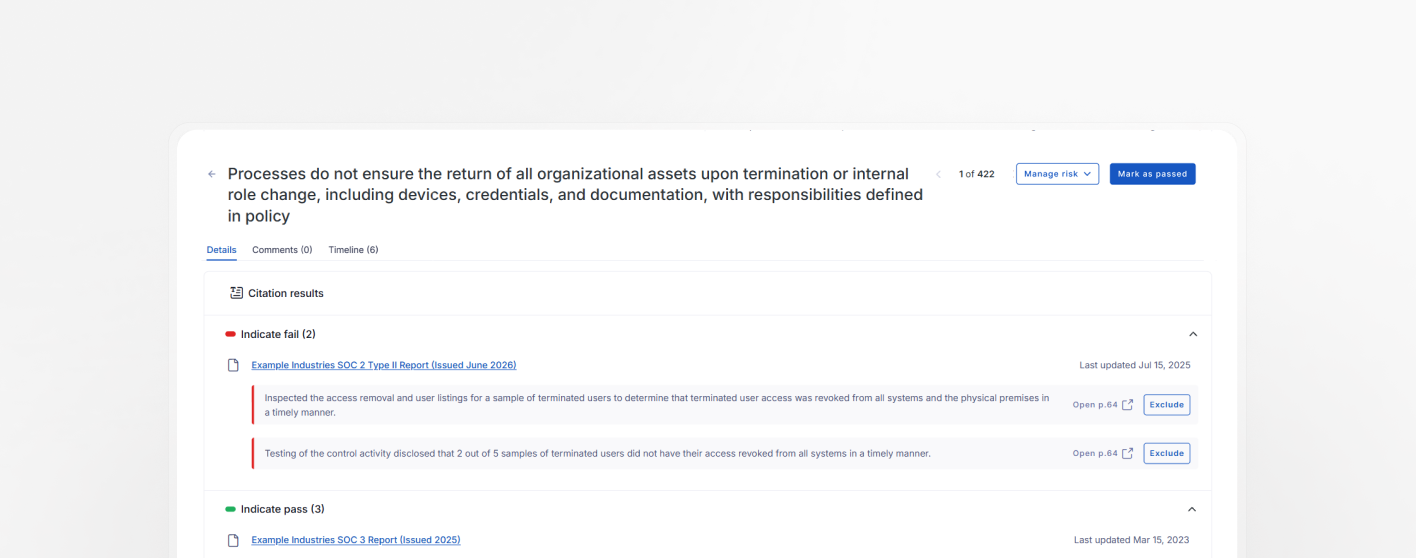
On question four, connecting the result to the decision: a flagged check doesn't stop at a snapshot. It becomes a risk you can triage and work with the vendor to remediate, and it rolls up into the risk assessment shared with the stakeholder who has to make the call. The parsing doesn't act in isolation from the rest of the assessment. It feeds it.
The analyst still makes the final call, and the product gives them room to exercise it. A citation can be rejected or removed, a check can be manually overridden or excluded from the assessment, and notes can be added for context a future reviewer will need. Every change is automatically tracked, building an audit trail without anyone having to maintain it by hand. The evidence behind all of it, together with its metadata, lives in one central system, so none of this depends on a separate export, a side document, or anyone’s memory of what happened.

Go beyond the accuracy question
AI parsing evidence quickly is worth having. What determines whether that speed holds up is if someone can still trust, trace, and act on the result well after the moment it was generated. The time an ungoverned tool saves today gets borrowed from a future version of your team: the one reconstructing a decision without the record that would have made it quick, or piecing together what changed from a snapshot that doesn't say.
Governed AI and fast AI aren't automatically the same product, and these four questions are how you tell which one you're being sold.
If you’d like to see how UpGuard Vendor Risk’s Security Profile answers these four questions, take a tour or book a demo for a personalized walkthrough of our AI-powered assessments.
Related posts
The Evidence Is In: UpGuard Named a Leader in the IDC MarketScape for Worldwide Third-Party Risk Management
