Release notes
Home

Abi Tyas Tunggal April 16, 2021
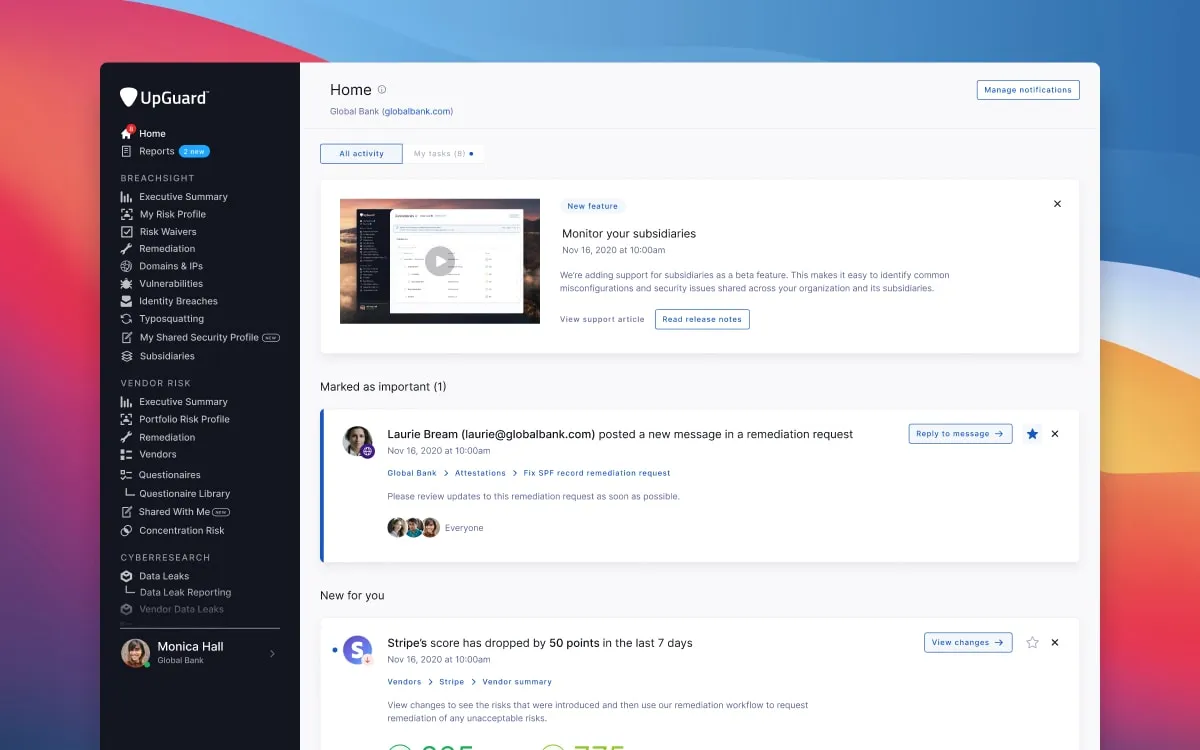
Keeping on top of what has happened in your UpGuard account is one of the most important things you can do to improve your security posture. That’s why we’ve created Home. Home is a replacement for the existing Notifications screen. It highlights new events and actions that have occurred since you last logged in.
Events can include score changes for your websites or your vendors, typosquatting updates, vulnerability notifications, and more. For UpGuard administrators, it can also include audit log events.
Home is split into two tabs, All activity and My tasks.
All activity is broken down into cards, with each card linking directly to the relevant section in the app, making it even easier to dive deeper into the events that matter most to you. Each card also has a list of breadcrumbs to help you passively learn the structure of the platform over time.
My tasks gives you an up-to-date list of the actions you need to take next inside UpGuard. This can include things like approving risk waivers, replying to messages, reviewing submitted security questionnaires, and actioning remediation requests. Tasks will stay active until you complete or dismiss them.
Home is currently in beta, if you would like us to enable it on your account please contact support@upguard.com
Learn how to manage your Home screen
Customers who have purchased more than one tier of our third-party risk management services can now pick which service level they want the vendor assessed to. We’ve also added support for defining the importance of the vendor to your organization.
As part of this work, we’ve also improved the granularity for the statuses shown in Managed Vendors to make it even easier to see where your request is up to. This means that rather than seeing that a request is in progress, you’ll be able to where in the process your request is up to such as gathering evidence, performing risk assessment, remediating risks, etc.
If you are an existing customer who wants to learn more about our third-party risk management services, please contact support@upguard.com
Learn more about Managed Vendors here
Gathering evidence and performing risk assessments are time-intensive and expensive for you and your vendors. That’s why we’re introducing a way to securely share your completed security questionnaires, additional evidence, and risk assessments with those related entities who also have an UpGuard account.
If your organization is part of a multi-org account, you and your related entities can now proactively share vendor assets. Sharing assets is a great way to eliminate the email back and forth that is usually associated with onboarding a new vendor, allowing your organization to assess more vendors in less time by leveraging the work done by related entities.
To understand how Shared Assets works, let’s go through an example.
Imagine you need to assess a potential vendor for your marketing team. You log into UpGuard, monitor the vendor, and click on Shared Assets. You see that a related entity has shared a completed questionnaire and a risk assessment.
Rather than doing your own assessment, you request access to your related entity’s assets, read through them, and determine the vendor is not adequately secure. You respond to your marketing team’s query, outlining why the potential vendor is not a good fit based on your related entity’s assessment.
And just as you can control access to your Shared Profile, you can control who has access to your Shared Assets. Related entities won’t get access to your assets unless you provide to them.
Learn how to use Shared Assets here