Release notes
Shared Profile enhancements

Abi Tyas Tunggal June 22, 2021
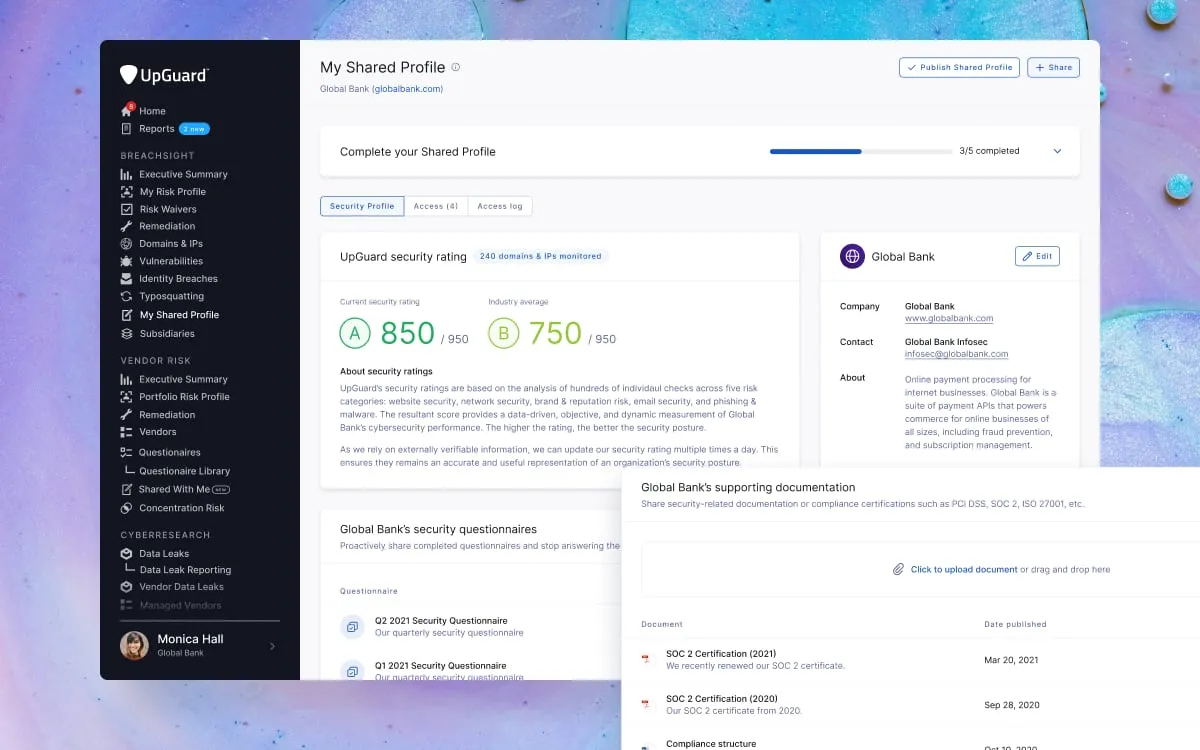
We’ve significantly improved and simplified the management of your Shared Profile.
For background, a Shared Profile lets you proactively share security-related information with companies that need to assess you. This typically includes completed security questionnaires and compliance certifications like PCI DSS, SOC 2, ISO 27001, or FedRAMP.
By completing your Shared Profile, you’ll build trust with your business partners and show that your organization is taking cybersecurity seriously. You’ll also spend less time filling in manual assessments while ensuring customers have an accurate and current view of your security posture.
When you go to manage your Shared Profile, you’ll now see a checklist of what you need to do to complete it. As you fill out more of your profile, we’ll automatically check off the associated line item in the checklist. This makes it easy to see what you have added and what you may be missing.
As part of these improvements, we’ve also improved the design of your Shared Profile, added support for adding a security contact and company description, and added the ability to toggle the inclusion of your security rating.
Learn how to publish your shared profile.
We’re making it even easier to create and manage remediation requests. Creating an internal remediation request is now just two steps down from four. Likewise, vendor remediation requests are now a maximum of four steps down from six. Each request will take you less time to create freeing you up to focus on other activities.
After creating a request, you’ll also notice that we’ve significantly improved the information hierarchy of the remediation request details page. The page has been split into two tabs:
Messages now appear in the top right corner of your screen which makes it easy to respond to any queries recipients may have.
Learn how to send an internal remediation request or a vendor remediation request.