Last updated
September 19, 2025
{x} minute read
Written by
Reviewed by
Table of contents

Key takeaways:

  • What happened: A self-replicating worm is spreading through NPM, affecting at least 187 packages.
  • How it works: It steals local developer credentials, then uses a bundled tool (TruffleHog) to scan public GitHub for more secrets.
  • Why it's unique: Instead of hiding stolen data, the worm exposes it publicly in new GitHub repositories created under the victim's account.
  • Immediate action: If you are using any of the compromised packages, all NPM, GitHub, and cloud credentials should be rotated.

A new and dangerous self-replicating worm has been identified targeting the JavaScript repository NPM, infecting at least 187 code packages. The novel malware strain is engineered to steal credentials from developers and publish them to a new public GitHub repository. 

The worm automatically propagates itself by copying its code into the top 20 most popular packages maintained by the compromised user and publishing them as new versions. This method of publicly exposing sensitive data creates a cascading threat, amplifying the worm's impact across the software development ecosystem.

The malware publishes all new stolen credentials in a new public GitHub repository that includes the word "Shal-Hulud" — the name of the sandworm in Frank Herbert's Dune — hence why the malware has been attributed this name.

How the Shai-Hulud malware works

The Shai-Hulud worm operates through a sophisticated, multi-stage process. It begins when a developer installs a compromised NPM package, kicking off a chain of events designed to harvest credentials, propagate, and cause maximum data exposure.

Stage 1: Credential harvesting

Upon execution, the malware's first priority is to harvest secrets from the developer's entire environment. This goes beyond simply scanning local files like .npmrc and .git-credentials. 

The worm also targets secrets stored in environment variables (process.env) and actively queries cloud metadata endpoints within AWS and GCP environments, which can expose credentials assigned to running instances or services. 

This comprehensive approach ensures it captures keys from both local development and automated CI/CD environments.

Stage 2: Internal source code scanning

Using a stolen GitHub token from the initial harvest, the malware pivots to an internal search. It leverages its bundled version of the open-source tool TruffleHog to scan all private GitHub repositories the compromised account can access. 

The objective is to find a second, often more valuable, set of secrets, like production API keys or database credentials, that have been committed directly to the company's internal source code.

Stage 3: Self-replication via NPM

With a stolen NPM token, the worm begins to propagate. It automatically enumerates the software packages maintained by the compromised developer and injects its own malicious code into them. 

It then publishes these infected projects to the NPM registry as new, tainted versions, creating a cascading supply-chain effect that infects anyone who downloads the updated package.

Stage 4: Dual-method exfiltration

The malware uses two distinct methods to send the stolen data to the attackers:

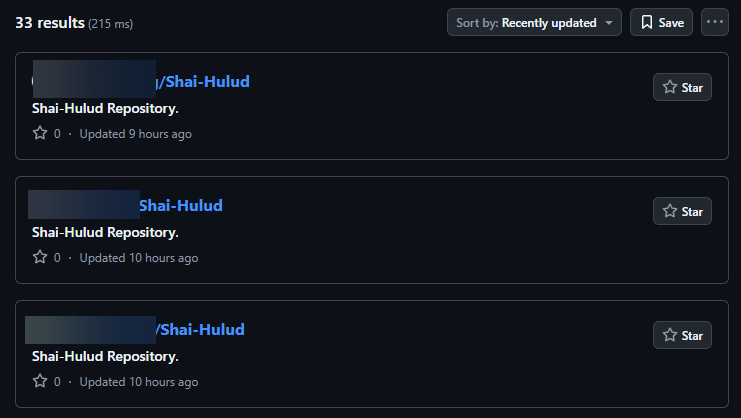
  1. Public Exposure: In its most visible action, it creates a new public GitHub repository under the victim's account, often named Shai-Hulud. It commits a JSON file to this repository containing a dump of all harvested secrets, system information, and environment variables for the world to see.
  2. Stealthy Webhook: Concurrently, it plants a malicious GitHub Actions workflow file (.github/workflows/shai-hulud-workflow.yml) in the victim's repositories. This workflow is designed to serialize the account's secrets and POST them directly to an attacker-controlled webhook, creating a more covert channel for data theft that also gets logged in the Actions history.
Stolen credentials being published. Source: Aikido.dev

Stage 5: Amplification and exposure

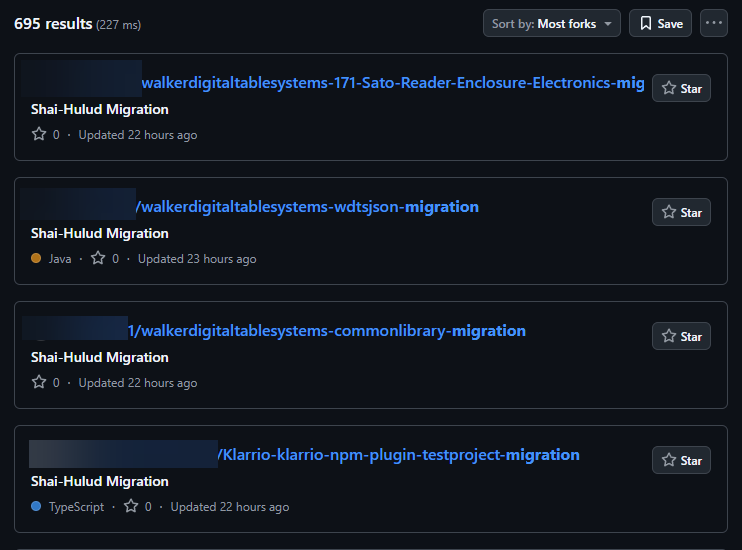
Finally, the worm seeks to amplify the data breach. It iterates through the victim’s repositories and changes their visibility from private to public, where permissions allow. Injecting the malicious workflow into additional repositories creates more triggers for the data exfiltration process, ensuring the attack's impact is as broad and damaging as possible.

Private repositories being turned public. Source: Aikido.dev
The attack is specifically designed to function in Linux or macOS environments.

How compromised credentials can be weaponized in a data breach

The public dump of credentials in Stage 4 is not the end of the attack, it's the beginning of a widespread, multi-front cybersecurity crisis. 

There are two possible attack strategies you need to be aware of:

1. Immediate exploitation

The first wave of attacks is likely automated and brutally efficient, targeting high-value assets for immediate gain. 

This could include:

  • Cloud service takeover: Stolen keys for AWS, Azure, and Google Cloud Platform are the most critical risk. Attackers can use them to access a company's entire cloud infrastructure to steal data from storage buckets (like Amazon S3), deploy ransomware, run crypto-mining schemes that generate enormous bills, or simply delete entire production environments.
  • Direct database theft: Exposed database credentials provide a direct line to a company's most sensitive information. Attackers can connect to databases to exfiltrate sensitive customer data, personally identifiable information (PII), financial records, and intellectual property.
  • Hijacking third-party services: Leaked API keys can be used to send convincing phishing messages from the company's legitimate accounts.

2. A long-term foothold

While automated bots cause immediate chaos, more patient attackers use the credentials to establish a persistent presence within the victim's network.

  • Lateral movement: SSH keys are the primary tool for this. An attacker can use a key to gain initial access to a single server. From inside the network's perimeter, they can move laterally to more critical targets like domain controllers or internal development servers.
  • Planting backdoors: Once inside a system, an attacker can install persistent backdoors. This ensures they maintain access to the network long after the original stolen key has been discovered and revoked, allowing them to conduct long-term espionage or launch another attack in the future.
  • Source code espionage: Access to private source code allows attackers to search for undiscovered security vulnerabilities (zero-days). By analyzing the application's logic, they can craft new, sophisticated exploits that are unique to the victim's systems.

Event timeline

The Shai-Hulud attack followed a series of related security incidents targeting NPM developers.

2025

Precursor Attack on NPM Developer

Late Aug

A precursor attack occurred when an NPM developer was compromised, resulting in malware being added to a popular tool with up to six million weekly downloads. This malware also stole credentials and published them to a public GitHub repository, but it could not self-propagate.

NPM Phishing Campaign Launched

Early Sep

A broad phishing campaign impersonated NPM, tricking developers into updating their multi-factor authentication settings. This campaign led to malware being inserted into at least two dozen NPM packages.

Shai-Hulud Worm Compromises First Package

Sep 14

At approximately 17:58 UTC, the Shai-Hulud worm compromised the first NPM package, rxnt-authentication.

Attack is Publicly Reported

Sep 16

The attack was publicly reported, with at least 187 packages confirmed to be infected. By this time, the worm's spread appeared to have slowed, potentially because the address used for data exfiltration was disabled due to rate limiting.

Impact and scope

The worm’s design for rapid, automated propagation resulted in a significant and widespread impact on the NPM ecosystem, creating a threat that security researchers warn could be long-lasting.

Affected packages and companies

The worm infected at least 187 software packages on the NPM repository. CrowdStrike confirmed that several of its public NPM packages were briefly compromised.

The company stated that after detecting the malicious packages, it quickly removed them and rotated its keys. According to CrowdStrike, the affected packages are not used in its Falcon platform, and neither the platform nor its customers were impacted.

Primary targets

The malware's immediate impact is on the developers whose credentials are stolen and publicly exposed. While the full downstream effects are still being assessed, end-users of applications built with compromised packages could be indirectly at risk.

Target environment

The attack is specifically designed to function in a Linux or macOS environment and deliberately skips execution on Windows systems. The malware confirms its environment by checking for the existence of /bin/bash before running its main payload.

A "living" threat

Researchers have described the attack as "a living thing, almost, like a virus." This is because the malware can lie dormant within an old, compromised package version. A single developer becoming infected by old code could restart the entire spread. The risk is particularly high if the newly infected developer is a "super-spreader" who maintains many popular packages.

Response and remediation

Security teams should immediately perform the following actions:

1. Audit GitHub accounts

Security teams should audit their systems for any signs of compromise. A key indicator of this attack would be the appearance of new, unexpected public repositories created under their developers' GitHub accounts.

2. Scan dependencies

Use tools like NPM Audit or Yarn Audit to audit your applications' dependencies to ensure you are not using any of the below known-compromised packages. To evaluate your potential third-party risk exposure, it may also be helpful to review this list of companies affected by Shai-Hulud.

Package Versions
@ahmedhfarag/ngx-perfect-scrollbar 20.0.20
@ahmedhfarag/ngx-virtual-scroller 4.0.4
@art-ws/common 2.0.28
@art-ws/config-eslint 2.0.4, 2.0.5
@art-ws/config-ts 2.0.7, 2.0.8
@art-ws/db-context 2.0.24
@art-ws/di 2.0.28, 2.0.32
@art-ws/di-node 2.0.13
@art-ws/eslint 1.0.5, 1.0.6
@art-ws/fastify-http-server 2.0.24, 2.0.27
@art-ws/http-server 2.0.21, 2.0.25
@art-ws/openapi 0.1.9, 0.1.12
@art-ws/package-base 1.0.5, 1.0.6
@art-ws/prettier 1.0.5, 1.0.6
@art-ws/slf 2.0.15, 2.0.22
@art-ws/ssl-info 1.0.9, 1.0.10
@art-ws/web-app 1.0.3, 1.0.4
@crowdstrike/commitlint 8.1.1, 8.1.2
@crowdstrike/falcon-shoelace 0.4.1, 0.4.2
@crowdstrike/foundry-js 0.19.1, 0.19.2
@crowdstrike/glide-core 0.34.2, 0.34.3
@crowdstrike/logscale-dashboard 1.205.1, 1.205.2
@crowdstrike/logscale-file-editor 1.205.1, 1.205.2
@crowdstrike/logscale-parser-edit 1.205.1, 1.205.2
@crowdstrike/logscale-search 1.205.1, 1.205.2
@crowdstrike/tailwind-toucan-base 5.0.1, 5.0.2
@ctrl/deluge 7.2.1, 7.2.2
@ctrl/golang-template 1.4.2, 1.4.3
@ctrl/magnet-link 4.0.3, 4.0.4
@ctrl/ngx-codemirror 7.0.1, 7.0.2
@ctrl/ngx-csv 6.0.1, 6.0.2
@ctrl/ngx-emoji-mart 9.2.1, 9.2.2
@ctrl/ngx-rightclick 4.0.1, 4.0.2
@ctrl/qbittorrent 9.7.1, 9.7.2
@ctrl/react-adsense 2.0.1, 2.0.2
@ctrl/shared-torrent 6.3.1, 6.3.2
@ctrl/tinycolor 4.1.1, 4.1.2
@ctrl/torrent-file 4.1.1, 4.1.2
@ctrl/transmission 7.3.1
@ctrl/ts-base32 4.0.1, 4.0.2
@hestjs/core 0.2.1
@hestjs/cqrs 0.1.6
@hestjs/demo 0.1.2
@hestjs/eslint-config 0.1.2
@hestjs/logger 0.1.6
@hestjs/scalar 0.1.7
@hestjs/validation 0.1.6
@nativescript-community/arraybuffers 1.1.6, 1.1.7, 1.1.8
@nativescript-community/gesturehandler 2.0.35
@nativescript-community/perms 3.0.5, 3.0.6, 3.0.7, 3.0.8
@nativescript-community/sqlite 3.5.2, 3.5.3, 3.5.4, 3.5.5
@nativescript-community/text 1.6.9, 1.6.10, 1.6.11, 1.6.12
@nativescript-community/typeorm 0.2.30, 0.2.31, 0.2.32, 0.2.33
@nativescript-community/ui-collectionview 6.0.6
@nativescript-community/ui-document-picker 1.1.27, 1.1.28
@nativescript-community/ui-drawer 0.1.30
@nativescript-community/ui-image 4.5.6
@nativescript-community/ui-label 1.3.35, 1.3.36, 1.3.37
@nativescript-community/ui-material-bottom-navigation 7.2.72, 7.2.73, 7.2.74, 7.2.75
@nativescript-community/ui-material-bottomsheet 7.2.72
@nativescript-community/ui-material-core 7.2.72, 7.2.73, 7.2.74, 7.2.75
@nativescript-community/ui-material-core-tabs 7.2.72, 7.2.73, 7.2.74, 7.2.75
@nativescript-community/ui-material-ripple 7.2.72, 7.2.73, 7.2.74, 7.2.75
@nativescript-community/ui-material-tabs 7.2.72, 7.2.73, 7.2.74, 7.2.75
@nativescript-community/ui-pager 14.1.36, 14.1.37, 14.1.38
@nativescript-community/ui-pulltorefresh 2.5.4, 2.5.5, 2.5.6, 2.5.7
@nexe/config-manager 0.1.1
@nexe/eslint-config 0.1.1
@nexe/logger 0.1.3
@nstudio/angular 20.0.4, 20.0.5, 20.0.6
@nstudio/focus 20.0.4, 20.0.5, 20.0.6
@nstudio/nativescript-checkbox 2.0.6, 2.0.7, 2.0.8, 2.0.9
@nstudio/nativescript-loading-indicator 5.0.1, 5.0.2, 5.0.3, 5.0.4
@nstudio/ui-collectionview 5.1.11, 5.1.12, 5.1.13, 5.1.14
@nstudio/web 20.0.4
@nstudio/web-angular 20.0.4
@nstudio/xplat 20.0.5, 20.0.6, 20.0.7
@nstudio/xplat-utils 20.0.5, 20.0.6, 20.0.7
@operato/board 9.0.36, 9.0.37, 9.0.38, 9.0.39, 9.0.40, 9.0.41, 9.0.42, 9.0.43, 9.0.44, 9.0.45, 9.0.46
@operato/data-grist 9.0.29, 9.0.35, 9.0.36, 9.0.37
@operato/graphql 9.0.22, 9.0.35, 9.0.36, 9.0.37, 9.0.38, 9.0.39, 9.0.40, 9.0.41, 9.0.42, 9.0.43, 9.0.44, 9.0.45, 9.0.46
@operato/headroom 9.0.2, 9.0.35, 9.0.36, 9.0.37
@operato/help 9.0.35, 9.0.36, 9.0.37, 9.0.38, 9.0.39, 9.0.40, 9.0.41, 9.0.42, 9.0.43, 9.0.44, 9.0.45, 9.0.46
@operato/i18n 9.0.35, 9.0.36, 9.0.37
@operato/input 9.0.27, 9.0.35, 9.0.36, 9.0.37, 9.0.38, 9.0.39, 9.0.40, 9.0.41, 9.0.42, 9.0.43, 9.0.44, 9.0.45, 9.0.46
@operato/layout 9.0.35, 9.0.36, 9.0.37
@operato/popup 9.0.22, 9.0.35, 9.0.36, 9.0.37, 9.0.38, 9.0.39, 9.0.40, 9.0.41, 9.0.42, 9.0.43, 9.0.44, 9.0.45, 9.0.46
@operato/pull-to-refresh 9.0.36, 9.0.37, 9.0.38, 9.0.39, 9.0.40, 9.0.41, 9.0.42
@operato/shell 9.0.22, 9.0.35, 9.0.36, 9.0.37, 9.0.38, 9.0.39
@operato/styles 9.0.2, 9.0.35, 9.0.36, 9.0.37
@operato/utils 9.0.22, 9.0.35, 9.0.36, 9.0.37, 9.0.38, 9.0.39, 9.0.40, 9.0.41, 9.0.42, 9.0.43, 9.0.44, 9.0.45, 9.0.46
@teselagen/bounce-loader 0.3.16, 0.3.17
@teselagen/liquibase-tools 0.4.1
@teselagen/range-utils 0.3.14, 0.3.15
@teselagen/react-list 0.8.19, 0.8.20
@teselagen/react-table 6.10.19
@thangved/callback-window 1.1.4
@things-factory/attachment-base 9.0.43, 9.0.44, 9.0.45, 9.0.46, 9.0.47, 9.0.48, 9.0.49, 9.0.50
@things-factory/auth-base 9.0.43, 9.0.44, 9.0.45
@things-factory/email-base 9.0.42, 9.0.43, 9.0.44, 9.0.45, 9.0.46, 9.0.47, 9.0.48, 9.0.49, 9.0.50, 9.0.51, 9.0.52, 9.0.53, 9.0.54
@things-factory/env 9.0.42, 9.0.43, 9.0.44, 9.0.45
@things-factory/integration-base 9.0.43, 9.0.44, 9.0.45
@things-factory/integration-marketplace 9.0.43, 9.0.44, 9.0.45
@things-factory/shell 9.0.43, 9.0.44, 9.0.45
@tnf-dev/api 1.0.8
@tnf-dev/core 1.0.8
@tnf-dev/js 1.0.8
@tnf-dev/mui 1.0.8
@tnf-dev/react 1.0.8
@ui-ux-gang/devextreme-angular-rpk 24.1.7
@yoobic/design-system 6.5.17
@yoobic/jpeg-camera-es6 1.0.13
@yoobic/yobi 8.7.53
airchief 0.3.1
airpilot 0.8.8
angulartics2 14.1.1, 14.1.2
browser-webdriver-downloader 3.0.8
capacitor-notificationhandler 0.0.2, 0.0.3
capacitor-plugin-healthapp 0.0.2, 0.0.3
capacitor-plugin-ihealth 1.1.8, 1.1.9
capacitor-plugin-vonage 1.0.2, 1.0.3
capacitorandroidpermissions 0.0.4, 0.0.5
config-cordova 0.8.5
cordova-plugin-voxeet2 1.0.24
cordova-voxeet 1.0.32
create-hest-app 0.1.9
db-evo 1.1.4, 1.1.5
devextreme-angular-rpk 21.2.8
ember-browser-services 5.0.2, 5.0.3
ember-headless-form 1.1.2, 1.1.3
ember-headless-form-yup 1.0.1
ember-headless-table 2.1.5, 2.1.6
ember-url-hash-polyfill 1.0.12, 1.0.13
ember-velcro 2.2.1, 2.2.2
encounter-playground 0.0.2, 0.0.3, 0.0.4, 0.0.5
eslint-config-crowdstrike 11.0.2, 11.0.3
eslint-config-crowdstrike-node 4.0.3, 4.0.4
eslint-config-teselagen 6.1.7
globalize-rpk 1.7.4
graphql-sequelize-teselagen 5.3.8
html-to-base64-image 1.0.2
json-rules-engine-simplified 0.2.1
jumpgate 0.0.2
koa2-swagger-ui 5.11.1, 5.11.2
mcfly-semantic-release 1.3.1
mcp-knowledge-base 0.0.2
mcp-knowledge-graph 1.2.1
mobioffice-cli 1.0.3
monorepo-next 13.0.1, 13.0.2
mstate-angular 0.4.4
mstate-cli 0.4.7
mstate-dev-react 1.1.1
mstate-react 1.6.5
ng2-file-upload 7.0.2, 7.0.3, 8.0.1, 8.0.2, 8.0.3, 9.0.1
ngx-bootstrap 18.1.4, 19.0.3, 19.0.4, 20.0.3, 20.0.4, 20.0.5
ngx-color 10.0.1, 10.0.2
ngx-toastr 19.0.1, 19.0.2
ngx-trend 8.0.1
ngx-ws 1.1.5, 1.1.6
oradm-to-gql 35.0.14, 35.0.15
oradm-to-sqlz 1.1.2
ove-auto-annotate 0.0.9
pm2-gelf-json 1.0.4, 1.0.5
printjs-rpk 1.6.1
react-complaint-image 0.0.32
react-jsonschema-form-conditionals 0.3.18
remark-preset-lint-crowdstrike 4.0.1, 4.0.2
rxnt-authentication 0.0.3, 0.0.4, 0.0.5, 0.0.6
rxnt-healthchecks-nestjs 1.0.2, 1.0.3, 1.0.4, 1.0.5
rxnt-kue 1.0.4, 1.0.5, 1.0.6, 1.0.7
swc-plugin-component-annotate 1.9.1, 1.9.2
tbssnch 1.0.2
teselagen-interval-tree 1.1.2
tg-client-query-builder 2.14.4, 2.14.5
tg-redbird 1.3.1
tg-seq-gen 1.0.9, 1.0.10
thangved-react-grid 1.0.3
ts-gaussian 3.0.5, 3.0.6
ts-imports 1.0.1, 1.0.2
tvi-cli 0.1.5
ve-bamreader 0.2.6
ve-editor 1.0.1
verror-extra 6.0.1
voip-callkit 1.0.2, 1.0.3
wdio-web-reporter 0.1.3
yargs-help-output 5.0.3
yoo-styles 6.0.326

3. If compromise is confirmed, rotate all credentials

If you have been confirmed to be compromised (or if you have a high confidence of this likelyhood) immediately revoke and rotate keys and tokens for:

  • NPM
  • GitHub
  • AWS, Azure, and Google Cloud Platform
  • All other integrated services

4. Long-term prevention

Package repositories like NPM should shift their publication model to require explicit human consent for every submission, using a phishing-resistant multi-factor authentication (MFA) method, such as a hardware security key (e.g., YubiKey).

Adopting such a method would effectively disrupt these attacks before they can spread, preventing the kind of rapid, automated propagation that makes the Shai-Hulud worm so dangerous.