Vendors are essential for running a modern organization, but each is a potential entry point to sensitive data. Vendor risk assessments enable your security and compliance teams to evaluate which third parties should receive access and help verify adherence to established controls and policies.
We’ll break down the vendor risk assessment process into clear, step-by-step stages that help you evaluate vendors at scale and protect your organization from third-party risks.
What is a vendor risk assessment?
A vendor risk assessment is a critical process for all modern organizations. It involves identifying and assessing the risks associated with your third-party vendors by determining the criticality of these risks and their potential impact on your organization.
A vendor risk assessment is the process of identifying, assessing, and protecting against several types of third-party vendor threats:
- Cybersecurity risks: These include weaknesses like poor access controls, misconfigurations, or inherited vulnerabilities that can expose your internal networks and sensitive data.
- Financial stability risks: Vendors experiencing cash flow issues may fail to meet their service level agreements (SLAs) or suddenly close, severely disrupting your operations.
- Compliance and regulatory risks: Breaching legal, regulatory, or contractual obligations can expose you to fines and business continuity problems (e.g., losing the ability to handle card payments due to a PCI DSS violation).
- Continuity and operational risks: External disruptions, vendor downtime, or inadequate incident response can directly impede your ability to serve customers.
- Reputational risks: A vendor’s engagement in poor labor practices, privacy breaches, or environmental violations can damage your brand by association.
Check out our example of a vendor risk assessment to learn what data assessments require and how a report is structured.
Why is a vendor risk assessment important?
Vendor risk assessments play a crucial role in identifying, mitigating, and managing the risks of working with third-party vendors. By conducting them, you can:
- Vet potential vendors thoroughly during procurement and throughout the vendor lifecycle, ensuring only trustworthy partners handle sensitive data or critical operations.
- Prevent incidents such as data breaches by uncovering vulnerabilities and weaknesses in vendor systems before they impact your organization.
- Adapt to a volatile threat landscape by regularly reassessing vendors, especially after regulatory changes, security incidents, or contract renewals.
- Support strategic decision-making by providing a comprehensive picture of vendor risk, supporting efficient remediation, and resource allocation.
Automating the assessment process drastically reduces time-consuming manual effort and standardizes procedures. By analyzing vendor security risk data and generating risk management reports for stakeholders, automation ensures more consistent, efficient, and scalable risk evaluations.
Those assessments are easier inside a TPRM platform that standardizes questionnaires, scoring, and reporting.
Ongoing monitoring is highly recommended as it continuously tracks changes in security posture, flagging new vulnerabilities or risks as they arise. This proactive approach closes security gaps that can persist between periodic assessments, helping security teams respond to emerging threats as they arise.
For a preview of this highly efficient new world of Vendor Risk Management, watch this video:
Vendor risk assessment automation drastically reduces time-consuming manual effort, allowing for fast, reliable, and consistent risk assessments.
When to perform a vendor risk assessment
Conduct a vendor risk assessment when starting a new vendor relationship, periodically throughout the relationship, and in response to triggers like security incidents or regulatory changes.
You should also use vendor tiering to classify your vendors based on the level of security risk they pose to your organization. This will help your security team tailor the depth of assessment and allocate resources appropriately for each vendor tier.
At the very least, vendor risk assessments must be performed under the following circumstances:
- Onboarding new vendors: Run a full assessment before onboarding any vendor that will access sensitive data, core systems, or critical infrastructure. For lower-tier vendors, a basic security and compliance questionnaire may be enough.
- Periodic security reviews: Perform a comprehensive assessment of critical vendors at least every six months.
- Before contract renewals: Use the renewal window to reassess each vendor’s overall risk profile and update their risk tiering if necessary. Review any changes in the data they handle, how they interact with your systems, and their services.
- Changes to the vendor’s service or infrastructure: Reassess any vendor that merges, restructures, moves to a new cloud provider, or changes how it handles your data. Even if the SLA stays the same, these changes can introduce new risks.
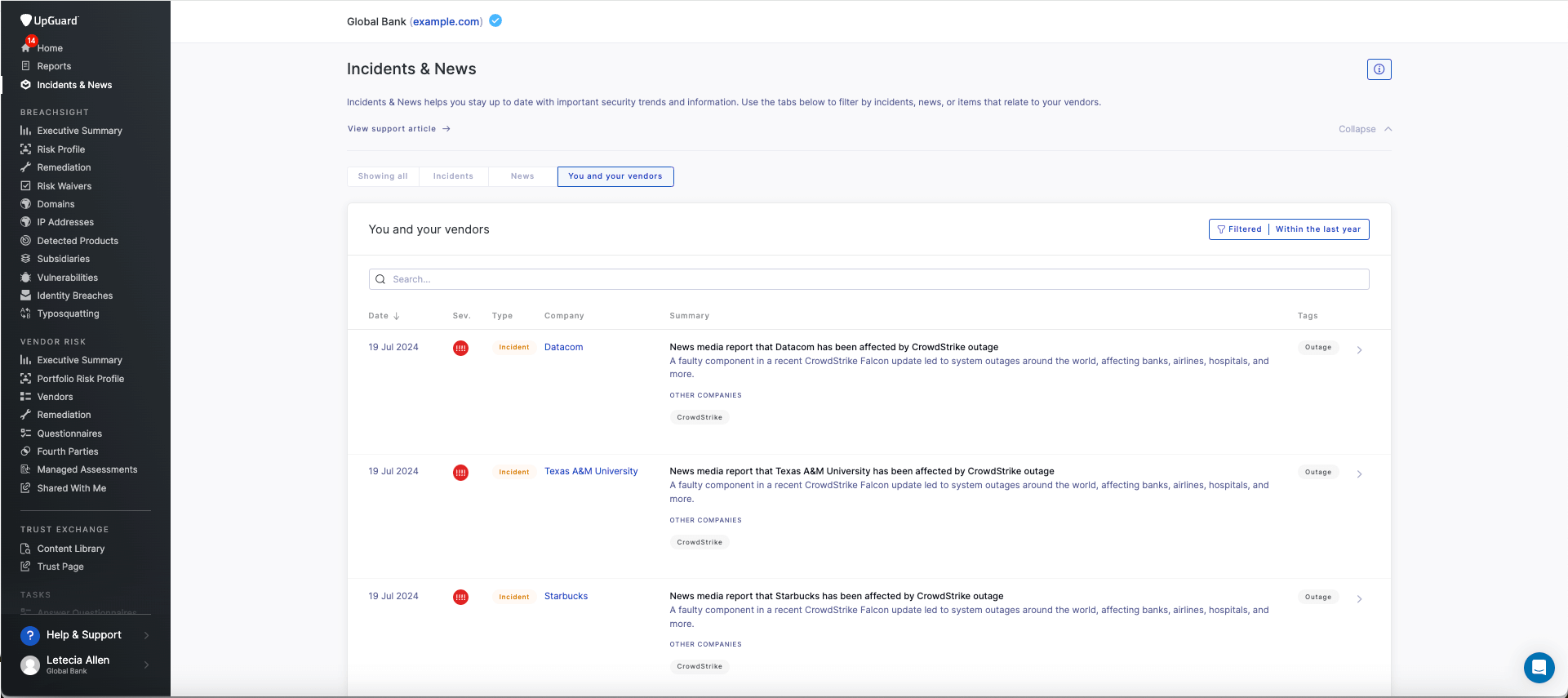
After a known breach or incident: Run an immediate assessment if a vendor suffers a security event or if an automated feed shows its risk score dropping.
If you're new to risk assessments, refer to this overview of performing a third-party risk assessment.
How to perform the vendor risk assessment process
The following framework will help establish a repeatable and scalable vendor risk assessment process.
For an illustration of how each step applies to a risk assessment workflow in a VRM tool like UpGuard, watch this video:
Developing a solid vendor risk assessment process starts with assigning clear ownership. Assign a dedicated team or risk lead, and give them the tools to track vendors, assess their risk, and flag any issues before they escalate.
Step 1: Select and gather evidence
Begin by collecting all available information about the vendor, including automated security scanning results and publicly available trust and security documentation. This is also the ideal time to standardize data requests during procurement cycles, as buyers will often evaluate a vendor's RFP security response to verify internal controls. Use this evidence to assess the vendor’s inherent risk level before formal engagement. Automated tools can quickly surface critical details about the vendor’s security posture, certifications, and compliance standards. This step should not be rushed; the more comprehensive your evidence-gathering efforts, the more streamlined a vendor's risk assessment workflow will be.
Step 2: Identify and prioritize risks
Review the gathered evidence to generate a list of risks associated with the vendor. Prioritize these risks by criticality, focusing on those that pose the greatest threat to your organization. Once you pinpoint specific risks requiring follow-up, request additional information or remediation, and consider waiving certain risks for lower-tier vendors as appropriate.
Step 3: Review and document assessment results
Examine the risk assessment output, which includes detailed commentary and risk ratings based on your evidence and prioritization. Edit or add final recommendations and comments to tailor your assessment to the vendor’s relationship with your organization and their overall risk profile. Make sure your documentation identifies areas requiring follow-up or further action.
Step 4: Establish a baseline and plan ongoing monitoring
Lastly, finalize your assessment to create a point-in-time baseline for the vendor’s risk profile. Share this assessment with stakeholders to guide future risk management activities, including ongoing monitoring and periodic reassessment. Regularly updating your assessment helps you track vendor security posture changes and maintain a robust, scalable risk management program.
Regularly updating your assessment helps you track vendor security posture changes and maintain a robust, scalable risk management program.
With this baseline established, the assessment process transitions from an unstructured and drawn-out bottleneck into a more efficient and repeatable process, which is the key to achieving a more scalable Vendor Risk Management program.
The Role of Automation Tools
Automation tools, like those in platforms such as UpGuard, are crucial for modernizing this process. They dramatically streamline risk assessment by providing rapid, AI-powered vendor risk assessments. These platforms can:
- Streamline Questionnaire Delivery: Automate the sending, tracking, and scoring of security questionnaires.
- Generate Risk Scores and Reports: Automatically generate risk scores, detailed commentary, and one-click risk assessment reports for rapid decision-making.
- Centralize Data: Create a centralized repository for all vendor risk data, including external security scans, questionnaire responses, and security certifications.
The benefits include significant time savings, instant audit-readiness through automatic mapping to core frameworks, and objective, consistent risk management.
Why you need a vendor risk assessment framework
A standard vendor risk assessment framework keeps your process consistent, repeatable, and auditable across every vendor. Using a standardized framework like NIST or ISO 27001 is critical to guide assessments and ensure efficient risk management.
It also makes it easier to:
- Reuse security questionnaires mapped to regulatory needs to reduce duplication, streamlining reviews across vendor tiers.
- Collect and validate evidence against standard framework control sets (like CIS) for faster audits and cleaner escalation when third-party risks arise.
- Apply consistent scoring and remediation criteria across all vendors to ensure risks are flagged early and decision-making is transparent. This helps avoid ad hoc exceptions, such as approving a high-risk vendor without clear, documented justification.
- Benchmark vendors across the same criteria to show risk trends, track improvement over time, and justify spend or renewal.
Many teams use established frameworks to structure their third-party assessments. The right choice depends on your industry, regulatory requirements, and vendor risk profile:
- NIST CSF: Use when you need a broad, widely recognized framework that covers risk governance, threat detection, and incident response. It’s also a strong fit for vendors with US operations and mapping a vendor’s posture to your internal NIST-based program.
- ISO 27001: This framework is ideal for handling sensitive data. It focuses on structured information security management systems (ISMS), risk treatment plans, and evidence-based control design. It also assesses security maturity and continuous improvement very well.
- SIG questionnaire: Designed for large-scale vendor assessments or procurement-led onboarding, the Standardized Information Gathering (SIG) Questionnaire tests vendors against 21 risk domains and compliance maps. SIG is suitable for companies wanting to compare business units like finance and HR.
- SOC 2: Common in SaaS and cloud services, SOC 2 covers security, availability, confidentiality, processing integrity, and privacy. Choose this for vendors offering hosted services or platforms that access sensitive business or customer data.
- PCI DSS: The PCI DSS framework is suitable for vendors that store, process, or transmit credit card data. It covers access control, encryption, logging, and network segmentation. Choose this when evaluating payment processors, e-commerce platforms, or any vendor in scope for cardholder data.
Related: How to implement a vendor risk assessment process.
Vendor risk assessment questionnaire template
Vendor risk assessment questionnaires help you understand the potential risks and cybersecurity measures of new vendors. They provide insights into how well a service provider has implemented information security practices, including incident response planning and disaster recovery.
There are several established vendor security questionnaires teams can use as part of their risk assessment process. These include the CIS Critical Security Controls, the Consensus Assessments Initiative Questionnaire (CAIQ), NIST 800-171, the Standardized Information Gathering Questionnaire (SIG or SIG-Lite), and the Vendor Security Alliance Questionnaire (VSAQ).

What to include in a vendor risk assessment report
A vendor risk assessment report gives you a complete picture of the risk for vendors that have completed risk assessments. Internally, it helps drive strategic decision-making, speeds up vendor due diligence, and highlights high-risk vendors you should terminate.
Sharing a risk assessment report with vendors fosters communication and gives them more visibility on their security posture, guiding the remediation process.
A standard vendor risk assessment report should include the following:
- Vendor profile: The vendor’s history, business model, service level agreements (SLAs), and market gauge to assess reliability.
- Compliance overview: An outline of a vendor’s compliance with regulatory requirements and industry standards, such as GDPR and HIPAA.
- Cybersecurity measures: The vendor's defenses against cyber threats (e.g., firewalls, encryption).
- Data management and privacy practices: How the vendor handles data security and the privacy practices in place to prevent a cyber attack.
- Risk assessment methodology: How the vendor identifies and mitigates risks.
- Third-party audits: An overview of all external audits and security certifications relating to the vendor that ensures the vendor follows industry best practices.
- Access control and identity management: Policies for identity access management and data protection.
- Supply chain risks: Mapping of a vendor’s third-party relationships to identify your fourth-party vendors and determine your level of concentration risk.
- Ongoing monitoring: Continuous monitoring and reporting practices and metrics ensure that decisions about vendor relationships are based on up-to-date information.

To create comprehensive, easy-to-digest reports for stakeholders and facilitate rapid decision-making, consider using a prebuilt vendor risk assessment questionnaire template.
Key components of a vendor risk assessment
To manage vendor risk at scale, your process needs several core components at its foundation.
Risk Categories
The first step in defining your components is to understand your risk categories. These categories define how you classify vendors based on their criticality, data access, and operational impact, which ultimately feeds into your tiering and assessment process.
For example:
- Tier 1 vendors: These are vendors that present a high risk and have access to your sensitive data or infrastructure.
- Tier 2 vendors: Medium-risk vendors have less access to your systems and limited exposure to non-sensitive data.
- Tier 3 vendors: Vendors with minimal exposure to either your data or systems are low risk.
Prioritize assessments for high-risk (Tier 1) vendors with a comprehensive review every six months at least.

Risk Scoring Methodology
The risk scoring methodology provides a numerical or graded system for objectively quantifying a vendor’s risk profile. It is the basis for prioritizing and tailoring your due diligence efforts.
Base your entire process on risk scoring to ensure higher-risk vendors undergo more rigorous assessments and more frequent monitoring. This methodology often integrates data from multiple sources:
- Automated Scanning: Using automated tools to continuously monitor each vendor’s security posture from the start of your relationship.
- Evidence Collection: Requesting and storing evidence, such as questionnaires, during onboarding, ongoing reviews, and following major updates or compliance changes.
Assessment Matrix and Sample Tiers
A vendor risk management assessment matrix visually represents vendor risks and their potential impact on your organization, combining risk severity with business criticality. It distills complex risk data about the overall risk landscape into an accessible, non-technical format.

As a result, you can more easily keep stakeholders and decision-makers informed about high-risk or high-impact vendors. With up-to-date knowledge, they can make strategic choices about vendor management, contract renewals, and allocating resources to mitigation or remediation efforts.
Vendor risk assessment process best practices
To build a robust Vendor Risk Management program, you must get the basics right.
Use a Vendor Risk Management checklist to stay in control of key risks while maintaining compliance. These best practices will help streamline your process:
- Standardize questionnaires by vendor tier: Tailor your questionnaires to match each vendor’s risk level. Use comprehensive assessments for high-risk (Tier 1) vendors, and streamline questions for lower-risk vendors to avoid unnecessary complexity.
- Use automation for consistency: Streamline vendor risk assessment by enabling automated data collection, continuous risk monitoring, and AI-driven risk analysis. These features ensure real-time alerts, efficient compliance tracking, and consistent, objective risk management while reducing manual effort.
- Establish response time SLAs: During onboarding and beyond, make it clear to all suppliers that you expect them to return assessments or fix issues you identify within a given time frame. This will speed up onboarding and turn remediation cases around faster.
- Train internal reviewers: Provide every team member with clear and practical guidance on what red flags to look for and when to escalate an issue. Ensure they have a confident grasp of your choice of VRM software to manage the entire vendor risk assessment process.
- Compliance gap tracking: Your assessment should map to each vendor’s regulatory requirements to ensure compliance gaps are promptly addressed.
- Control gap detection: Use a VRM system that leverages AI to continuously analyze vendor controls, including cybersecurity protocols and operational safeguards. It should inform you of noteworthy changes and provide actionable evidence for each finding.
Here’s how these best practices could be applied across healthcare, financial services, and technology industries:
| Industry | Key Regulations/Standards | Specific Vendor-Risk Priorities |
|---|---|---|
| Healthcare | HIPAA, HITECH, NIST CSF, HITRUST CSF |
|
| Banks & Financial Services | GLBA, SOX, PCI DSS, FFIEC, NYDFS Part 500 |
|
| Technology | ISO 27001, SOC 2, GDPR, CCPA |
|
Comparing three vendor risk assessment tools
The better your risk assessment software, the better your chances of avoiding a third-party data breach. You should pick the platform that fits your review frequency, automation requirements, and tech stack.
1. UpGuard
UpGuard delivers rapid, AI-powered vendor risk assessments by continuously monitoring third-party security postures, automating questionnaires, and providing actionable remediation insights to streamline risk management workflows. UpGuard offers a complete vendor risk assessment framework packaged in a single workflow, helping organizations efficiently assess, monitor, and mitigate vendor risk within a Third-Party Risk Management (TPRM) program.
UpGuard’s key features include:
- Continuous Monitoring: Full vendor security scans are completed every 24 hours to provide a near real-time view of security posture changes.
- Risk Scoring: Automated risk scoring based on a proprietary model (0–950), with scores and underlying data refreshed daily.
- Workflow Automation: Natively integrated remediation workflows allow you to track and collaborate on corrective actions directly within the platform.
- Evidence Collection & Analysis: AI-powered evidence analysis extracts risk-relevant information from security documents (like SOC 2 reports) to accelerate reviews.
“We consider UpGuard best-of-breed. Previously, vetting a vendor took one to two days. Now, it takes minutes. We don’t just use it—we actively recommend it to other government agencies, neighboring counties, and industry peers.”
- Anthony Chogyoji, Chief Information Security Officer (CISO) of Riverside County
2. Bitsight
Bitsight offers data-driven vendor risk assessments using continuous security ratings and analytics. Its platform enables the rapid assessment of third-party risk throughout a vendor's lifecycle, allowing organizations to validate vendor security postures and improve third-party risk management at scale.
Bitsight’s key features include:
- Continuous Monitoring & Scoring: Provides security ratings that measure security performance daily, enabling daily monitoring of vendor risk.
- Automated Questionnaires: Assessment Reporting allows for a high level of efficiency and automation, helping reduce the time it takes to complete an assessment.
- Workflow & Integration: The platform integrates with major GRC and TPRM platforms (like ServiceNow) and can automatically trigger alerts based on changes in a vendor’s rating to kick off powerful remediation workflows.
- Evidence-Based Insights: Data is gathered from various sources, including botnet and malware intelligence, providing evidence-based insights that correlate to potential security incidents.
3. SecurityScorecard
SecurityScorecard helps organizations assess and continuously monitor vendor risk through real-time security ratings and automated questionnaires. Its patented technology rates over 12 million companies continuously and is used for enterprise risk management, due diligence, and regulatory oversight.
SecurityScorecard’s key features include:
- Continuous Monitoring & Scoring: It uses an easy-to-understand A-to-F letter grade rating system by continuously monitoring 10 risk factor groups.
- Automated Questionnaires: The assessment features allow users to send, complete, and auto-validate questionnaires at scale, leveraging SecurityScorecard ratings to validate responses.
- Integration with Platforms: The platform can integrate with systems like ServiceNow to automatically create and send assessments when a vendor’s score falls below a minimum threshold.
- Risk Categories: SecurityScorecard evaluates vendors based on ten risk categories, including network security and application security, to provide a holistic view of the security posture.
Automate your vendor risk assessment processes with UpGuard
Traditional vendor risk assessments are too slow for the modern threat landscape. UpGuard transforms this process with a deeply integrated AI platform, empowering your team to move faster, scale your program, and make decisions with confidence.
UpGuard’s specific capabilities include:
- Auto-generated reports: Create comprehensive, point-in-time risk assessments with one click, translating complex findings into easy-to-digest reports for stakeholders.
- Risk scoring dashboards: Automated risk scoring is based on a proprietary model (0–950), with scores and underlying data refreshed daily.
- Prebuilt questionnaire templates: Automate the sending, tracking, and scoring of security questionnaires.
- Continuous external monitoring: Full vendor security scans are completed every 24 hours to provide a near real-time view of security posture changes.
With UpGuard, you can free your team from tedious manual work and focus on what matters most: protecting your organization.