

AI security questionnaire software helps you clear inbound security questionnaires faster by drafting answers from your own evidence library, so your team isn't writing responses from scratch every time with every new security review. The tool cites its sources and leaves the final decision to accept, edit, or reject with a human on your team.
This guide walks through the key capabilities and features that separate an ideal tool from the rest, so you can avoid buying the wrong solution.
What AI security questionnaire software is (and what it's not)
AI security questionnaire software helps you complete inbound deal questionnaires without having to rebuild answers from scratch each time. It drafts responses from your evidence library, then requires a human to accept, edit, or reject before anything is sent to a customer.
The system should pull from documents and prior answers you choose, identify all referenced sources, and leave final send authority with a reviewer on your team. If those controls are missing, you have a chatbot with a security theme rather than a response workflow.
AI security questionnaire software is not:
- ChatGPT or Claude pointed at a Google Drive folder — a DIY setup that drafts answers but gives you no source citations and no record of who accessed what, with no boundary on how your data is used.
- A browser agent that logs into a customer portal and submits on your behalf
- Buyer-side assessment AI that sends questionnaires to vendors (that sits in vendor risk management, not this category)
Why security teams are turning to AI-powered security questionnaire tools
A security questionnaire still arrives late in the sales cycle, after someone already promised a date to the buyer. The file is often a long multi-tab spreadsheet, and the people who can answer it are usually the same lean security or governance, risk, and compliance (GRC) group running the rest of the company's security and compliance work.
Security teams need to complete multiple questionnaires a month, with workloads spiking when several enterprise deals land at once. With sufficient practice, you might achieve a lightning-fast copy-and-paste hand gesture, but this manual effort doesn't scale when policies, controls, and product scope have changed since your previous responses.
Time lost from manually gathering data, routing approvals, and answering hundreds of questions can add up to 5–15 hours per questionnaire. Multiply that load across a month of inbound requests, and the backlog becomes a significant revenue blocker.
Criteria for trustworthy AI answering
Security questionnaire software should reduce completion times without inventing answers or oversharing sensitive information. An ideal tool should meet the following criteria:
- Answers grounded only in your documents: Drafts should come only from files and prior answers you select, such as SOC 2 reports, information security management system policies, completed questionnaires, and related evidence. If the model can invent outside that corpus, you can’t defend the response in an audit conversation.
- Citations on every accepted answer: Each answer you keep should link back to the source document or prior response. No citation means treat the draft as untrusted, even when the wording sounds polished.
- Confidence triage: Exact Match and Strong Match labels (or an equivalent score) should tell reviewers what they can accept quickly and what needs a human. Reading 300 answers at the same depth defeats the point of automation.
- Least-disclosure and persona controls: Tone, length, and gap handling matter as much as factual grounding. Directional feedback from third-party risk practitioners is consistent on this point. Buyers often want a “yes” plus a short justification, and responders want to send the least information that still satisfies the question.
- Human review before sending: Accept, reject, and edit must be first-class actions. Prefer Autofill that only fills empty fields so work already done is not overwritten by a fresh model pass. That human-in-the-loop expectation also shows up in public AI risk guidance: the NIST AI Risk Management Framework treats oversight, documentation, and accountable use as core to trustworthy AI systems.
- Excel intake that matches real files: Production questionnaires are .xlsx workbooks. The tool must detect question, requirement, and answer columns, let you include or exclude sheets, and set starting or heading rows when auto-parse fails.
- Library freshness: Saved answers and uploaded docs become the next questionnaire’s starting point. Version drift is the silent failure mode, such as last year’s SOC 2 attached to this year’s claims.
- Training-data policy: Customer content must not be used to train the vendor’s models. For many CISOs and AI risk committees, that policy is a gate, not a footnote.
- A path off the hamster wheel: AI that only re-answers the same 200 questions every quarter is incomplete. Pair response automation with a Trust Center or equivalent publish-once surface so repeat buyers can read evidence instead of reopening the spreadsheet. Public trust centers already use this pattern for standardized diligence packs; for example, Esri publishes ArcGIS Online Consensus Assessment Initiative Questionnaire (CAIQ) materials through its ArcGIS Trust Center.
Red flags during demos:
- Accuracy percentages with no published method
- Credit metering that punishes legitimate volume spikes
- “Agent” language with no named reviewer or audit trail
- DIY Claude or ChatGPT plus SharePoint presented as the operating model
- Framing that only works for one questionnaire standard
When you compare security questionnaire automation options, score each vendor against this list before you score completion speed claims.
"AI agents" vs governed Autofill
Buyers who search for leading AI agents for security questionnaires are usually asking one operational question: will this complete the entire questionnaire?
Some vendors answer with named agents and portal-fill or MCP connector stories. Treat that as market language for end-to-end completion, and if a demo skips reviewer, source, and access log details, treat that as a red flag.
A human should review all AI drafts before they are accepted, and not blindly accept all AI responses.
Portal completion sits outside that pattern, since the tool authenticates to the customer's portal, reads the questions, drafts and enters answers, and submits on your behalf — with no human reviewing each response before it reaches the customer. If portal completion is a hard requirement, then explicitly state that on the evaluation sheet and verify who is liable when a wrong answer is submitted.
Trust Exchange by UpGuard leaves portal completion out by design, so a human reviews every response before it's sent.
How Trust Exchange approaches security questionnaires
Trust Exchange maps the checklist above into a sell-side workflow: draft from your library, review with confidence and citations, then publish evidence so the next buyer can read instead of re-question.
1. AI Autofill
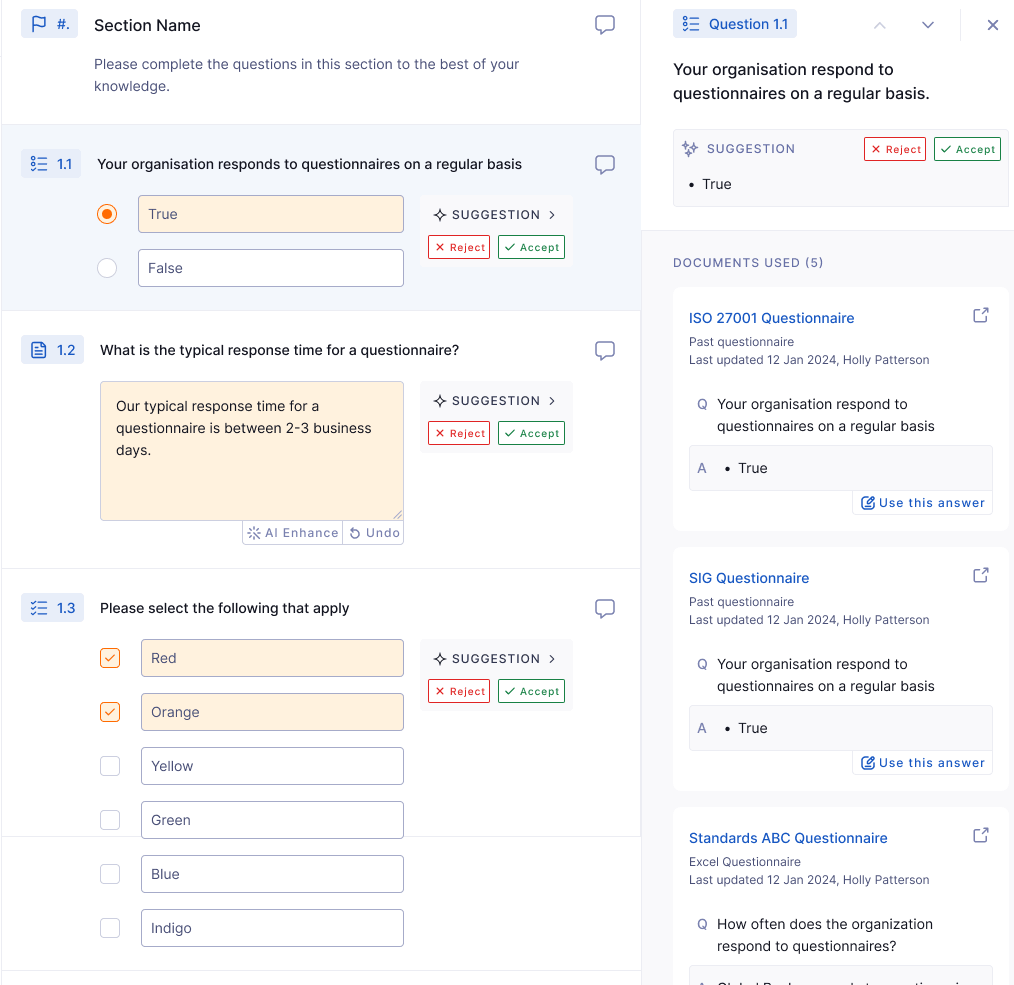
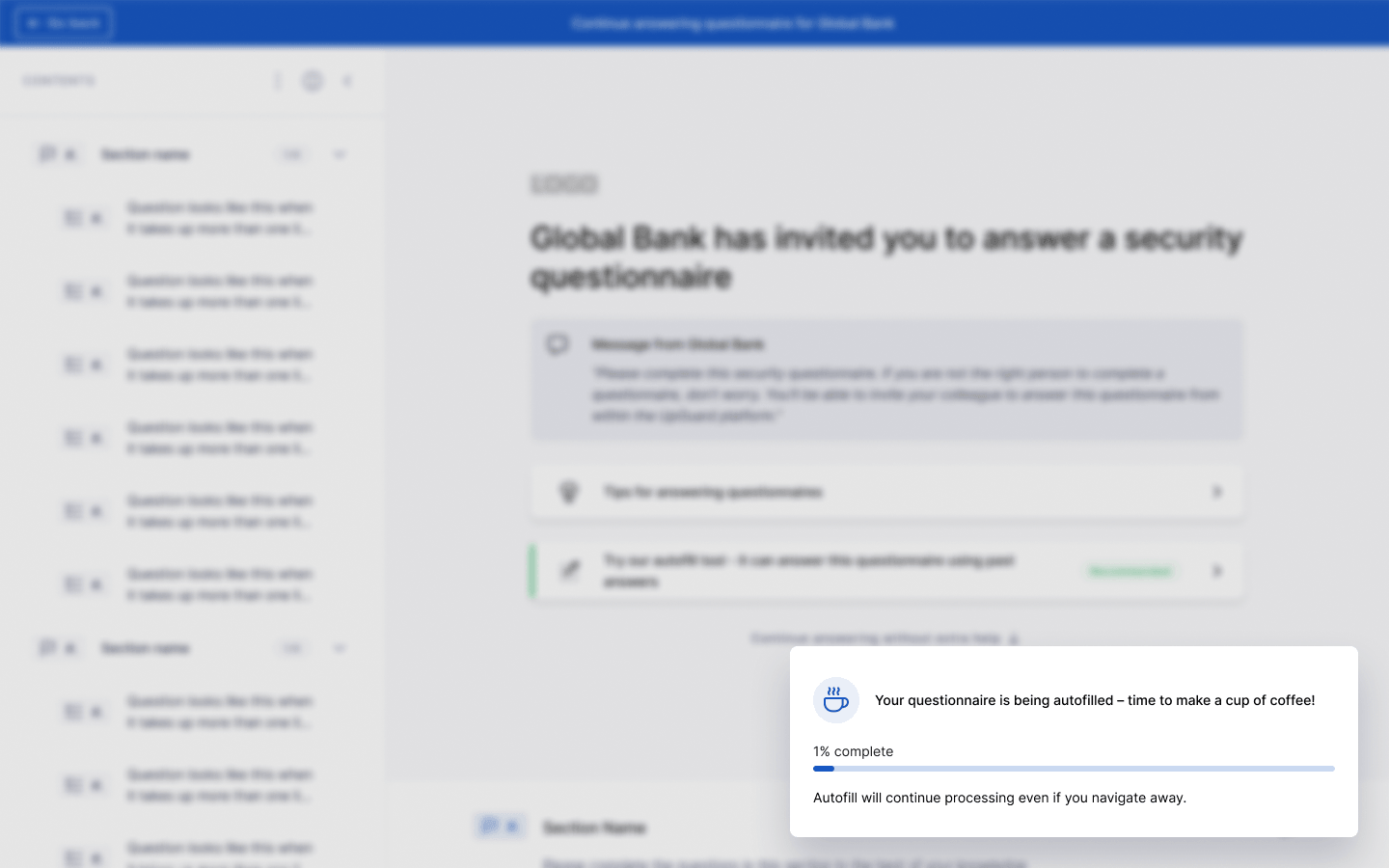
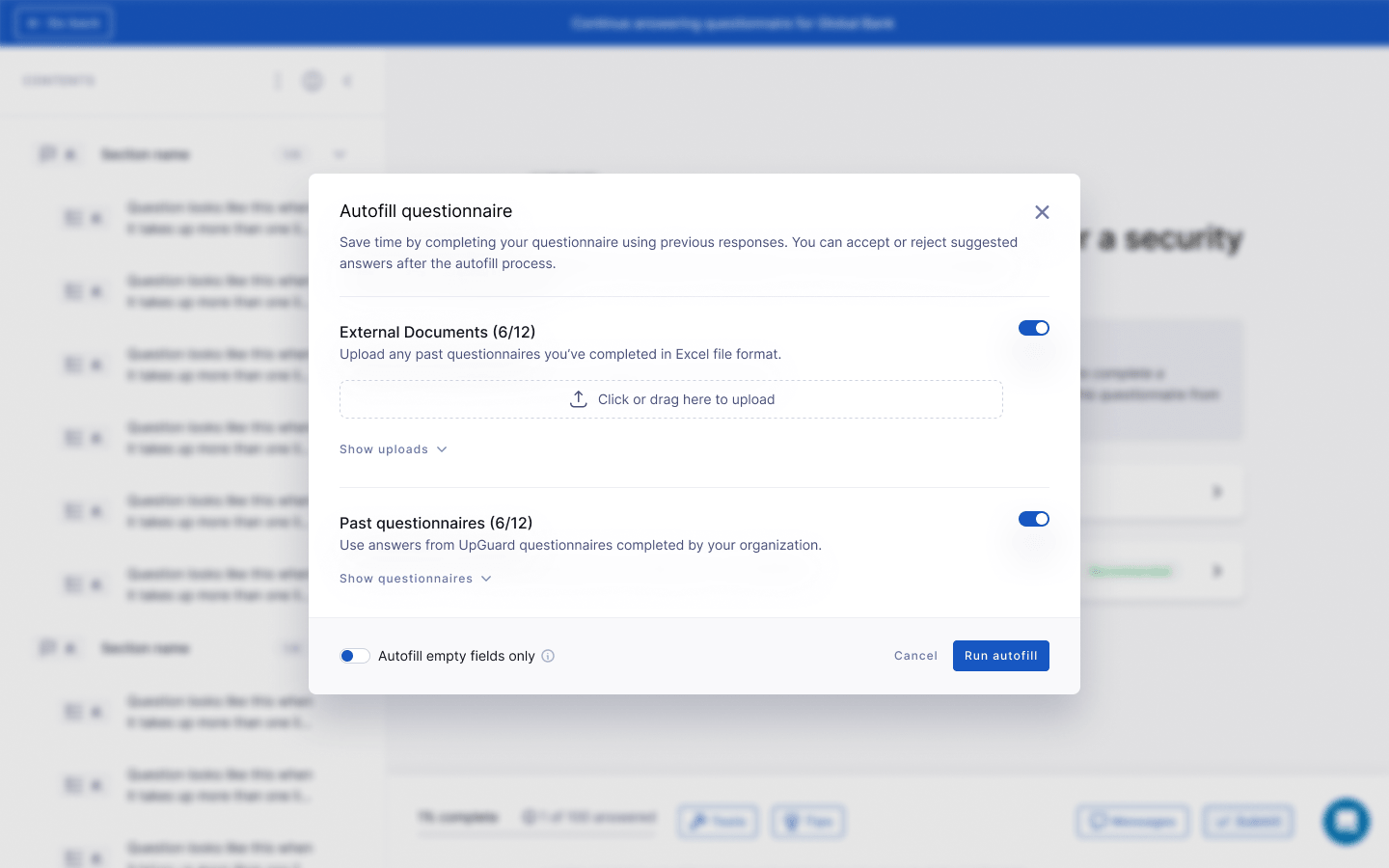
AI Autofill suggests answers from evidence you choose, including SOC 2 reports, policies, past completed questionnaires, and other supported PDFs or Excel files. You upload or open the questionnaire, select sources, run autofill, then accept, reject, or edit each suggestion.
Accepted answers show an AI indicator and a link to the source. Confidence levels such as Exact Match and Strong Match flag what you can accept quickly versus what needs deeper review.
2. Personas
AI personas (Security analyst, Sales engineer, CISO, Default, or a custom persona up to 5,000 characters) set tone, format, length, and how gaps are handled so drafts follow least-disclosure norms instead of defaulting to oversharing. AI Enhance polishes clarity after you’re satisfied with substance.
3. Excel imports
Excel import parses question, requirement, and answer columns. You can include or exclude sheets and set starting or heading rows when structure is messy. Autofill empty fields only preserves work already done. Saved responses feed the next questionnaire, and the sender is notified on submission.
4. Content library
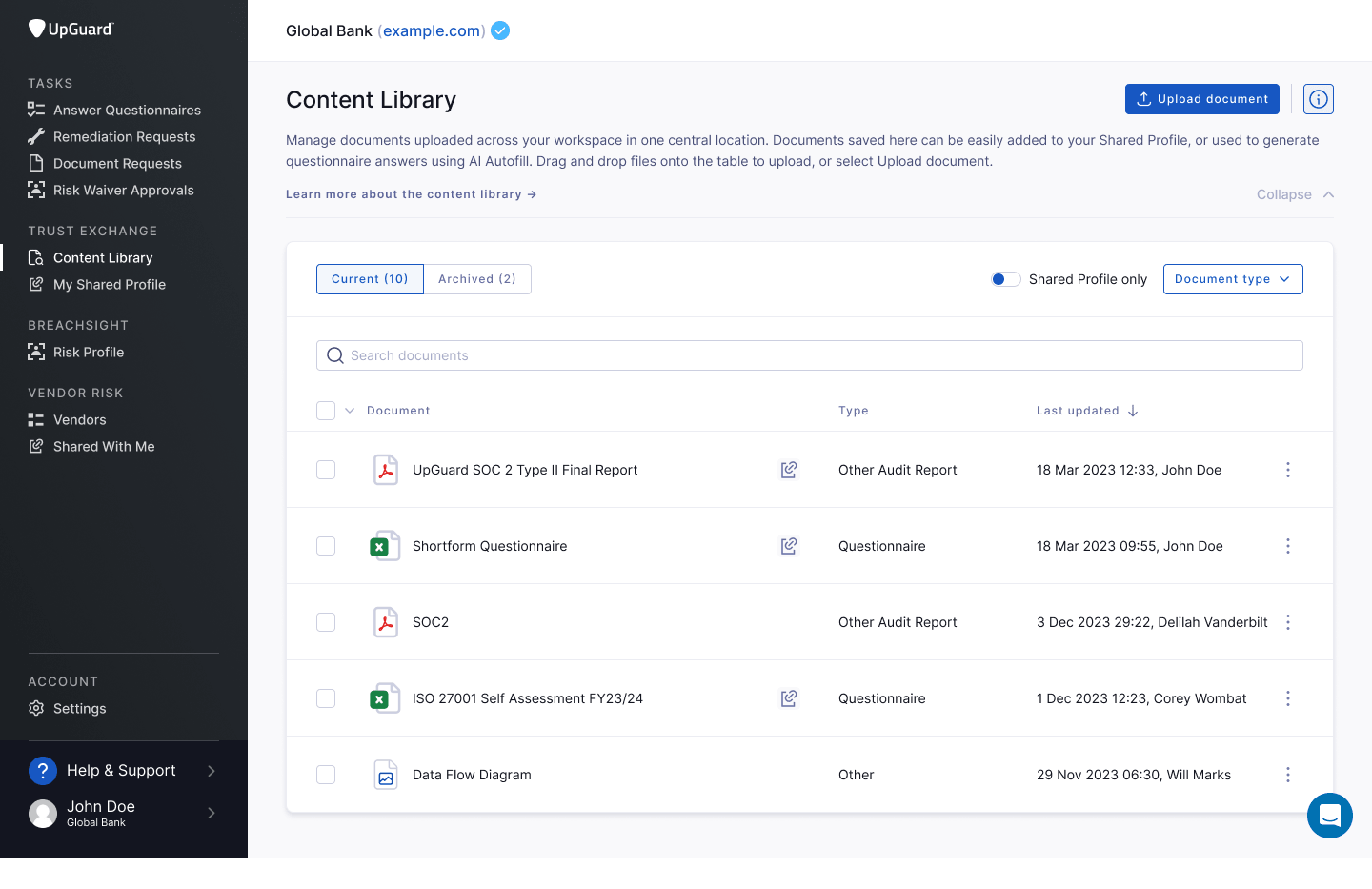
The content library is the system of record that those drafts pull from: versioned SOC 2s, policies, pen tests, and related artifacts reused as attachments, Trust Center documents, and Autofill evidence. A hosted Trust Center is the off-ramp. Publish once so the next buyer reads current posture instead of sending the same 200 questions.
5. Pricing transparency
A free plan includes one questionnaire import per month and one Trust Center — an NDA-gated public trust page for sharing your security policies, certifications, and completed questionnaires.
Paid plans are about $600 per month or $6,000 per year, with 15 imports per month, five Trust Centers, a custom domain, and the ability to publish and maintain your subprocessors.
Quick comparison: top AI security questionnaire software options
How to choose the best option for you
Run five questions before you expand the pilot:
- Can I see the source of every draft?
- Can I stop the model from oversharing with persona or least-disclosure controls?
- Does the product ingest the Excel files we receive, including multi-sheet workbooks?Does the vendor use customer data to train its model? If the answer is yes or unclear, many CISOs will block uploading SOC 2s and policies.
- Does the same library publish a Trust Center or equivalent so you’re not paying AI to re-answer the same questions next quarter?
If a vendor can't show you the source of every draft, maintain human reviews, or state its training-data policy in writing, the risks aren't worth it. No matter how fast the software is.
How UpGuard helps with security questionnaire responses
When the next real spreadsheet lands, start with Questionnaire AI on Trust Exchange rather than another blank workbook and a chat window.
- Questionnaire AI Autofill: Ground drafts in the evidence you select, review with citations and confidence, and keep send authority with your team.
- Trust Center: Publish core posture materials once so repeat buyers can read instead of reopening a 200-question file.
- Free tier: Start with the free Trust Exchange tier to prove the workflow on a live customer questionnaire before you expand volume.
Try Questionnaire AI on a real file, then decide whether paid import volume and multiple Trust Centers match your deal load.
Frequently asked questions
What is AI security questionnaire software?
Software that drafts answers to inbound security questionnaires from your own evidence library, then requires a human to accept, edit, or reject before sending.
Is an AI-CAIQ the same as AI questionnaire software?
No. An AI-CAIQ assesses a vendor’s AI system; AI questionnaire software helps your team answer questionnaires customers send you.
How does AI autofill a security questionnaire?
The tool matches each question to approved documents and prior answers, drafts a response with sources and confidence, and leaves acceptance to a reviewer.
Are AI questionnaire answers accurate enough to send without review?
No. Treat drafts as untrusted until a human accepts them; require citations and escalate low-confidence items.
What is the difference between an AI agent and AI Autofill?
“AI agent” is market language that often implies portal completion; governed Autofill means AI drafts, a human sends, and every accepted answer has a traceable source.
Does AI questionnaire software use my data to train models?
It depends on the vendor. Some use customer content to improve their models, and others don't. Before you upload SOC 2s or policies, request a written policy stating that your content will not be used to train the provider's models.
.jpeg)