Announcing Risk Automations: From Discovery to Resolution In Seconds


In the world of Risk Management, speed is often the enemy of thoroughness. Security teams are stretched thin, acting as "human APIs" by manually moving data between spreadsheets, ticketing systems, and risk dashboards.
Today, we are thrilled to announce the launch of Risk Automations, a powerful new addition to the UpGuard platform designed to turn risk intelligence into immediate, measurable action and connect the tools and platforms you rely on.
Move beyond static monitoring
Risk awareness is only half the battle. The next challenge is taking action. The moment a vendor's score drops or a vulnerability surfaces, the remediation race is on. Yet, most teams find themselves stuck at the starting line. Before a fix can help, an analyst must manually triage the alert, open a ticket, and notify the right stakeholders.
Risk Automations eliminates this manual overhead. By connecting UpGuard directly to the tools you use every day, you can build automated workflows that identify, notify, and resolve risks 24/7 — no more triage bottlenecks.
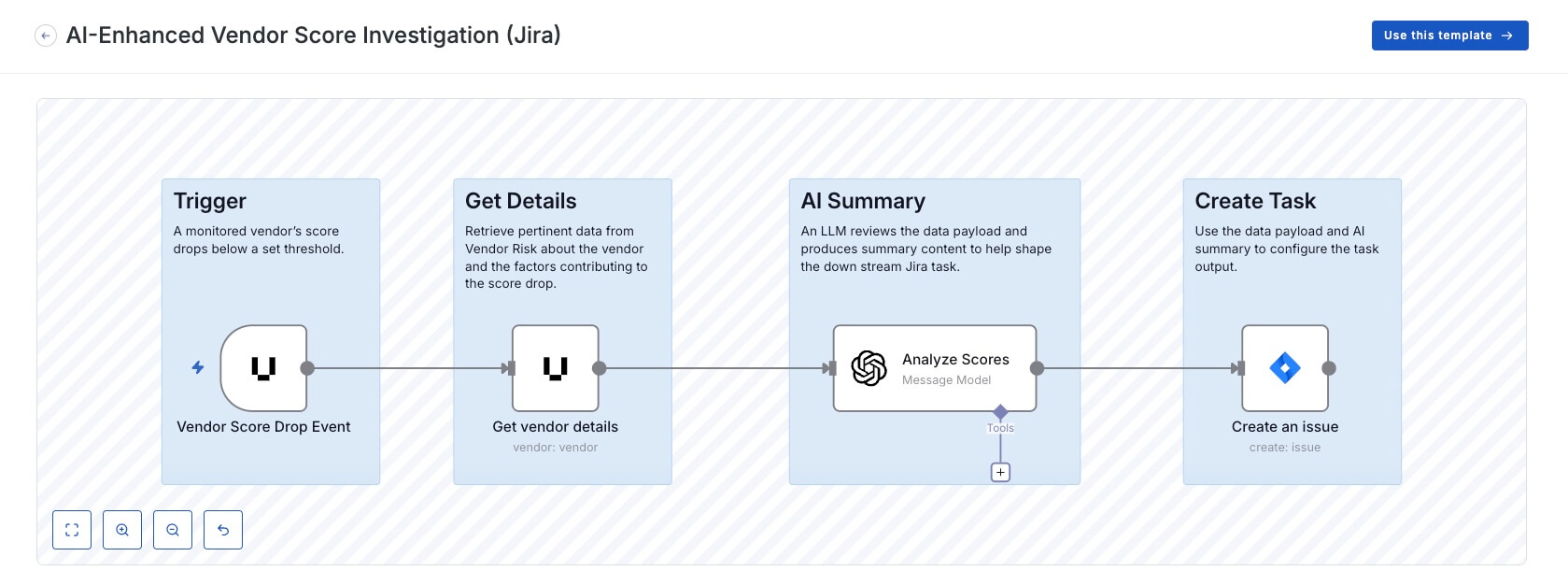
Here's an example workflow triggered by a vendor's security score dropping below a specified threshold.
How it works:
- Trigger: The workflow listens for a Vendor Score Drop event (e.g., falling below 600).
- Data Retrieval: It instantly queries UpGuard data to fetch the vendor's comprehensive risk profile, including historical scores and category breakdowns.
- AI Analysis: The data is passed to your approved AI instance, ensuring its secure handling. Acting as a security analyst, the AI triages the data and pinpoints exactly what caused the drop and highlights new high-severity risks.
- Action: A Jira task is created in your backlog. The description is pre-populated with the AI's bulleted summary, ready for assignment. If you use a different ticketing platform, simply swap out the Jira node for Zendesk, Asana, or whatever tool your team uses.
100+ native integrations
Risk Automations syncs natively with over 100 common tools:
- IT Service Management: ServiceNow, Jira, Freshservice, Zendesk, HaloPSA
- Communication: Slack, Microsoft Teams, Mattermost, Email
- Cloud and infrastructure: AWS (All), Microsoft Azure, Google Cloud, Cloudflare
- SIEM and observability: Splunk, Datadog, DynaTrace, Elastic
- Security and identity: CrowdStrike, Okta, Zscaler, Carbon Black, Rapid7 InsightVM
For bespoke tools, use our universal API connector to bridge them directly into your UpGuard Risk Automations workflows.
If it has an API, you can automate it.
Get immediate value with pre-built templates
You shouldn’t have to be a developer to automate your security program. Risk Automations comes equipped with a library of vetted, no-code templates designed to solve the most common headaches.
Popular automation templates include:
- Vendor risk triage: Automatically triage new risks as they are discovered, creating a ticket complete with remediation steps.
- Vendor score drop triage: When a vendor score drops below a threshold, triage the vendor, trigger a notification, and create a ticket complete with recommended actions.
- Real-time threat routing: When a critical breach is identified in Breach Risk, automatically push the intelligence to a dedicated Slack channel or create an incident ticket for your SOC team.
- Dynamic remediation: Move from "discovered" to "resolved" instantly. Automatically trigger system-level actions, like password resets for compromised credentials.
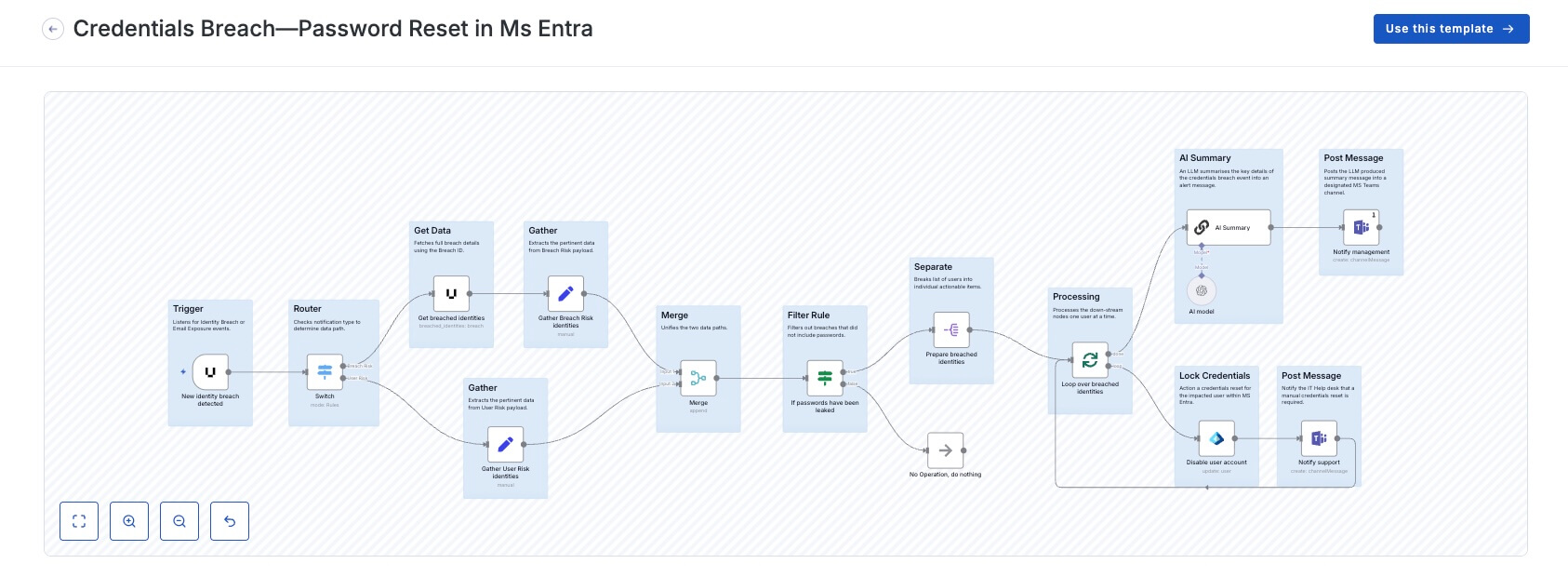
Here's an example workflow template for instantly resetting account credentials through Microsoft Entra ID (formerly Azure AD) the moment UpGuard detects a user's password has been exposed in a third-party breach.
How it works:
- Trigger: The workflow listens for "Identity Breach" or "Email Exposure" events from UpGuard.
- Smart Filter: It analyzes the breach data. The automation proceeds only if the compromised data includes Passwords. If only email addresses were exposed, the workflow stops to prevent unnecessary lockouts.
- Remediation: The affected user account is set to Enabled: False in Microsoft Entra ID, immediately revoking access.
- Notification:
- Management: An AI-generated summary of the breach context is sent to a leadership channel in Microsoft Teams.
- Support: A specific alert is sent to your IT Support channel identifying the locked user, prompting them to facilitate a manual password reset.
AI-driven precision
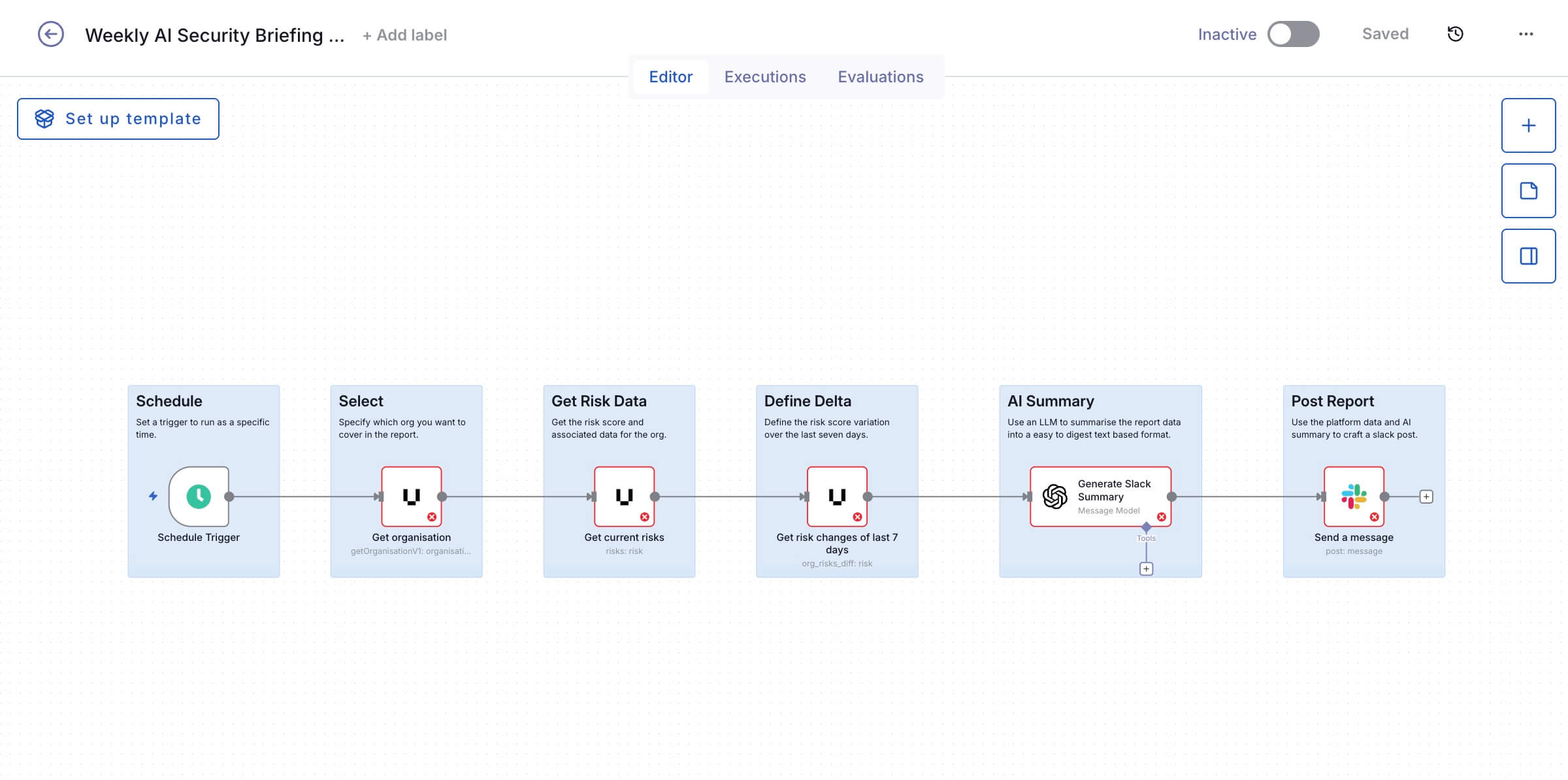
You don't need more noise; you need contextualized insights. Risk Automations ensures only high-priority insights requiring immediate attention are delivered to decision-makers. But instead of everyone receiving the same generic, highly technical risk overview, each message is automatically crafted for its specific audience. No more time wasted on interpretation; instantly understand the scenario, and your exact next steps.
Keeping the human-in-the-loop
The automation workflow doesn't end with a high-fidelity alert. After a risk is identified, resolve it instantly with automated, system-level triggers, including password resets, firewall updates, and blocking malicious IPs. By resolving issues at the source, you can automate the complete cyber risk lifecycle, reducing time-to-resolution from days to just seconds.
For critical issues, Risk Automations offers human-in-the-loop checkpoints, giving you the opportunity to granularly control actions without worrying about manual handoffs.
Quantify your efficiency
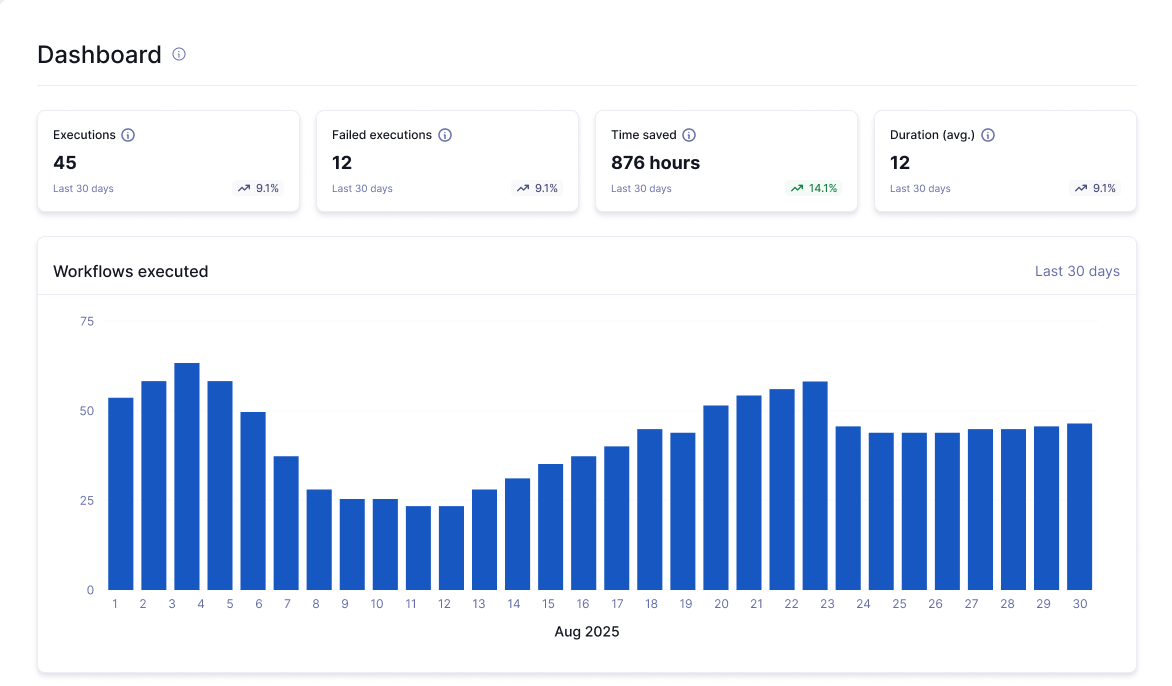
Gain instant visibility into the health and impact of your workflows with a centralized view. Monitor execution status in real time to quickly identify and resolve failed automations, while quantifying the exact time saved for each task. Then, use this data to demonstrate the efficiency and scalability of your risk remediation strategy to stakeholders and auditors.
Ready to automate your risk process?
Risk Automations is available now. Ready to transform your manual workflows into an intelligent resolution engine?
.jpeg)