How User Risk Finds the Shadow AI Outside Your Directory
.jpg)

It’s Thursday afternoon, and a message from your CEO slides across your notification bar: “Quick one. Which AI tools are our people using?”
Microsoft Copilot, live since March, is set up in Entra and named in the AI policy everyone signed. But you know that’s not the full answer. Personal ChatGPT accounts never touch Entra, and AI notetakers that do sign in land in consent logs your lean team has little time to review.
Those are the blind spots you can name. The ones you can’t are what worry you, because the CEO won’t be the last to ask. Your auditor will want the same list, with evidence, and that means looking past the official list to what people use day to day.
That starts with visibility: an inventory built from real usage. That’s where User Risk comes in, surfacing the shadow AI in your browsers that sits outside your directory.
Shadow AI: The AI your directory never sees
Your CEO’s question is common in today's AI-driven landscape, and so is the gap behind answering it confidently. In McKinsey’s 2026 State of AI survey, nearly nine in ten respondents said their organizations use AI regularly, and 44% said it’s already scaling across the enterprise, up from 38% a year earlier.
While adoption has grown rapidly, visibility hasn’t kept pace. In UpGuard's analysis of app usage across 20 organizations for The Shadow Supply Chain report, the average security team was blind to 72.9% of its active vendor supply chain.
Every time someone signs up for a new AI tool, that blind spot grows. And it’s hard to shrink, because your current tools focus on the apps you’ve approved, which leaves three gaps:
You can’t see it
In the same research, 31.4% of vendor interactions happened through direct browser logins that bypass single sign-on (SSO) entirely. Entra exists to manage the apps you sanction and provision. Personal accounts and password sign-ins happen outside that scope.
You can’t see what it reaches
A one-click sign-in with a work account can make a new app feel approved. But that same click can give an AI notetaker access to calendars, mail, and files, along with any personal data inside them.
Consent signals end up in logs that lean teams rarely have time to review, so the access goes unchecked, and so does the risk. Notetakers aren’t alone here either. In UpGuard’s research, AI meeting assistants went unmonitored in 93.8% of instances.
You can’t tell approved from unvetted
Entra is your source of truth for sanctioned apps. Shadow AI never went through approval, so you have no list to compare it against and no view of the vendors you haven’t assessed.
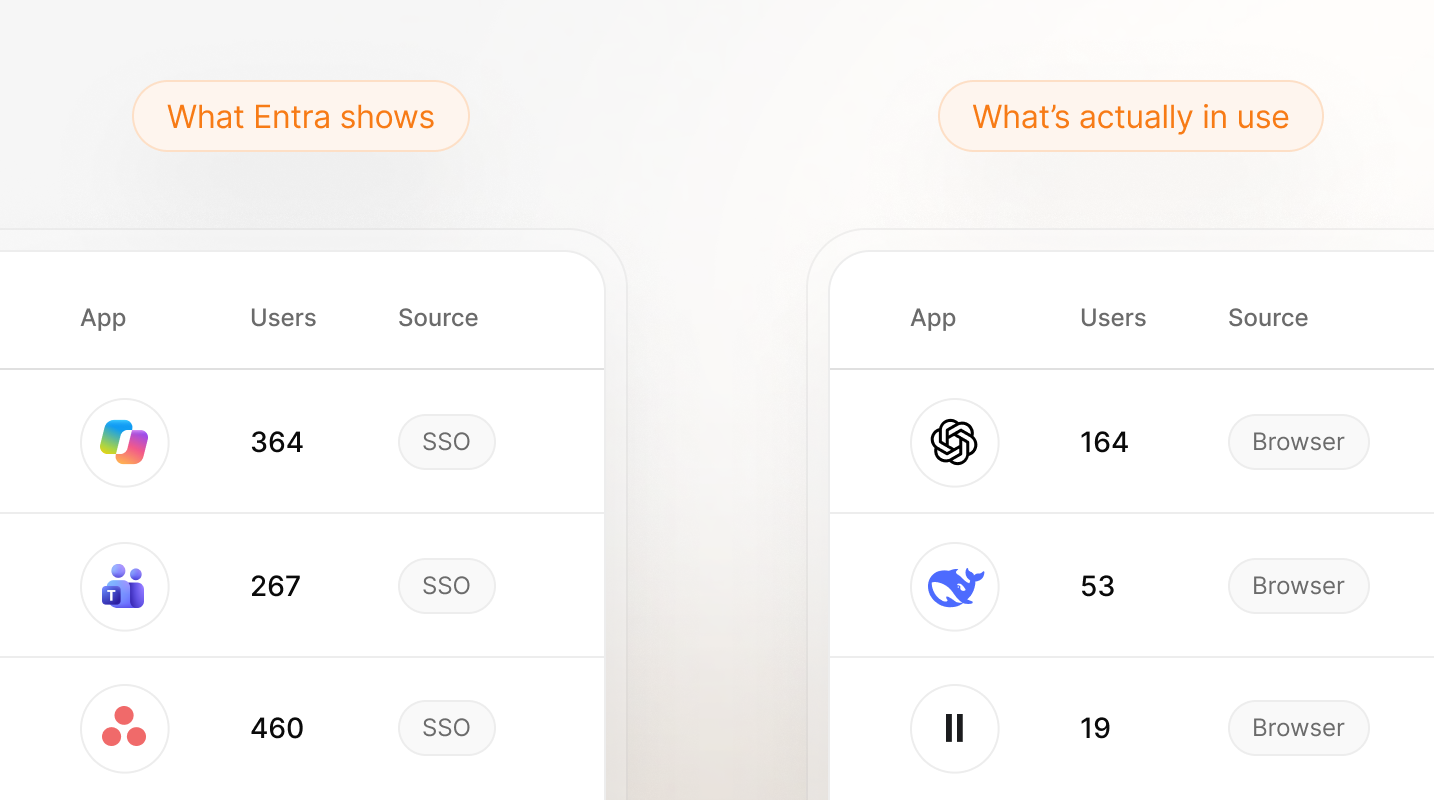
The cost? Client data and meeting recordings sit with vendors you have no contract with, and because you can't offboard personal accounts, that data stays put after the employee leaves. When the auditor asks for your AI inventory, a procurement list won’t show which tools your staff uses or what data those tools can reach.
App inventory logs see what signs in through them. Procurement records what you bought. Neither sees what your people are using when a deadline hits. Blanket blocking entire categories just pushes employees and fellow staff to find workarounds.
45% of workers say they find ways around blocked apps. And every workaround is one more tool outside your view.
— The State of Shadow AI, UpGuard
Want the bigger picture? Read Solving Human Risk: Close the Visibility Gap.
How UpGuard User Risk discovers your true AI inventory
User Risk answers the CEO’s question by looking where the work happens: in the browser, and in the connections behind it. Personal accounts outside SSO, one-click sign-ins few teams have time to review, and tools that never went through approval all sit there, outside your official list.
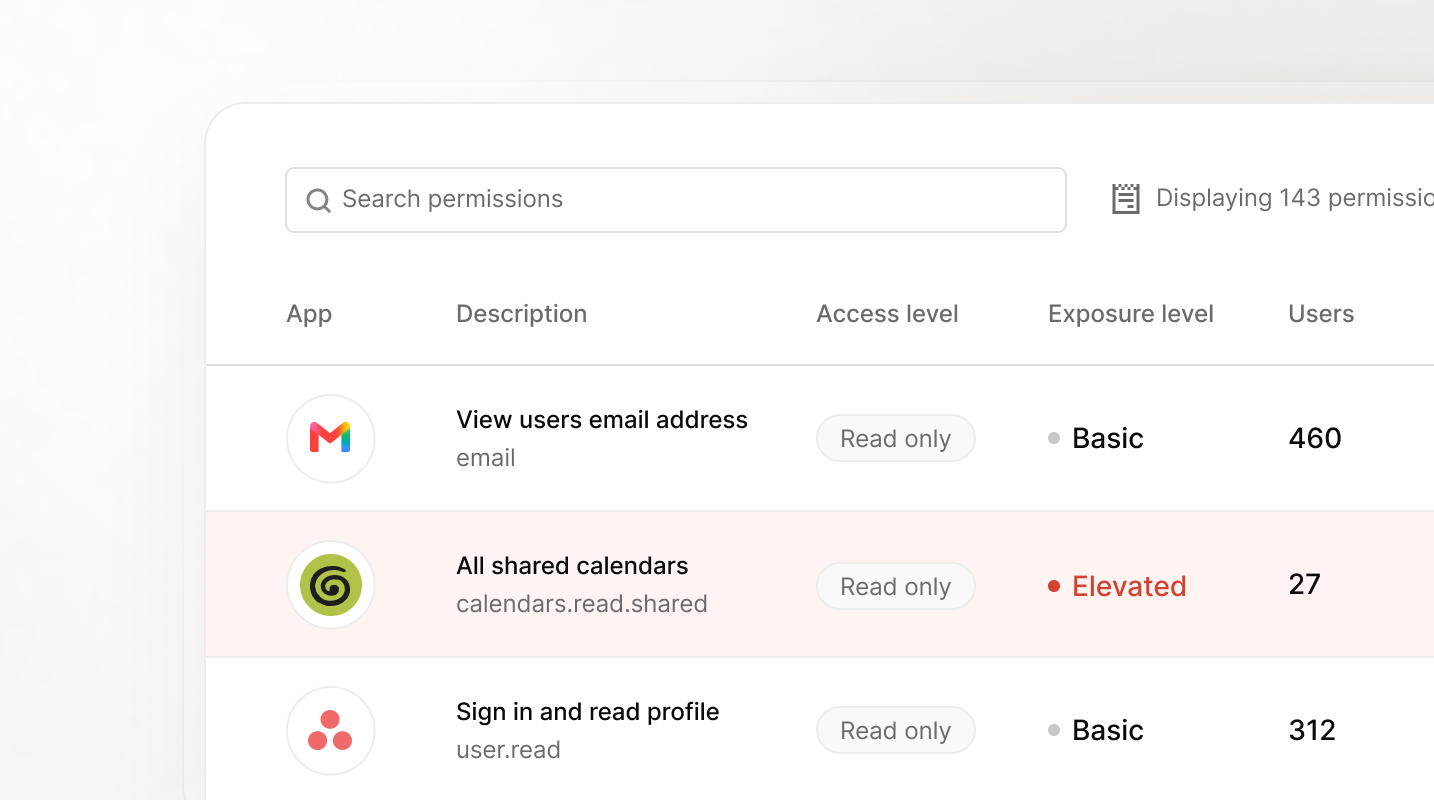
User Risk sports three features to build a more accurate inventory:
- Shadow SaaS and AI Discovery uses a lightweight browser extension to find the AI and SaaS apps people use in the browser, including non-SSO apps and personal sign-ins.
- Permissions Visibility shows what each connected app can reach, so a notetaker with calendar access stands out.
- Microsoft Entra integration pulls in your sanctioned apps and counts them in the Executive Summary.
User Risk doesn’t replace Entra. It reads your Entra-approved apps and adds the AI and SaaS tools people use in the browser. If you also run UpGuard Vendor Risk, any vendor you already monitor shows its security posture right beside the app.
See how Shadow AI Monitoring works, or explore the inventory through a quick product tour.
What it looks like before and after your organization has User Risk
That’s the inventory on paper. In practice, here’s the same week at the same company, before and after User Risk.
Before User Risk
Monday, 9:05 AM. Marcus in client services wants better notes from his calls. He finds a free AI notetaker, signs in with his work account, and accepts calendar access. From then on, it joins every client call.
Wednesday, 4:30 PM. Dana in finance has a board deck due. She opens ChatGPT in her browser and signs in with her personal Gmail.
Thursday, 2:15 PM. The CEO’s message arrives. You reply: ‘Copilot.’
Six weeks later. Your ISO 27001 auditor asks for an inventory of the AI tools in use. You send the procurement list.
Nobody hid anything. Marcus clicked Accept, and Dana used the tool she knew. Your tools focused on the apps you’d approved, and this work happened elsewhere.
After User Risk
Monday, 9:05 AM. Marcus connects the same notetaker. This time, Permissions Visibility lists it along with the calendar access he granted. An app sitting in every client meeting is now a line item you can review.
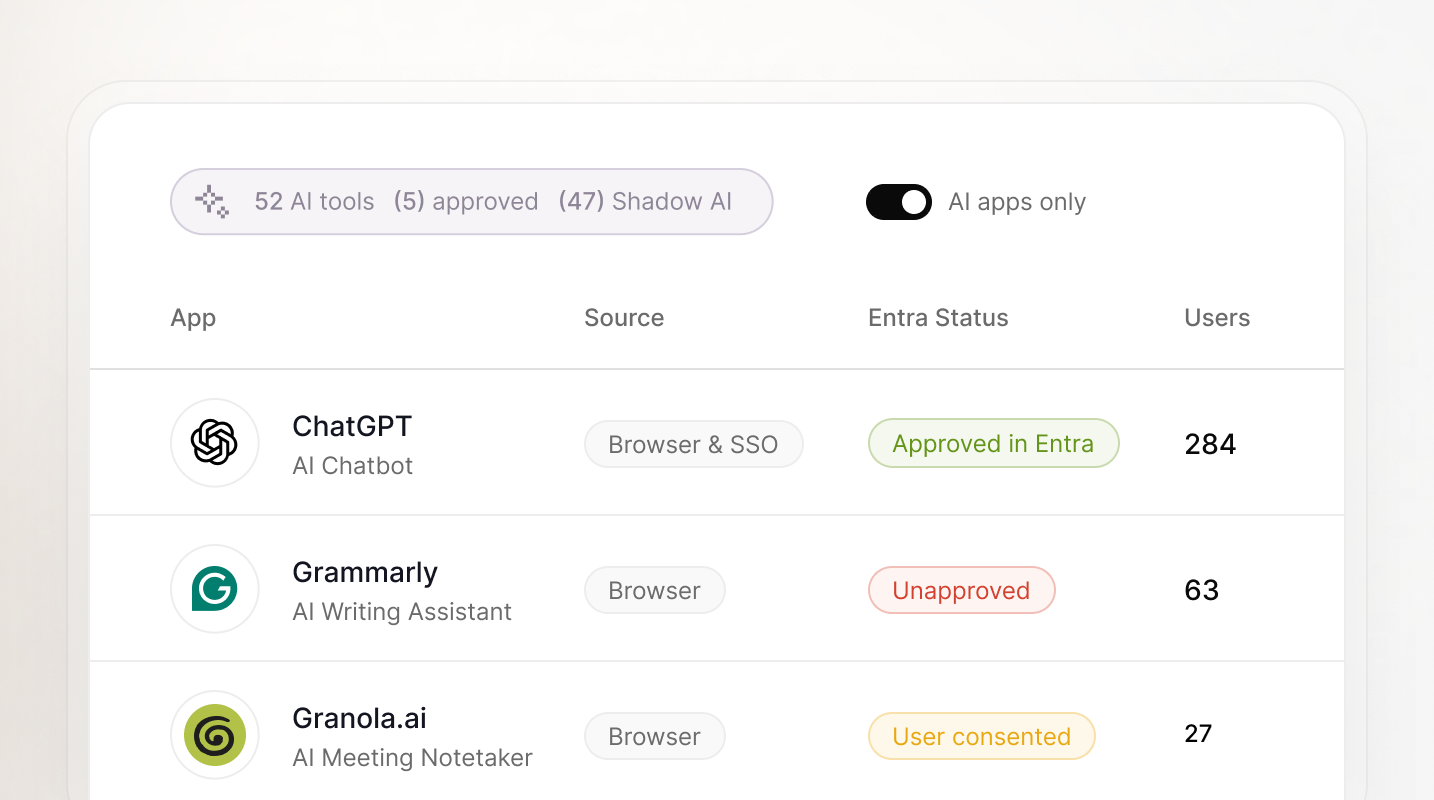
Wednesday, 4:30 PM. Dana signs into ChatGPT the same way. Shadow SaaS and AI Discovery picks it up through the browser extension, even on a personal account. AI use on personal accounts, which sits outside Entra’s scope, now has a place in your inventory.
Thursday, 2:15 PM. The CEO’s message arrives, and this time you open User Risk. The inventory shows 52 tools in use: five approved in Entra, including Copilot, and 47 shadow AI tools, from a writing assistant to the notetaker Marcus connected. Each one shows how many people use it and who they are. You reply with a list instead of a guess.
You reply with a list instead of a guess. And because you also run Vendor Risk, you can see right away whether the notetaker’s vendor is one you monitor.
Six weeks later. The auditor asks for the inventory. You open the dashboard and walk them through it live.
Marcus still has his notes ready, and Dana still hit her deadline. You have the list, plus the ability to decide how each shadow AI tool is handled in the browser: approve it, nudge people toward something safer, tolerate it, or block it.
Blocking everything is tempting, but remember the 45% we noted earlier. A blanket block mostly moves the problem somewhere you can’t see it. Whether to block outright or offer an alternative is where the next post in this series picks up.
But that decision comes second. Discovery comes first, and it’s where Felix Group Holdings began.
How Felix Group Holdings started with discovery
Felix Group Holdings, a vendor management platform, started exactly here. Before setting a single policy, Felix ran User Risk to baseline AI and SaaS use across the company.
It then surfaced four to five unsanctioned AI tools, including ChatGPT, Gemini, Perplexity, and unapproved Claude instances. So when consultants running an AI governance readiness audit at Felix asked how they keep shadow AI in check, CIO Tony Chan opened the dashboard live.
“Showing how everything is picked up and logged systematically turned the tables — it made it look like we were better prepared than they were.”
— Tony Chan, Chief Information Officer, Felix Group Holdings.
The next time you’re asked about AI
Next quarter, the CEO asks again. This time, you open the dashboard and answer with a list.
With User Risk, all three blind spots are brought into view. Personal accounts show up through the browser, one-click sign-ins come with their permissions, and the tools you did approve sit right beside them.
That’s why discovery sits at the foundation of User Risk. Your people will keep finding tools that make their day easier, and most of the time that’s a good instinct. Seeing what they use is what lets you say yes to more of it, safely.
Get a demo to see how we take the answer to your CEO’s question from a guess to a list.