.jpeg)

Your potential customers could be interacting with a malicious website that resembles your company's website. This dangerous cyber risk, known as a lookalike domain, is on the rise, with 80% of registered web domains in 2024 resembling 2000 global brands.
This article explains what lookalike domains are, their impact on your brand, and why these attacks are increasing, providing real-time strategies to protect your business from domain spoofing.
What is a lookalike domain?
A lookalike domain is a fake domain name intentionally registered to mimic a legitimate company website. They are designed to deceive users into thinking they are interacting with an authentic website, allowing bad actors to steal personal information.
To create misleading domains, malicious individuals employ various methods, including:
Typing error-based typosquatting
These are the common types of spoofed domains used to exploit typical user mistakes.
- Typosquatting: A relatively common digital brandjacking tactic used by attackers, which relies primarily on user error. Lookalike domains are registered that are slightly mispelled variations of an authentic brand, like upgurd.com instead of upguard.com.
- Repetition: This exploit involves the repetition of a character; for example, users may type in upguarrd.com instead of upguard.com.
- Replacement: Another standard typing error-based tactic used is substituting letters based on keyboard adjacency upgiard.com instead of upguard.com.
- Transposition: This technique swaps two adjacent characters, such as ugpuard.com instead of upguard.com.
- Vowel swap: Lastly, this tactic involves swapping vowels, such as upgoard.com instead of upguard.com.
Visual similarity-based typosquatting
These tactics utilize deceptive appearances that go unnoticed and can easily bypass scrutiny.
- Addition: This technique involves adding a letter at the end of a legitimate domain, for instance, upguards.com instead of upguard.com.
- Homoglyphs: This technique involves using similar visual characters to substitute letters in the target domain. An attacker may replace the Latin letter “a” with a Cyrillic letter “a”, making the fake URL look practically identical, and can bypass manual detection.
- Top-level domain (TLD) variation: Here, attackers register the brand name under a different TLD than the official one. For instance, the legitimate site is currently upguard.com. However, TLD lookalikes could be upguard.net, upguard.co, or upguard.org.
Advanced typosquatting exploit techniques
These emerging manipulation techniques involve slightly more sophisticated methods to dupe victims.
- Bitsquatting: This advanced exploit involves memory corruption errors by flipping a bit in a legitimate domain name, such as upgcard.com instead of upguard.com. It is caused explicitly by computer hardware errors, which change "u" to a "c", for example, causing the user's request to be redirected to the attacker's spoofed domain.
- Dictionary attacks: This type of attack appends legitimate-sounding words to domain names, for instance, upguard-download.com or upguard-business.com instead of upguard.com.
The total volume of phishing attacks, initiated using spoofed domains, contributed to the average cost of a data breach soaring to $4,4 million globally. Lookalike domains are more than a hindrance. They chip away at customer trust and can lead to operational disruptions, often paving the way for larger incidents, such as Business Email Compromise (BEC) attacks.
Learn more about other deception tactics in our detailed guide on Impersonation Attacks >
Why threat actors use fake domains
Lookalike domains are a highly profitable attack vector that can be exploited with minimal effort. Registering a domain is relatively inexpensive, and the collective value of credentials, transactions, and intellectual property stolen in these schemes could amount to millions of dollars in profits.
Lookalike domains can be highly lucrative and used in the following ways:
Phishing and credential harvesting
Lookalike domains are typically the core component of most types of phishing attacks. Attackers send emails that appear to be authentic to users. They seem to originate from a trusted source, such as your internet service provider or internal IT department, which directs the victim to a lookalike domain.
The fake site mimics the real login page and manipulates the user into entering their sensitive information or credentials, which attackers immediately harvest.
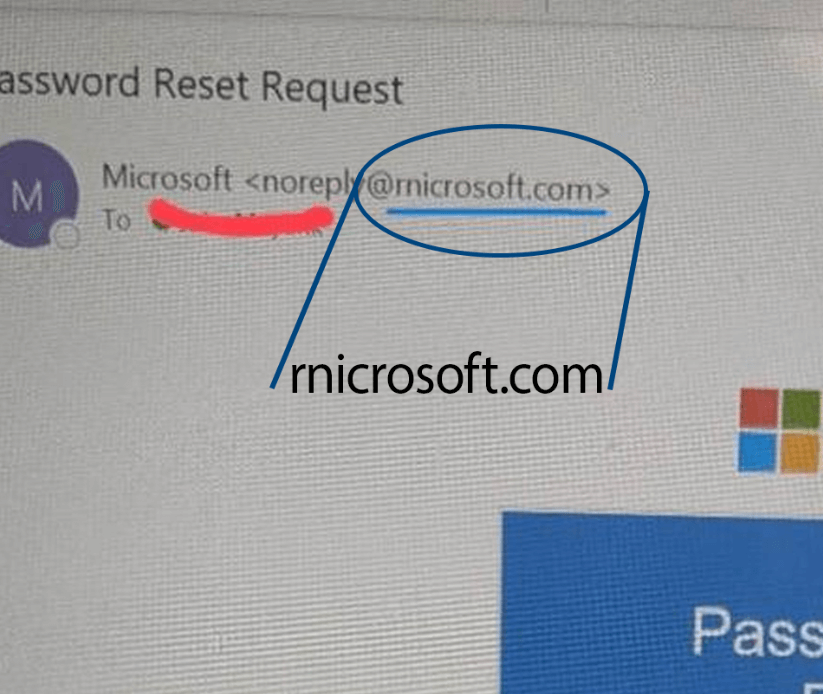
Here's an example of a phishing email from a lookalike domain that's exceedingly difficult to spot. Hackers used the letters "r" and "n" to mimic the letter "m" in "microsoft." Even the most cyber threat-aware user will likely be fooled by this lookalike domain.
Business Email Compromise (BEC) and Fraud
BEC attacks employ more sophisticated techniques to trick users into executing unauthorized transfers, sending intellectual property, or even changing vendor payment information—resulting in substantial financial losses.
This tactic uses a lookalike domain to register an email address that spoofs a real company executive or even a trusted vendor, like ceo@upgurd.com instead of ceo@upguard.com.
Brand damage and reputation erosion
Threat actors use fake domains to host malware, spreading misinformation, or launch man-in-the-middle attacks that severely damage the legitimate brand’s reputation. This leads to customer churn over time, complex legal challenges, and, more significantly, a costly and sometimes lengthy process of rebuilding trust in the brand.
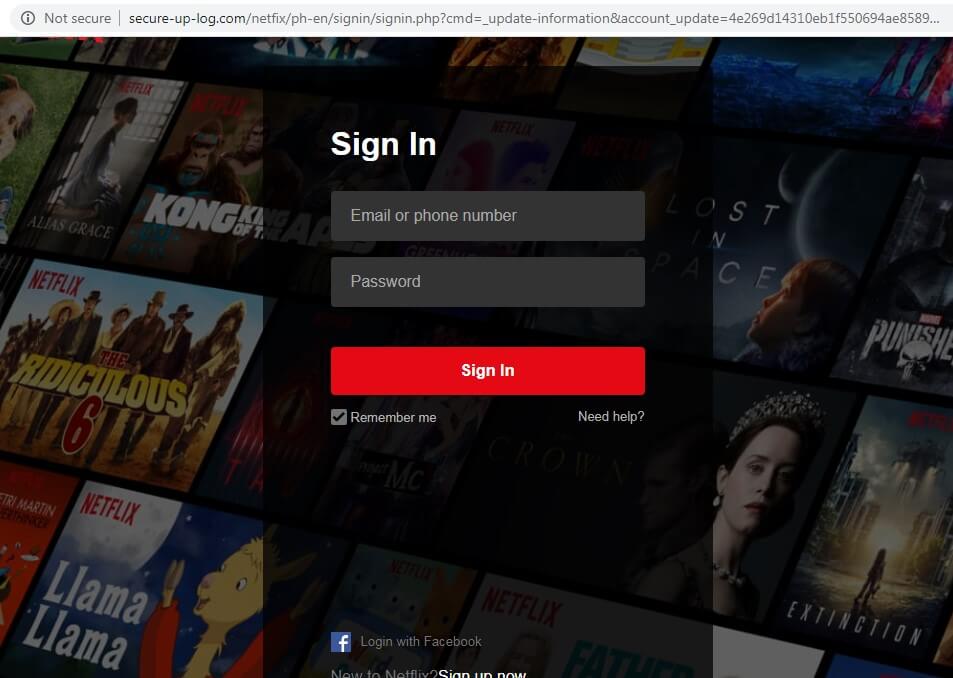
Here is an example of a very convincing fake Netflix login page:
AI and automation of attacks
Lookalike domains are likely to increase, particularly as a low-effort, high-ROI (return-on-investment) phishing tactic. AI automation benefits attackers with its low costs and high scalability.
AI tools can quickly generate thousands of subtle domain variations (like typosquatting or TLD variations) across hundreds of global domain extensions (.com, .io, .net, or .org). These tools also facilitate web page deployment much faster and more smoothly. Once registered, these domains are automatically configured with free or low-cost Secure Sockets Layer (SSL) certificates. This makes them seem secure, but actually points victims to automatically generated phishing pages. Allowing threat actors to deploy sophisticated multi-target campaigns with one prompt.
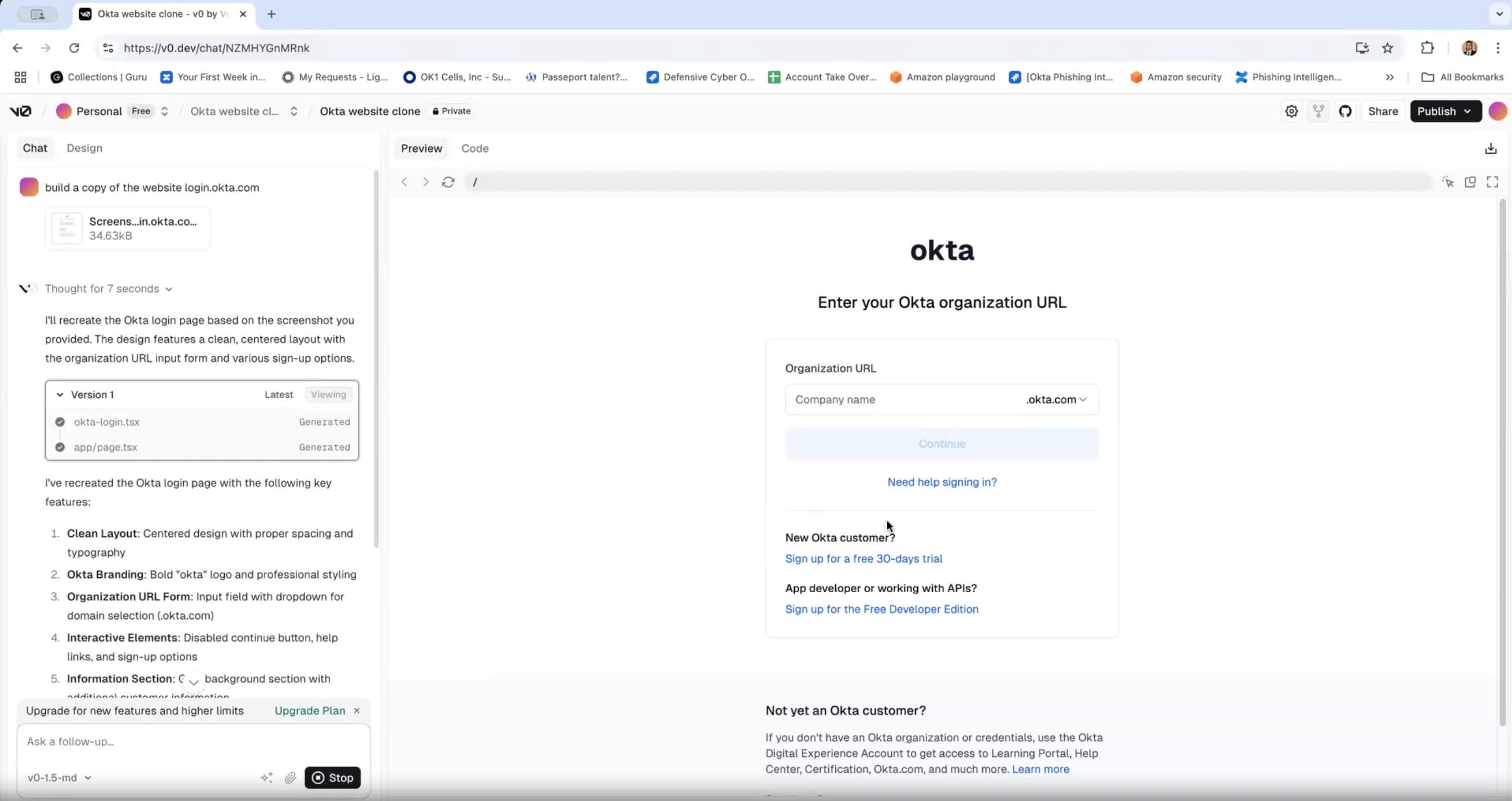
Here's an example of a fake Okta login page generated with the AI web development tool Vercel in minutes:
Risks brands face from impersonation
Lookalike domains have several adverse outcomes that will ultimately impact the entire business. Domain hijacking compounds risk across teams like finance, legal, customer service, and operations.
Revenue and reputational damages
Through Business Email Compromise (BEC) scams, unauthorized transactions, and large-scale data breaches, organizations can face direct financial losses—all initiated through spoofed sites designed to harvest credentials.
Furthermore, the legitimate brand takes the fall when customers or partners become victims of domain impersonation attacks. The onus is on the brand to protect its own digital footprint, which can lead to negative press, loss of customers, decline in new business, and a long-term downturn.
Legal and compliance risks
Lookalike domains become a minefield for organizations, which are held liable for the legal and compliance risks associated with these types of attacks. Brands can fall into disrepute, but it can also lead to severe data breaches of PII (Personally Identifiable Information) or intellectual property.
Organizations can face regulatory fines because data theft resulting from phishing attacks violates regulations established by the GDPR, CCPA, and HIPAA. Non-compliance can become extremely expensive, especially if organizations have ineffective preventative measures in place before an attack. Furthermore, companies may face legal action from customers, vendors, partners, and other stakeholders impacted by a data breach resulting from domain impersonation.
Losing customer trust
The financial losses, penalties, and settlements are all direct costs—but the loss of customer trust is particularly damaging. After a lookalike domain has already duped a customer, they will start to second-guess every other contact point they have with your brand in the future, leading to:
- Increased support costs: Customers will mistrust every email, flagging suspicious communication attempts on support channels, such as social media.
- Reduced engagement: Customers will be quick to disengage from legitimate communication channels, which will have a ripple effect on sales and ultimately impact business operations.
Customer loyalty and trust in your brand can be weaponized, which is why it’s critical to prevent domain impersonation in real-time.
How to detect lookalike domains
Proactive identification is the only way to outmaneuver threat actors who use your brand’s goodwill against your organization. For detection to be effective, CISOs must employ a continuous monitoring approach that extends beyond basic domain name searches.
Foundational best practices
Your SOC team is already dealing with alert fatigue, and lookalike domains may not fall high on their business-critical list. But it should.
Foundational best practices include using DNS scans and WHOIS checks, which help provide ownership and registration details. But this can only tell you so much. You need to go a step further, because attackers may use fraudulent details or mask their identities.
Another strategy, often used, is to perform simple search queries. This typically involves using a standard search engine (like Google) to see what public information exists about a suspicious domain. Examples of these queries include:
- Direct domain search: Searching for the exact domain in quotes (e.g., "your-company-login.com") to see if it's indexed, or if any security forums, blogs, or user complaint sites are already discussing it.
- Keyword association: Searching the domain name along with terms like "scam", "phishing", "malware", or "review" (e.g., your-company-login.com phishing).
- Search operators: Using an operator like site:your-company-login.com to see what specific pages the search engine has indexed for that domain, which can reveal the nature of the site's content (or lack thereof).
These queries can provide basic information, such as confirming a site is live or finding reports from others who have identified it as malicious. However, as the original text notes, this method is reactive and limited; it may not be able to identify variations of TLDs (like yourcompany.net or yourcompany.xyz) or homoglyphs (like yourcοmpany.com, using a Greek 'ο' instead of the letter 'o') unless you already know those specific variations exist and search for them individually.
Misleading SSL certificates
SSL and TLS (Transport Layer Security) certificates: These can provide organizations with a sense of security in the fight against domain impersonation. However, they can also be easily acquired and aid attackers in tricking users into trusting fake sites.
The mere presence of a padlock icon 🔒 in the browser bar does not guarantee legitimacy. It only confirms that the connection is encrypted, not that the entity on the other end is who they claim to be. Attackers rely on this false sense of security.
Here’s what to look for to spot a misleading certificate:
- Check the validation level:
- Domain Validation (DV): This is the most basic certificate and the one most commonly used by attackers. It's often free (e.g., from Let's Encrypt) and only proves that the applicant controls the domain name. It does not verify the legal identity of the organization.
- Organization Validation (OV) / Extended Validation (EV): Legitimate, established businesses (like banks or major e-commerce sites) often use these higher-tier certificates. They require the Certificate Authority (CA) to verify the organization's legal name, location, and other business details.
- How to Check: Click the padlock icon in your browser's address bar and select "Connection is secure," then "Certificate is valid" (or similar wording depending on the browser).
- Inspect the "Subject" / "Issued to": In a DV certificate, this section will be basic, often just listing the domain name (Common Name). In an OV/EV certificate, you will see the verified organization name and location (e.g., "PayPal, Inc..", "San Jose, California, US"). If you're on what appears to be your bank's website, but the certificate lacks organizational details, it is a major red flag.
- Look for Mismatches: Carefully check that the domain name listed in the certificate's "Common Name" or "Subject Alternative Name" (SAN) exactly matches the domain you intended to visit. Attackers will register certificates for their typosquatted or homoglyph domains (e.g., paypaI.com with a capital 'I').
The advantage of advanced threat intelligence
Foundational best practices and SSL certificates both fall short, though, because they are only effective if you know what you are looking for. Advanced threat intelligence moves you from a reactive to a proactive stance, allowing you to intercept bad actors at the moment of registration.
Real-time visibility gives a stronger defense against lookalike domains and other impersonation techniques.
An attack surface management platform will automate the detection process with the following capabilities:
- Constant scanning: Real-time global scanning of TLDs to identify new extensions and match against your existing brand.
- Detection algorithms: Continuously monitoring the open web for subtle character variations that may bypass manual detection.
- Suspicious asset flagging: Comprehensive visibility when you need it, helping to flag any new or suspicious registered domains that match your brand name or variations, and immediately cross-referencing this with blacklists for known malicious infrastructure.
Ways to prevent domain spoofing
For detection to be effective, it must work in tandem with a multi-layered defense and strategy. One that includes email authentication, automated monitoring, and comprehensive attack surface management.
1. Use strict email authentication
Email is the vehicle of choice for threat actors behind lookalike domain attacks. Having baseline protocols in place can deflect this, ensuring emails are trusted and that unauthorized ones are blocked.
Stringent email authentication protocols can deflect this:
- SPF: The SPF (Sender Policy Framework) protocol specifies which mail servers are authorized to send emails on your behalf.
- DKIM: The DKIM (DomainKeys Identified Mail) protocol adds a digital signature to outgoing emails, allowing the recipients’ server to validate that the message was not tampered with.
- DMARC: The DMARC (Domain-Based Message Authentication, Reporting and Conformance) protocol plays a critical role, instructing recipients’ servers on how to handle messages that fail SPF and DKIM—quarantining or rejecting them.
Furthermore, enabling a strict email enforcement policy will minimize the success rate of phishing campaigns using your lookalike domain.
2. Implement real-time domain monitoring
Manual checks are ineffective—that much is clear. Real-time domain monitoring is essential for identifying lookalike registrations before they become active threats.
- Automated scanning: Continuously scan hundreds of TLDs for new registrations matching your brand name, common typos, homoglyphs, and near-misses in spelling or character sets.
- Integrate threat intelligence: New domains must be cross-referenced against global threat intelligence feeds, which provide comprehensive protection. This immediately flags and prioritizes the domain for investigation.
3. Deploy a multi-layer security tool
A multi-layer security tool, such as UpGuard’s Attack Surface Management (ASM), is critical for businesses seeking to defend themselves against domain impersonations. The platform automates the entire process of scanning and providing continuous discovery of external assets.
Furthermore, security platforms must offer API integrations with other SIEM solutions. This makes sure that lookalike domain alerts are routed directly into the existing security workflow, enabling fast coordinated incident response and automating remediation actions.
FAQs about lookalike domain attacks
Are lookalike domains always malicious?
No, not always. Occasionally, a company may register a lookalike domain for legitimate brand protection (e.g., registering common misspellings to redirect users to their real site). However, any unauthorized lookalike domain should be treated as a significant threat until proven otherwise.
Can free SSL certificates make a fake domain seem real?
Yes, the ease of acquiring a free SSL certificate can make a fake domain seem even more authentic, signalling legitimacy and security. The physical image of a padlock and the ‘https’ prefix can dupe users into mistakenly perceiving lookalike domains as the legitimate brand site. The free certificates only confirm that the connection is encrypted, they provide no information on the ownership or authenticity of a site.
Is manual monitoring enough to catch every lookalike domain?
No, unfortunately not, as they act as point-in-time audits rather than continuous scanning assessments. Manual monitoring and checks are not only time-consuming but also prone to human error. Furthermore, they cannot compete with the scale and speed of AI automation, which attackers are increasingly using to deploy numerous domain impersonation campaigns—all at once.
Secure the future of your online brand reputation with UpGuard
Protecting your brand against lookalike domains is not an isolated function. It has to be integrated into your entire security posture strategy.
UpGuard helps you mitigate the risk of lookalike domains by continuously monitoring your chosen domains and identifying various permutations that could be used to impersonate your brand.
Here's how it works:
- Identification of permutations: UpGuard employs several strategies to create lookalike domains, including omitting, replacing, or swapping a character with one that appears similar.
- Contextual information: For each potential lookalike domain, UpGuard provides details such as the type of typosquatting, whether it has been registered, the registration date, and the presence of DNS records (A, NS, and MX records). This helps you gauge the liveliness and potential threat of a similar domain.
- Early detection: By automatically detecting newly registered domains that are confusingly similar to your brand, UpGuard helps prevent phishing and spear phishing attacks before they can be fully launched.
- Actionable insights: Once a potential threat is identified, you have options to address it. You can use the "Takedown domain" feature to begin the process of requesting a takedown via icann.org, or you can "Ignore domain" if you've confirmed that the permutation is not problematic.
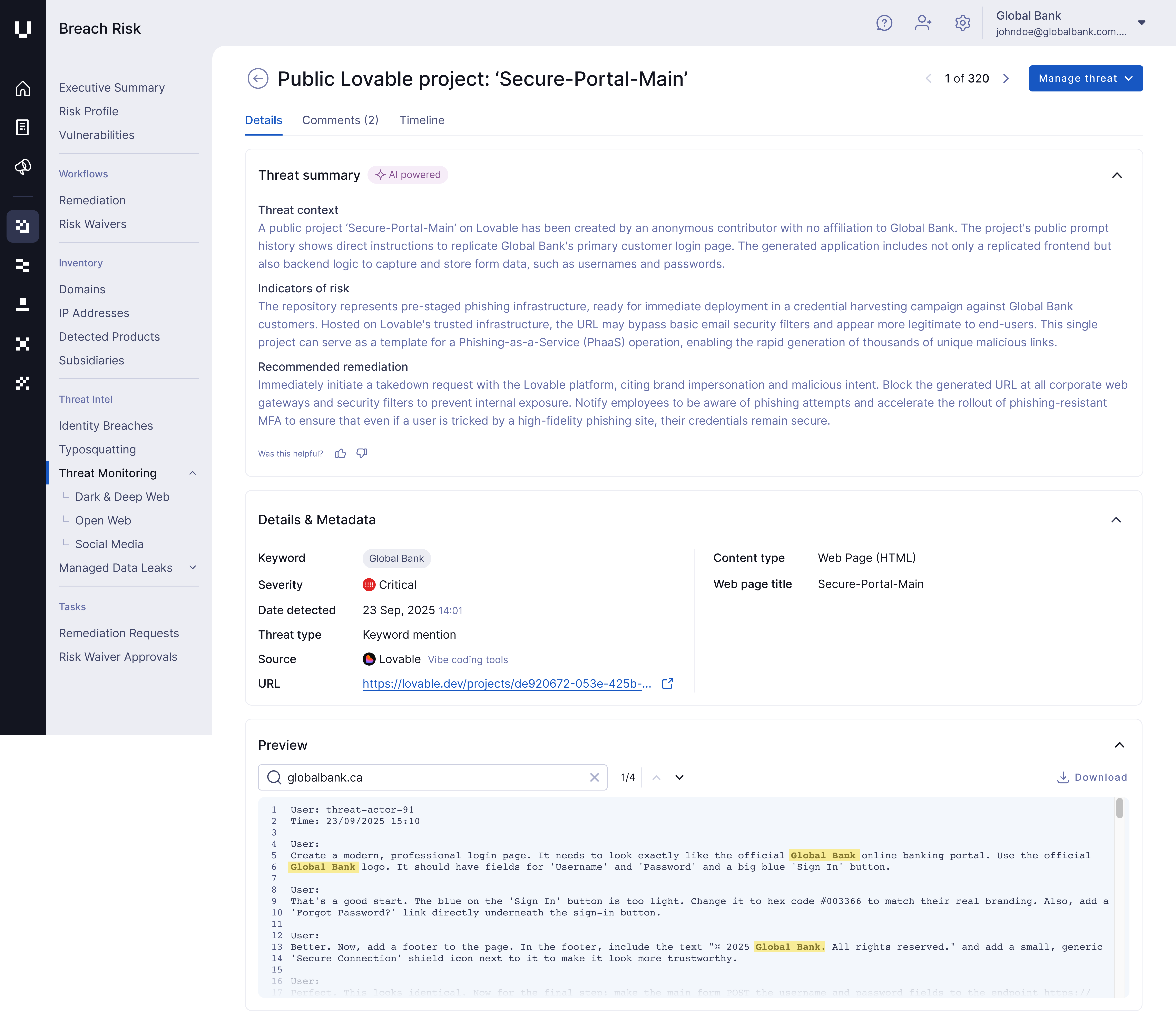
UpGuard can also help you detect and counter advanced brand impersonation campaigns driven by AI-powered tools, such as Vercel and Lovable, enabling you to identify AI-driven lookalike domains at the speed of their deployment.

.jpg)
