Your First Dark Web Scan Report, Explained


Most people don't hesitate to run a free security scan because they doubt it'll find anything. They hesitate because they don't know what the results will look like. Will it be 40 pages of raw data without context? A sales pitch disguised as a report? We'll walk through it screen by screen so you know exactly what to expect before entering a domain.
What goes into a scan?
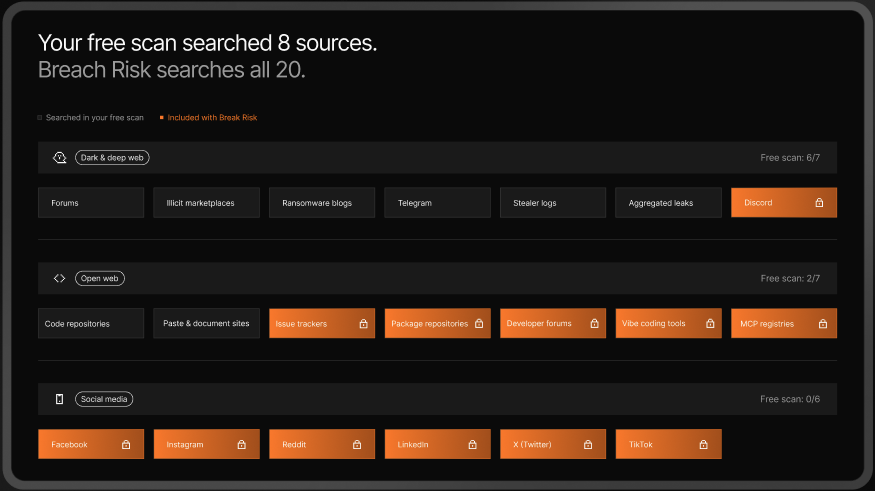
One input: your company domain. Just the domain. No signup, nothing else to download. Enter it, and the scan searches eight dark web sources in under a minute, including dark web forums, marketplaces, Telegram channels, ransomware leak sites, and infostealer logs.
The executive summary: your exposure, up front
The report opens with a single number. Something like: "261 dark web signals found. 65 came from infected devices." Everything else is a detailed breakdown of that headline, split by category and threat type.
Leading with the total number gives you immediate clarity, much like checking a credit score before reviewing the full breakdown. You can instantly gauge whether there is cause for concern.
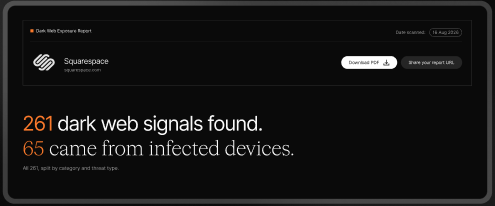
Note: The report separates references found in public code repositories from credential leaks. Because a leaked API key and a leaked password pose entirely different security risks, keeping them distinct prevents inflating the headline figure.
Not just a pile of findings: the category breakdown
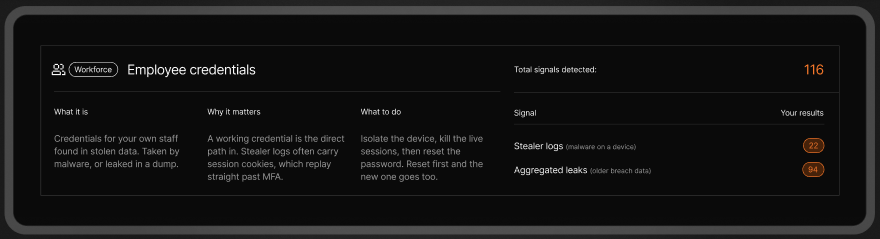
The findings are split into five distinct categories, each detailing what it is, why it matters, and how to remediate it:
- Employee credentials: Credentials stolen by malware or harvested from data breaches. Infostealer logs frequently capture active session cookies and passwords, enabling attackers to replay sessions and bypass multi-factor authentication. Remediation requires a strict order of operations: isolate the device, terminate active sessions, and then reset the password. Resetting the password first risks handing updated credentials straight back to the malware.
- Website visitor credentials: Stolen customer or partner credentials. While compromised on unmanaged external devices, the impact hits your support teams and brand reputation. You can revoke active sessions and enforce re-authentication, but continuous vigilance is required since you cannot remediate external devices.
- Public code repositories: Domain occurrences across public code repositories, such as README files, configuration files, and commit histories. While many entries are benign, exposed hardcoded API keys or secrets require immediate attention.
- Data leak sites: Domain references within documents or text dumps on public file-sharing platforms. Because these files are publicly accessible without authentication, it is critical to review the exposure and submit takedown requests.
- Dark Web chatter and listings: Domain mentions across forums, illicit marketplaces, ransomware blogs, and Telegram channels. These discussions often precede active attacks or indicate compromised access is being auctioned, making continuous monitoring essential.
A free scan provides initial signal counts without severity scoring or prioritization. UpGuard's Breach Risk Threat Analyst filters out up to 68% of non-threatening signals across more than 500,000 monthly findings. It assigns severity levels, context, and actionable remediation steps, enabling security teams to focus on critical threats.
What you see, and what you don't
The report shows enough detail to confirm a threat without exposing sensitive data. Here is what is visible, and what stays hidden:
- What you see: Partially redacted findings that prove an exposure is real and specific to your domain (for example, "Password stolen: h********@gmail.com for *****.com"), along with its severity, date, and source.
- What stays hidden: Raw passwords and full unredacted credentials. Masking plain-text details ensures the report itself does not introduce additional security risks.
Waiting for alerts means you're always reacting. Continuous dark web monitoring catches exposures before they turn into incidents.
What happens after the free report?
The free report is yours to keep. You can download the PDF or generate a shareable link directly from the results page at any time.
While the free scan covers eight core sources, a 14-day Breach Risk trial expands coverage to 20 sources, delivering a comprehensive dark web exposure analysis that includes subsidiary domains, brand names, exposed API keys, and triaged findings.
To put this in perspective: manually investigating a sample report of 249 signals, where roughly two-thirds are false positives that take 20 minutes each to dismiss, and the rest require 4 hours of analysis, would demand nearly 376 hours of manual work.
The Breach Risk trial automates this initial triage step, handing your team fully context-rich, actionable threats rather than overwhelming raw data.
Ready for deeper dark web visibility? Start your free trial today!
.jpg)