Can You Use ChatGPT or Claude for Vendor Risk Assessments?


A frontier model like ChatGPT or Claude is good at reading. Give it a SOC 2 Type II report, and it’ll summarize the auditor's opinion and list the exceptions the auditor found. It will also pull out the complementary user entity controls, which are the controls the vendor expects you to run on your side.
Ask it to map the report to NIST CSF 2.0 or to ISO 27001, and it’ll make a reasonable first pass. It drafts follow-up questions for the vendor faster than you can type them.
The results are convincing, and they arrive fast. One analyst with a stack of reports and a good prompt can clear a review backlog far quicker than before. But what a frontier model works with is the document in front of it, the prompt you wrote, and the model as it is that day. A vendor decision needs evidence from outside the conversation too.
What the document can’t tell you
A SOC 2 report is the vendor’s account of its controls, tested by an auditor the vendor engaged, for the systems the vendor put in scope. It’s good evidence, with limits that matter when you make a decision:
- Scope: The report covers the systems in its system description. The service you’re buying may run on infrastructure that sits outside it.
- Period: A Type II report covers a period that has already ended, often months before you read it. It tells you nothing about changes since.
- Carved-out suppliers: Vendors often exclude their own service providers, such as their cloud host, from the report. You’d need to look at those providers separately.
A SOC 2 report also answers only part of a framework-based assessment. In UpGuard’s analysis, a single SOC 2 report provides enough evidence, on average, to complete 61% of the checks in a NIST CSF 2.0 or ISO 27001:2022-aligned AI-powered Security Profile assessment.
The remaining checks need evidence from somewhere else: the vendor’s answers to a focused questionnaire, other security documentation, and what you can observe about the vendor from the outside.
Once the evidence comes from several sources, it rarely agrees. A questionnaire answer says one thing, a policy says another, and a newer piece of evidence says something else. A chat tool typically looks at the documents you give it in a single conversation and produces one answer.
UpGuard Vendor Risk’s Security Profile assesses all of a vendor’s evidence against the same checks and shows which sources support each check, which contradict it, and where gaps remain. You then decide how to weigh the conflict.
Seeing a conflict matters most when an auditor or a customer asks how you know a vendor meets your requirements. “The SOC 2 said so” covers part of the answer. It doesn’t cover what the report left out, or what you found that contradicted it.
What you can see that the vendor didn’t write down
Some of the most useful evidence about a vendor never appears in its documents. It’s what anyone can observe about the vendor’s internet-facing systems today, such as whether exposed services run software with known vulnerabilities, or whether its email domains can be spoofed.
No model can collect this from a document. It takes infrastructure that continuously scans the internet. UpGuard scans every monitored vendor’s domains and IP addresses at least once a day and runs 414 security checks against them.
The results are a security rating calculated with a published method: each failed check lowers the rating based on its severity, and weaker domains and IP addresses carry more weight, so a few exposed systems can’t hide behind many well-run ones.
For an analyst, the rating is a starting point. It tells you where to look before any questionnaire comes back, and it gives you something to test the documents against.
If a vendor’s SOC 2 report describes strict patching and its exposed servers run end-of-life software, you have a specific question to ask. And because scanning continues after you approve the vendor, you're not relying on a report whose period ended months ago.
How do you know the AI analyzed it correctly?
Frontier models have known limitations that matter when the output needs to be managed as a governed vendor decision:
- The same question can get a different answer: Running the same prompt over the same documents twice won't always give the same result. Small changes in wording, from a colleague or a template, can change what the model looks for and what it concludes.
- The model changes without telling you: Providers update their models regularly. An assessment run this quarter may follow different reasoning from last quarter's, and nothing in the output shows it.
- Citations need checking: A model can paraphrase a passage and present it as a quote, or point to text that doesn't say what it claims. In long document sets, it can also miss content altogether.
- It doesn’t always recognize when it falls short: Frontier models can produce a confident, polished answer even when they haven't completed the task in full, missed important requirements, or lack the capability to do what was asked. They don't reliably flag these limitations, so an incomplete result can look like a complete one.
None of these limits matter as much when reading a single report. They become more apparent when you compare results across vendors or repeat them at reassessment, and the biggest risk there is how a control gets judged.
Take a control such as "the vendor has an incident response plan." It bundles several separate claims together: Is the plan documented? Has it been tested? Does it name who leads the response? Does it set a timeframe for notifying customers?
A policy can satisfy one of these and say nothing about the rest. If the control gets one overall verdict, you can't tell which part the evidence supported.
Breaking the control into specific checks solves that problem, but only if the checks are defined in advance. If the model decides them fresh each time, two vendors marked "met" may have been tested against different things. And when a vendor's result changes at reassessment, you can't tell whether the vendor changed or the questions did.
Whichever AI tool you use, four questions tell you whether you can rely on its output:
- Is each control assessed against a defined set of checks that stays the same across vendors and over time?
- Does each finding cite the passage it relied on, so you can check it in seconds?
- Can an analyst reject a finding or a citation, and is that decision recorded?
- Can you see which documents it read, and remove one that shouldn't count?
A frontier model can cite passages if you ask it to. The other three need a fixed assessment structure and a single, secure system that records decisions, which a chat session isn't designed to provide.
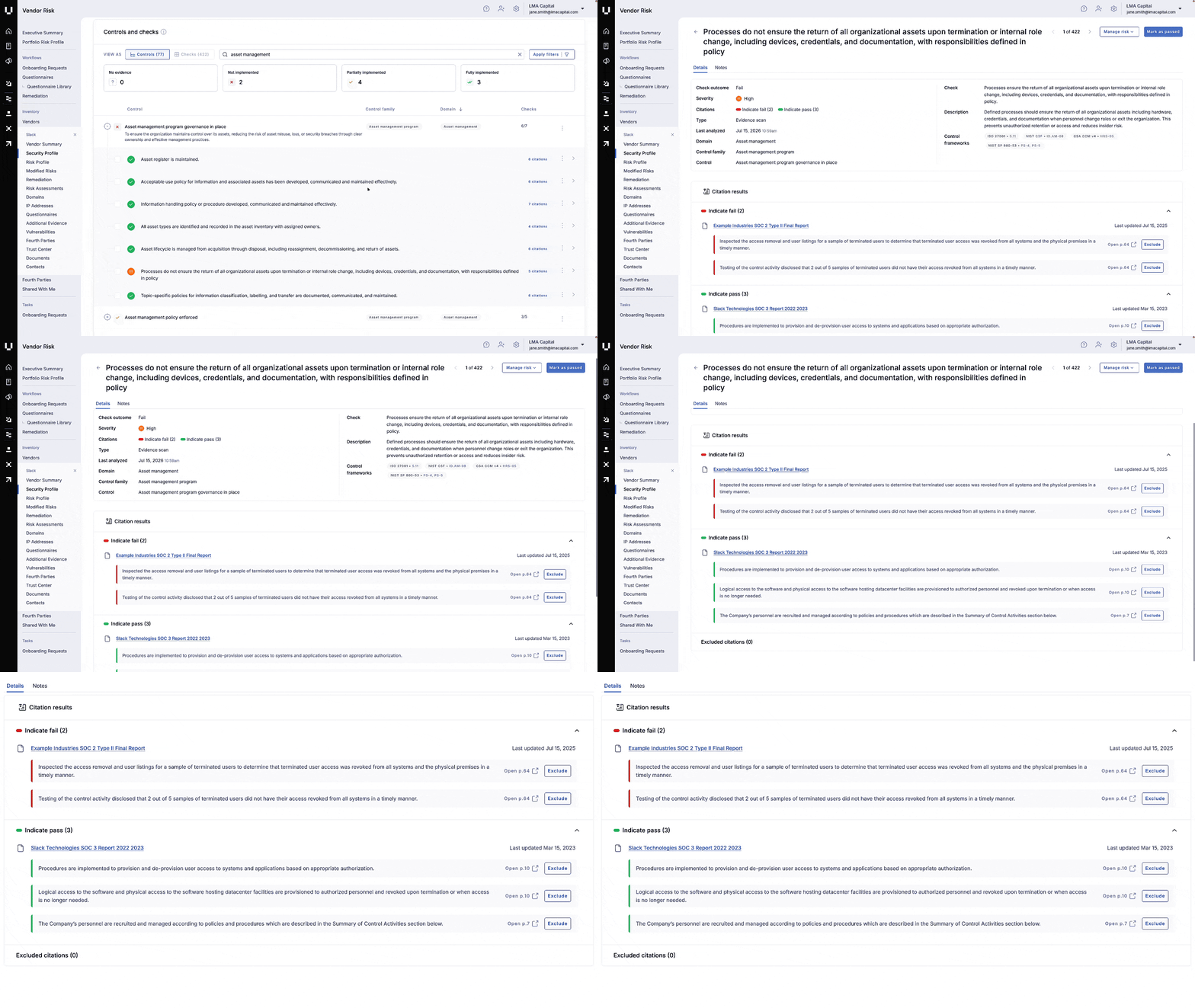
Vendor Risk’s Security Profile breaks each control into a defined set of checks and assesses every vendor against the same ones. The AI marks each check as met, unmet, or needing more evidence, and cites the source text behind each conclusion.
Because each check makes one narrow claim, an analyst can quickly see whether the cited passage supports it. Analysts can reject a citation, override a finding, comment on a result, or remove a document from the AI's review, and those decisions stay with the assessment. The AI does the reading, and the analyst makes the call.
Fixed checks and recorded decisions also show how rarely analysts disagree with the AI. Fewer than 0.2% of Security Profile AI check findings are rejected in published risk assessments. A chat tool can’t produce this number because there’s no fixed set of checks to count against and no record of what analysts rejected across their sessions.
Six months later, someone asks why you approved this vendor
Vendor decisions get revisited. An auditor samples your approvals, or a vendor has an incident and the board wants to know what you knew.
The answer has to be a record: the evidence you read, the findings, any risk you accepted and why, and who signed off. A chat history records a conversation, and it lives in the account of whoever ran it. It can’t show how a finding changed between assessments or who approved the vendor.
UpGuard Vendor Risk keeps each assessment's evidence, vendor communication, and findings together. Check history shows how each result changed over time and which evidence sat behind each version, so a reassessment can pick up from what’s changed since the last one.
When you accept a risk, Vendor Risk records it as a waiver with a justification and any compensating controls. Waivers can require approval and can expire, so accepted risks come back for review. "Why did we approve this vendor?" becomes a quick lookup.
Try it side by side
If your team already reviews SOC 2 reports with a general AI tool, here’s a fair test. Pick three vendors you’ve assessed that way, run the same three through Vendor Risk, and compare:
- Which checks the documents couldn't answer.
- What the external scan found that the documents didn't mention.
- Whether each finding shows and keeps a record of where it came from.
- Where the vendor's own evidence disagreed, and whether you could see it.
- Whether you get the same result when you run the same vendor twice.
Both approaches will be fast. The Security Profile analyzes security documents in minutes and generates a risk assessment report in under 60 seconds. For widely used vendors, you might not need to ask for anything. UpGuard has over 2,100 pre-sourced evidence documents covering the 250 most monitored vendors.
Speed gets you through the queue. Governance is what you defend.
AI has changed how fast a vendor review can move, and that's worth keeping. A SOC 2 report that used to take an afternoon by hand now takes minutes with AI, and a review backlog clears far faster. No team should give that up.
The harder question is whether you can stand behind the approval later. That requires evidence beyond the vendor's own documents, consistent checks across vendors and reassessments, findings analysts can trace back and understand, and an audit trail that outlasts whoever ran the review. Any technology used to support a vendor approval, whether frontier models, a third-party risk management platform, or something your team has built, needs to meet that standard. If it can't, it shouldn't be the basis for a defensible decision, and you’ll have a hard time defending it at your next audit.
Start a free Vendor Risk trial and run three of your vendors side by side.
Related posts
The Evidence Is In: UpGuard Named a Leader in the IDC MarketScape for Worldwide Third-Party Risk Management