MCP: The AI Protocol Quietly Expanding Your Attack Surface
.jpg)

In February 2026, researchers uncovered something that should give every security leader pause. A malware operation called SmartLoader, previously known for targeting consumers who downloaded pirated software, had completely pivoted its infrastructure.
SmartLoaders new target was developers, and its new entry point was a protocol most security teams had never heard of. The payload delivered to victims: every saved browser password, every cloud session token, every SSH key on the machine.
The protocol was called MCP. And it had been running silently in developer environments across thousands of organizations for over a year.
What MCP actually is
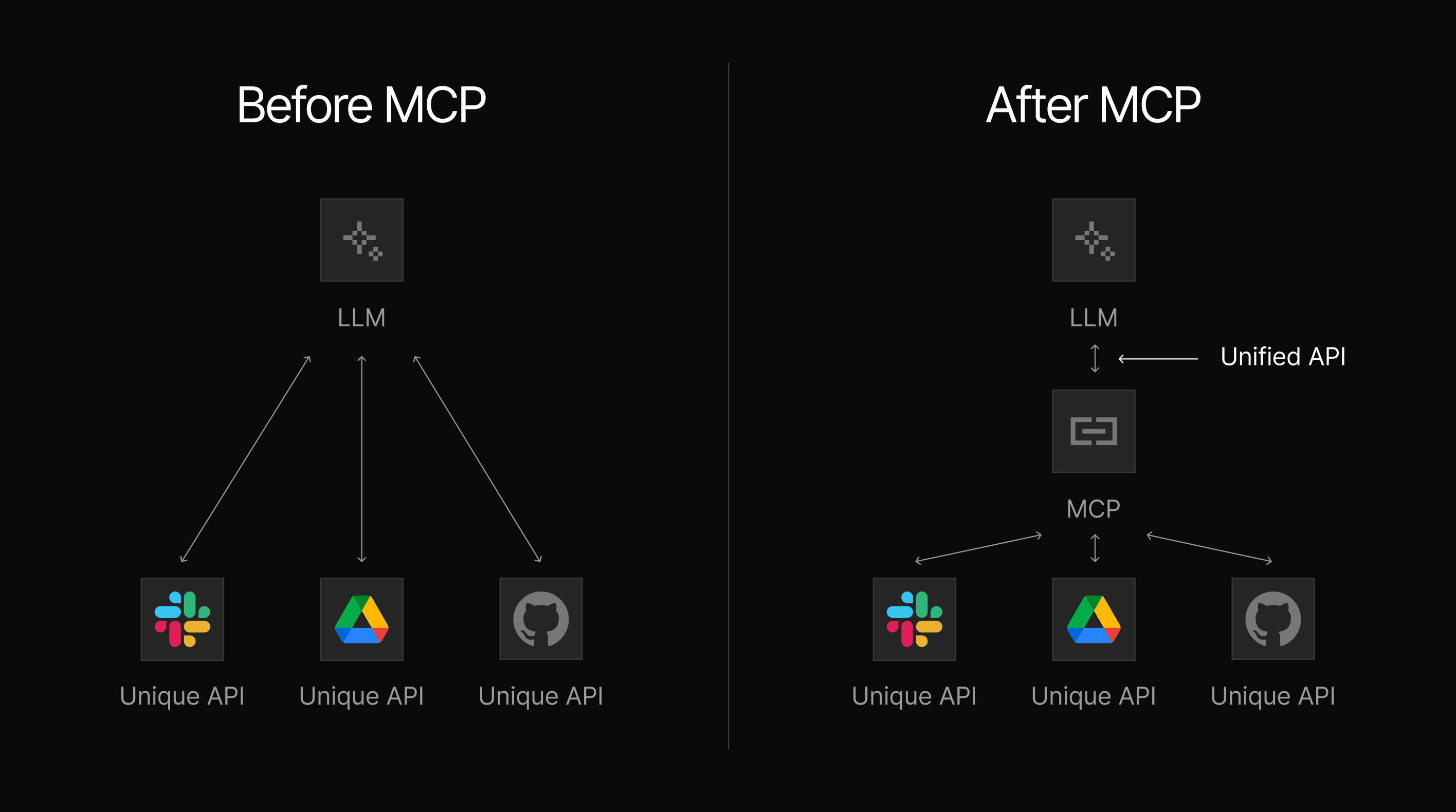
Model Context Protocol (MCP) is an open standard launched by Anthropic in late 2024. It solves a problem that has frustrated AI developers for years: every time you wanted an AI model to connect to a new tool or data source, someone had to write custom integration code. One integration for GitHub. Another for Slack. Another for your database. Each one is bespoke, fragile, and requires ongoing maintenance.
MCP fixes this with a single standardized connection layer. Consider the way USB standardized device connections. Before USB, every peripheral needed a specific port. After USB, any compliant device plugged into any compliant host. MCP does the same thing for AI agents and external tools: one protocol, infinite connections.
Since its release, MCP has been adopted by a remarkable range of organizations — Anthropic, OpenAI, Google DeepMind, Microsoft Copilot Studio, Cloudflare, Stripe, Salesforce, and dozens more enterprise platforms. The AI development tools your developers are already using — Cursor, Visual Studio Code with Copilot, Claude Desktop, Windsurf — are all MCP-enabled. When a developer uses one of these tools, they are using an MCP host.
That’s the most important thing to understand: MCP is already in your environment. The next question is, what is it connected to?
The architecture that creates the risk
MCP has three components. Understanding each one briefly is enough to see why the risk is unlike anything your security program has dealt with before.
- The MCP host: This is the client-side AI application — Claude Desktop, Cursor, VS Code with Copilot. This is what your developers interact with. When a developer installs a new MCP server, the host automatically trusts it and begins using it. No IT approval. No security review. No audit trail by default.
- The MCP server: The external tool or service the AI connects to. A GitHub server. A Slack server. A database server. Critically, anyone can build one and publish it to a public registry. In fact, there are now more than 21,000 MCP servers listed across the four largest public registries, with almost no vetting of who built them or what they actually do.
- The MCP client: This is the intermediary that passes instructions between the AI and the server. It operates silently in the background. The user does not see what the client sends to the server, what the server returns, or what the AI does with that data.
To break down the risk factors entailed in the above three components of MCP server usage, here's the description in plain terms:
An AI agent connected to an MCP server can read files, execute commands, query databases, send emails, and make API calls — all within the permissions of the logged-in developer, and your security team has no default visibility into any of it.
Why MCP differs from the Shadow IT problem you already managed
Most security leaders at mid-sized organizations have lived through the Shadow IT wave. Employees started using Dropbox, personal Gmail accounts, and unmanaged SaaS tools. The risk was clear: data leaving the organization without governance. It took years — and significant investment — to establish the detection, policy, and controls needed to manage it.
MCP creates a similar problem, but with a materially higher risk profile.
Shadow IT stored your data without approval. A shadow MCP server can act on your data without approval. The difference is a filing cabinet that moves itself to a stranger's house, and one that reads, processes, and responds to requests.
Traditional access controls are tool-based, meaning you govern who can access a specific system. An AI agent connected via MCP can access multiple systems in sequence — reading from one, writing to another, calling an API with the results — combining permissions in ways no single access policy anticipated. And that agent can do this in response to a single, ordinary user request.
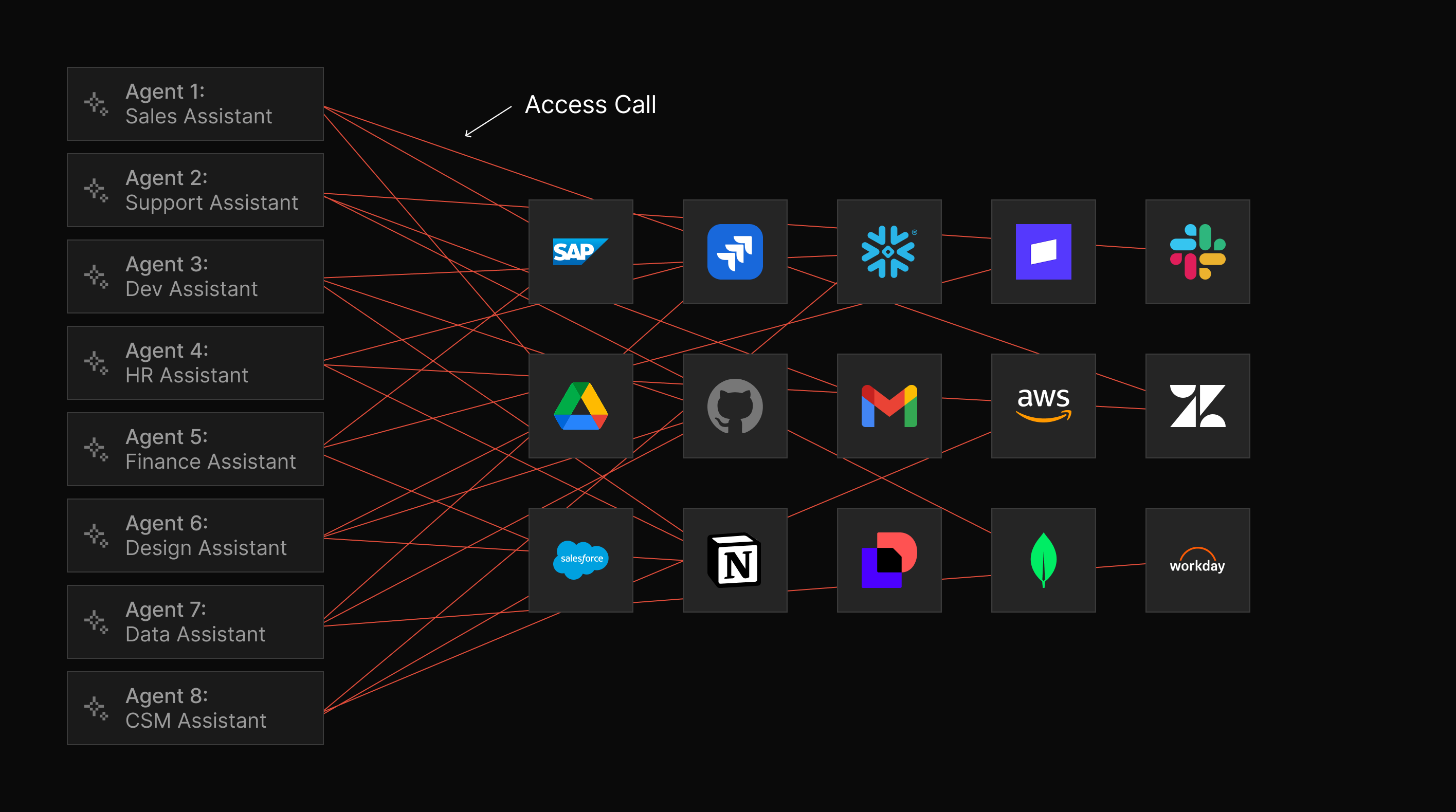
There is no MCP equivalent of a corporate app store, an approval workflow, or an automated dependency scanner. A developer can install a new MCP server in seconds. Most do.
If your security team already struggles with the context gap — spending 43% or more of its time assembling context instead of deciding or remediating — MCP adds a new ungoverned tool surface that makes that gap worse. More tools to correlate, more shadow infrastructure to discover, more signals with no existing detection. This is the same dynamic that already causes 79% of companies to learn about threats from third parties rather than from their own tools. MCP simply extends that exposure to the AI agent layer.
The scale of the unverified ecosystem
The numbers here are important because they demonstrate that the theoretical risk tied to MCP server usage is already a practical one.
The official GitHub MCP Registry — the most governed list in existence — contains 57 verified entries, all carefully reviewed and published by vetted organizations.
Smithery.ai, on the other hand, one of the most widely used community registries, lists over 3,500 servers, and of those, 92% carry no verification badge of any kind.
At the most extreme end, MCP.so lists over 16,000 servers and operates with essentially no moderation. Researchers have found that for every verified brand server on that platform, between 3 and 15 unverified lookalikes exist using the same brand name.
For a security leader at a mid-market organization: if any of your developers use an AI-powered IDE, the probability that unvetted, third-party MCP servers are already running in your environment is high. The question is not whether this represents a risk; we know it does. The question is whether you know about it.
The security questions to ask this week
This is not a problem that requires a six-month program to begin addressing. A lean team can establish a meaningful baseline with four practical questions:
1. Which AI development tools are your developers currently using?
- Cursor, Claude Desktop, VS Code with Copilot, Windsurf, and Claude Code are the most common. Ask the development team leads directly — do not assume.
2. Are any of those tools connecting to MCP servers from public registries?
- The answer is almost certainly yes if any of the above tools are in use. The next question is: which servers, and who published them?
3. Do you have any visibility into what those servers can access?
- Not just what they are supposed to do, but what permissions the connected user account holds, and therefore what an MCP server could theoretically reach.
4. Has your AI tooling policy been updated in the last six months to address MCP?
- Most software procurement and open-source vetting policies were written before MCP existed. If yours has not been updated, there is no governance framework covering this attack surface.
The goal for this week is not to solve the problem. It is to understand the scale of your current exposure so you can prioritize what comes next.
Most procurement and vetting policies were written before MCP existed. The UpGuard AI Security Center closes that governance gap. Our free AI Policy Toolkit generates a baseline policy covering AI tools and integrations, while AI Insights helps your team build an internal knowledge base to guide those decisions.
Build your AI policy now→
What comes next in this series
The six posts in this series build from the foundational to the practical. Post 2 examines the specific threats in public MCP registries — including documented evidence of typosquatting, brand impersonation, and a real supply chain attack that spent months building a fake developer ecosystem before deploying its payload.
Posts 3 and 4 cover the runtime attack classes — prompt injection and tool poisoning — with case studies from production incidents. Post 5 addresses the Shadow MCP problem in your own environment, and post 6, finally, delivers a practical playbook calibrated specifically for lean security teams.
The threat is documented. The attack patterns are established. The question now is visibility.
MCP is one more external threat surface — alongside dark web exposure, credential leaks, and brand impersonation — where breaches start. UpGuard Breach Risk monitors all three surfaces from a single platform, and Threat Monitoring now extends that visibility to the MCP ecosystem by discovering servers published under your brand name, identifying unofficial lookalikes, and surfacing new registry activity before it becomes a breach.
See what MCP servers mention your brand →
Next in this series: Post 2 — 1 in 15 MCP Servers are Lookalikes: Is Your Org at Risk?
Related posts
Your First Dark Web Scan Report, Explained